azure-location

Get FREE shipping in the US for orders over $35 + FREE returns within 30 days

Get FREE shipping in the US for orders over $35 + FREE returns within 30 days

You need advice? our online chat connects you with real experts instead of bots!

Chat with us today

You need advice? our online chat connects you with real experts instead of bots!

In this article
  • Recommended 4K Projectors:
  • 1. What Will You Use Your Projector For?
  • 2. Room Size & Screen Size: Finding the Right Fit
  • 3. How and Where Will You Set It Up?
  • Beyond the Projector: What Else Goes Into a Home Theater
  • Understanding Projector Specs: Key Features Explained
  • Find the Right Projector for Your Needs
Recommended 4K Projectors for Building a Home Theater
  • BenQ
  • 2026-10-21

We know choosing a home projector can feel overwhelming. With so many technical terms, specs, and features, it's easy to get lost and wonder, "Which projector is right for me?” and “What should I know before buying a projector?”. Don't worry, we've got you covered. Instead of diving into complex details, here are our top recommended 4K models designed for unmatched out-of-the-box color performance.

Recommended 4K Projectors:

For Dedicated Home Theater Rooms (Low Light to Dark): BenQ Home Theater Series. 4K Home Theater projectors, offering 100% DCI-P3 cinematic color and HDR-PRO tone mapping for light-controlled spaces.

For Smart Apartment Theaters (Bright): BenQ Home Entertainment Series. Bright, premium 4K LED projectors that handle ambient living room light effortlessly.

For Game Rooms: BenQ Gaming Series.  High-brightness 4K 4LED gaming projectors featuring ultra-low input lag, high refresh rates, and vibrant color.

If you aren't sure which of these models fits your specific space, finding your perfect match comes down to answering three simple questions before you buy:

1. What Will You Use Your Projector For?

Different projectors are designed for different types of viewing experiences. For example, a 4K home theater projector and a living room projector will provide different experiences tailored to the space. Identifying your main use case will help narrow down the best options.

  • Standard Home Theater (Movies & TV) – Ideal for a cinematic experience in a dark room. Look for high contrast, good color accuracy, and at least 1080p resolution or 4K for a premium experience.
  • Gaming – A gaming projector should have low input lag (under 16ms) and a high refresh rate to ensure smooth and responsive gameplay.
  • All-Purpose Home Entertainment – If you plan to use your projector for streaming shows, sports, and family entertainment, consider a bright projector with built-in smart features.
  • Casual or Outdoor Use – For outdoor movie nights or occasional use, a portable, battery-powered projector with moderate brightness is the best choice.

2. Room Size & Screen Size: Finding the Right Fit

The size of your room and how far you can place the projector from the screen will impact your decision. The throw ratio determines how far the projector needs to be from the screen to create a certain image size.

buying-guide-home
buying-guide-home
  • Standard projectors require more distance but can create a larger screen for a true theater-like experience.
  • Short-throw & ultra-short-throw projectors work well in small spaces, allowing you to place them closer to the screen.

The projection size is also influenced by the projector’s light source and its flexibility. That’s why BenQ projectors provide detailed recommendations for optimal projection distances in their user manuals. Checking these specifications ensures you achieve the best image quality for your setup. For instance, the BenQ W2720i 4K home theater projector can project a 120-inch image from 3 meters, which falls within its recommended projection range. Similarly, the BenQ TK710 living room projector can project up to 150 inches from 3.8 meters, maintaining high image clarity.

Want to learn more? Understanding Throw Ratio

3. How and Where Will You Set It Up?

Projector setup varies depending on space limitations and lighting conditions.

buying-guide-home
buying-guide-home
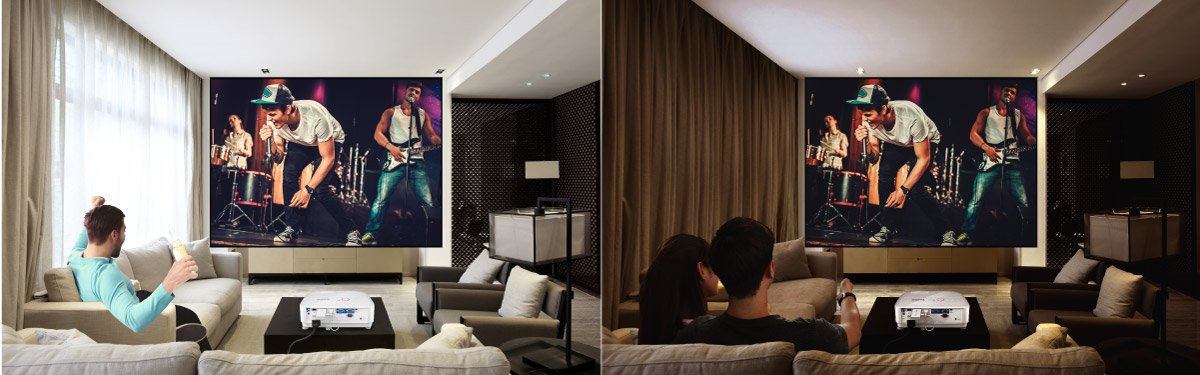
  • Lighting Conditions – If you’ll be using the projector in a bright room, you’ll need a higher-lumen model to maintain image clarity. Contrary to popular belief, you don’t always need a dark room for a great projection experience. Modern projectors are designed to perform well under varying lighting conditions, ensuring flexibility for different viewing environments. For versatile environments, projectors like the BenQ TK705i, TK705STi and W2720i feature optimized light adjustment technology that enhances image quality based on the surrounding lighting.

  • Placement & Installation – Decide if you’ll mount the projector on the ceiling or place it on a table. Some projectors have keystone correction and lens shift to help with flexible placement.
  • Connectivity & Compatibility – Ensure your projector has the right inputs (HDMI, USB, USB-C DP Alt, USB-C Power Delivery) for your streaming devices, gaming consoles, and other equipment. BenQ also offers models with built-in dongles or Android TV for seamless streaming and connectivity. 

Want to learn more? Projector Brightness & Lumens

Beyond the Projector: What Else Goes Into a Home Theater

A great projector is the center of a home theater, but a few other choices decide how good the picture and sound end up.

Screen. Choose a screen size that fits your room and your seating distance, then check your projector’s recommended projection range to confirm it can fill that screen. A larger screen is where 4K resolution pays off most.  Understanding Throw Ratio

Light control. Ambient light washes out contrast, so the less stray light on the screen, the better your picture looks. Blackout curtains or dimmable lighting help in any room. If you can’t fully control the light, look for a projector built to correct for it, like the W2720i with AI Cinema Mode.

Audio. Movies are half sound. Many projectors can pass audio to a soundbar or AV receiver over HDMI, so check your model’s audio options before choosing speakers.

Seating and placement. Plan where the projector sits (ceiling mount or table) before you buy, since placement affects the throw distance you need and the cable runs you’ll want to hide. Lens shift and keystone correction add flexibility if your ideal spot isn’t perfectly centered.

Understanding Projector Specs: Key Features Explained

Find the Right Projector for Your Needs

Now that you know what to look for, it’s time to choose a projector that fits your usage, space, and setup preferences. Whether you want a home theater experience, a gaming display, or a casual movie night outdoors, understanding these key factors will help you make the right decision. Happy viewing!

best projector for home cinema

Home Cinema Projectors

best projector for home and living room

Home Projectors

PJC官網改版專案_知識文
PJC官網改版專案_知識文

Gaming Projectors

PJC官網改版專案_知識文
PJC官網改版專案_知識文

Portable Projectors

Was this article helpful?

Yes No

Recommended Products

  • Save {{currency}}{{item.saveAmount| numberThousandsCommas | numberDecimalPoint}}
    Save {{item.savePercent| numberThousandsCommas | numberDecimalPoint}}%

    {{item.productWordingTag}}

    {{item.title}}

    • {{point}}

    {{currency}}{{item.finalPrice| numberThousandsCommas | numberDecimalPoint}} Save {{currency}}{{item.saveAmount | numberThousandsCommas | numberDecimalPoint}} Save {{item.savePercent | numberThousandsCommas | numberDecimalPoint}}%

    new device price{{currency}}{{item.regularPrice| numberThousandsCommas | numberDecimalPoint}}