azure-location

Get FREE shipping in the US for orders over $35 + FREE returns within 30 days

Get FREE shipping in the US for orders over $35 + FREE returns within 30 days

You need advice? our online chat connects you with real experts instead of bots!

Chat with us today

You need advice? our online chat connects you with real experts instead of bots!

In this article
  • Best BenQ Projectors for HDR and Color Accuracy in Movies
  • Understanding HDR
  • Unveiling the Key to BenQ HDR-PRO Technology: Multi-Stage Light Control
  • First Stage: Optimal HDR Tone Mapping
  • Second Stage: Global Contrast Enhancement & Local Contrast Enhancer
  • Third Stage: Dynamic Black
  • Color Accuracy: Seeing Colors as the Filmmaker Envisioned
  • BenQ Envisions More Details for You
Best Projectors for HDR and Color Accuracy in Movies
  • 2026-10-21

The best projectors for HDR and color accuracy in movies pair a wide color gamut with smart tone mapping, so every scene looks the way the filmmaker envisioned. BenQ’s HDR-PRO technology optimizes contrast frame by frame, and BenQ home theater projectors deliver accurate color out of the box with no calibration gear needed.

Best BenQ Projectors for HDR and Color Accuracy in Movies

Model​

Light Source​

Brightness

(ANSI Lumen)

Color

HDR-PRO Support

Best For

W4100i​

LED

3200

100% DCI-P3, Delta E<2

Yes

Dedicated movie rooms

W2720i

LED

2500

90% DCI-P3, 98% Rec.709, Delta E<3

Yes

Living rooms with ambient light

W5800

Laser

2600

100% DCI-P3, Delta E<2

Yes

Small to Mid Sized Home Theaters

W5850

Laser

2600

100% DCI-P3, Delta E<2

Yes

Large Home Theaters

BenQ W4100i: for quality movie nights. Accurate color out of the box, HDR-PRO that adjusts each frame to protect highlight and shadow detail, plus Filmmaker Mode and 24p playback for the original cadence. W4100i product page

BenQ W2720i: for rooms that aren’t fully dark. Delta E<3 color accuracy with HDR-PRO and AI Cinema Mode, which corrects color and contrast for ambient light automatically.  W2720i product page

BenQ W5800: for large home theaters. A 4K laser projector with 100% DCI-P3 coverage and Delta E<2 color accuracy, with HDR-PRO optimizing contrast so dark scenes keep their detail and bright scenes keep their highlights. W5800 product page

BenQ W5850: for the biggest screens in smaller rooms. True 4K laser with the same color accuracy and HDR-PRO, plus a 1.0 to 1.6 throw ratio and lens shift so it fits your room without compromising the picture. W5850 product page

Understanding HDR

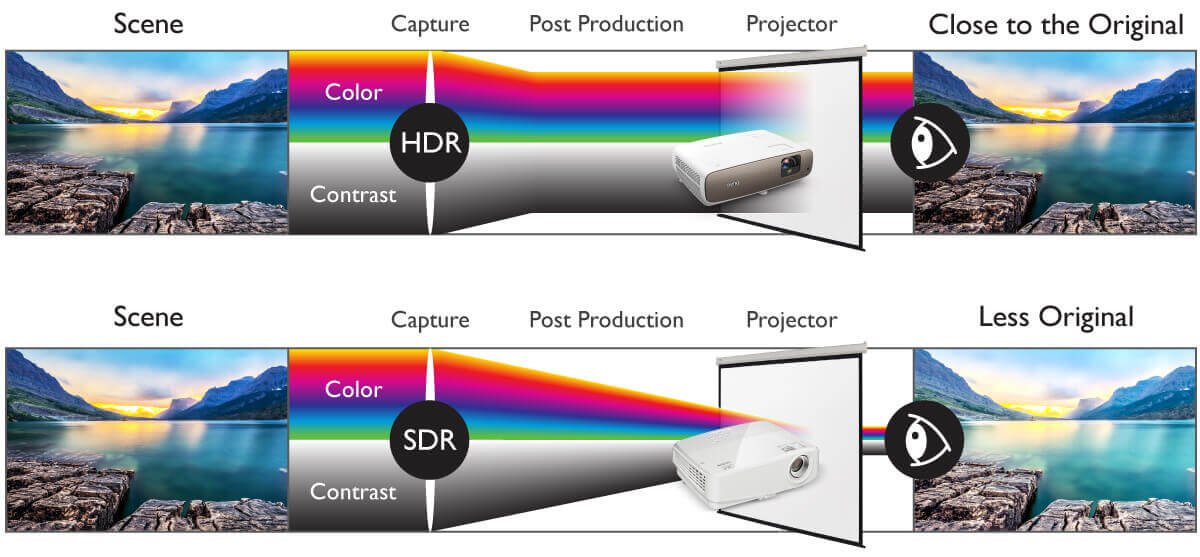
HDR, or High Dynamic Range, represents a standard in video signals that provides a wider dynamic range, allowing images to be displayed with higher brightness and finer tonal details. HDR enhances both the brightness of highlights and the contrast in shadow areas, resulting in a more comprehensive and faithful representation of the original image, closer to what the human eye perceives.

In this series of articles, we delve into the fundamental definition of HDR and gain insights into its capture and post-production for videos. In the previous installment, we explored the presence of true HDR in projectors, revealing efforts by manufacturers to replicate the cinematic viewing experience despite the inherent limitations of projector brightness.

Apart from LCD TVs and display panels, BenQ invests heavily in projector development, integrating software and hardware technologies to present true HDR imagery, offering consumers refined visual content with superior image quality.

Unveiling the Key to BenQ HDR-PRO Technology: Multi-Stage Light Control

BenQ HDR-PRO Projector

Others

First Stage: Optimal HDR Tone Mapping

Adjusting and displaying the best image according to projector specifications

Different devices often have varying brightness specifications, and the limited maximum brightness of projectors may lead to misrepresentation of original content in terms of color and brightness.

BenQ HDR-PRO technology incorporates Tone Mapping during design, compressing the brightness range to fit within the projector's brightness range, ensuring image projection is based on accurate calculations and precise projection.

Dynamic Tone Mapping (2025 New Feature)

Dynamic Tone Mapping (DTM) is a newly integrated technology in this stage, designed to intelligently analyze and adjust each HDR10 video frame based on its brightness level. By applying scene-appropriate tone curves—preserving highlights in bright scenes and enhancing shadow detail in dark scenes—DTM ensures a more faithful and immersive visual experience across dynamic content.

*Note: Select premium BenQ projectors, such as the W4100i and W5850, feature Dynamic Tone Mapping to deliver advanced HDR tone curve optimization for enhanced visual detail.

DTM is designed to intelligently analyze and adjust each HDR10 video frame based on its brightness level.

With DTM OFF: Highlights are blown out, losing texture in the molten stream.

With DTM ON: Maintains highlight detail with visible texture and controlled brightness.

Second Stage: Global Contrast Enhancement & Local Contrast Enhancer

Optimizing contrast and detail in both shadow and highlight areas simultaneously

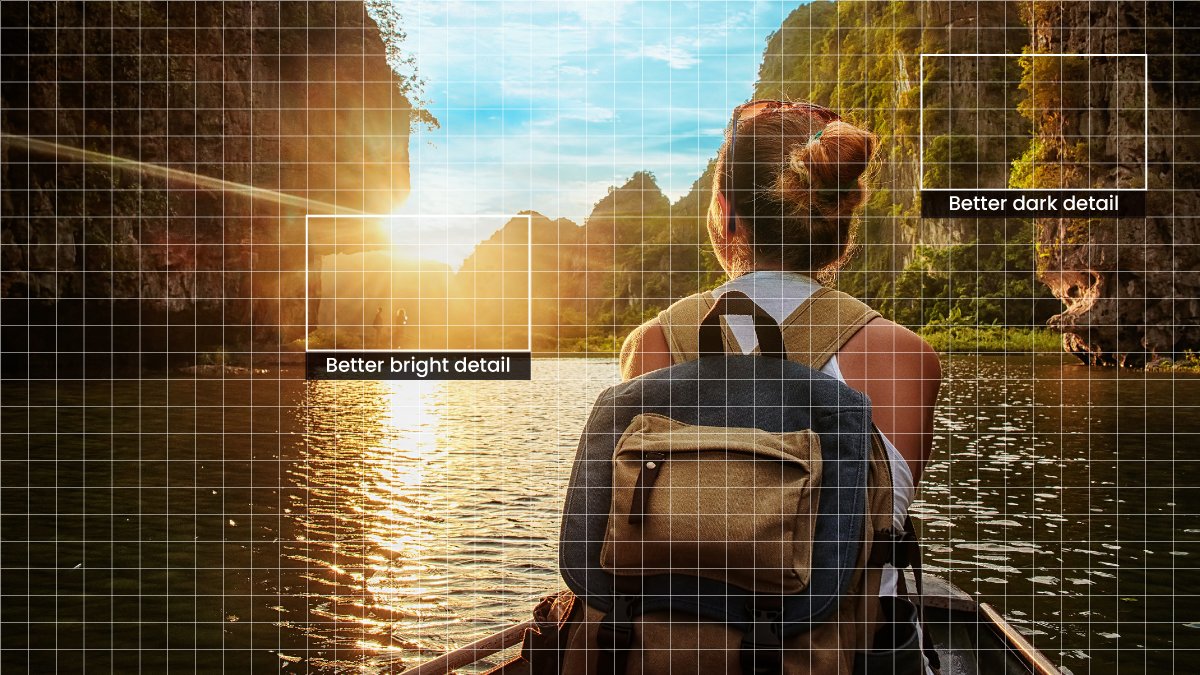
When image information is concentrated in medium brightness, the Global Contrast Enhancer adopts an "S curve" to enhance detail in highlights and shadows. While these features can produce contrast enhancement effects, challenges arise when an image contains both highlights and shadows. BenQ's industry-leading Local Contrast Enhancer overcomes such challenges. Each image is divided into over 1,000 regions for applying localized contrast enhancement algorithms, optimizing contrast and detail in both shadow and highlight areas simultaneously.

Utilizing both Global & Local Contrast Enhancer technology, BenQ projectors produce deeper black levels and optimized contrast detail. With revolutionary overall stereoscopic perception, they offer viewers richer 4K HDR image depth, catering to the preferences of audiovisual enthusiasts.

Better dark detail

Better bright detail

Third Stage: Dynamic Black

Enhancing performance in color, brightness, and contrast

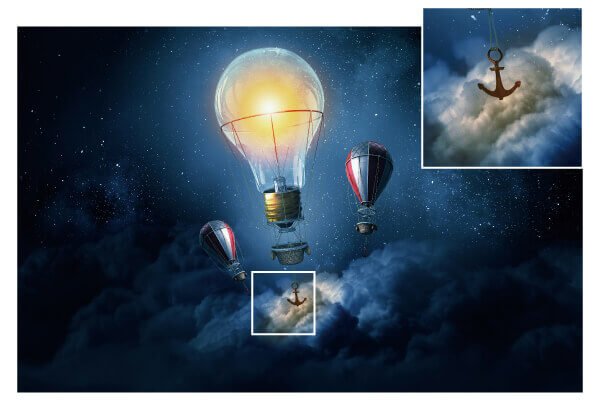
BenQ Projectors with Dynamic Black Technology

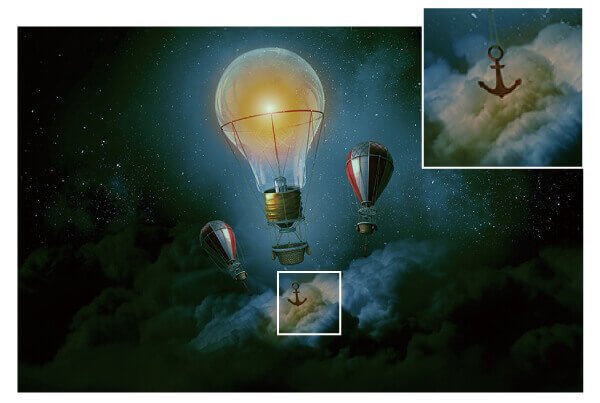
Other Projectors without Dynamic Black Technology

To maximize the effectiveness of tone mapping, BenQ employs Dynamic Black technology tailored for different light sources. While most projectors in the market prioritize either highlights or shadows, some sacrifice image fidelity to maintain contrast within their range. Through Dynamic Black, projectors calculate the optimal light output for different content or scenes, dynamically adjusting their light source output through control of the projector's optical system. This optimization enhances contrast, bringing scenes closer to the vision intended by directors or creators.

With its Dynamic Black technology and proprietary deep dark sealing coating optical engine, BenQ lamp projectors can create an exceptionally wide dynamic range. Regardless of whether the original scene is very bright or very dark, viewers can see the original content more clearly. Especially noteworthy is BenQ's Solid State Illumination (SSI) technology, which boasts a 20% higher contrast compared to other SSI technologies, responding faster to changes in image brightness.

Color Accuracy: Seeing Colors as the Filmmaker Envisioned

HDR is only half of a faithful picture. Color accuracy decides whether every color on your screen matches what the colorist graded in the studio.

DCI-P3 is the color space used for theatrical masters and most HDR movie releases. A projector that covers it fully can reproduce the colors filmmakers actually worked with, instead of a narrower approximation. BenQ’s CinematicColor technology is built around this, covering DCI-P3 and Rec.709 for both modern HDR content and standard sources.

Delta E measures how far a displayed color is from the intended color. Differences below 2 are generally hard for the eye to notice, so a Delta E under 2 means colors on screen are effectively true to the source.

Out-of-the-box Color Accuracy matters because most viewers never calibrate. BenQ’s W-series projectors deliver accurate color from the first movie, with no calibration tools required, so the picture you see is the one the filmmaker intended.

How it works with HDR-PRO: wide color gamut keeps colors accurate, while HDR-PRO’s tone mapping and contrast enhancement keep brightness and shadow detail intact. Together they preserve both the color and the contrast of each scene.  

What is HDR and Why Tone Mapping Matters 

 Dynamic Tone Mapping guide

BenQ Envisions More Details for You

Providing ideal HDR brightness for different projection screen sizes

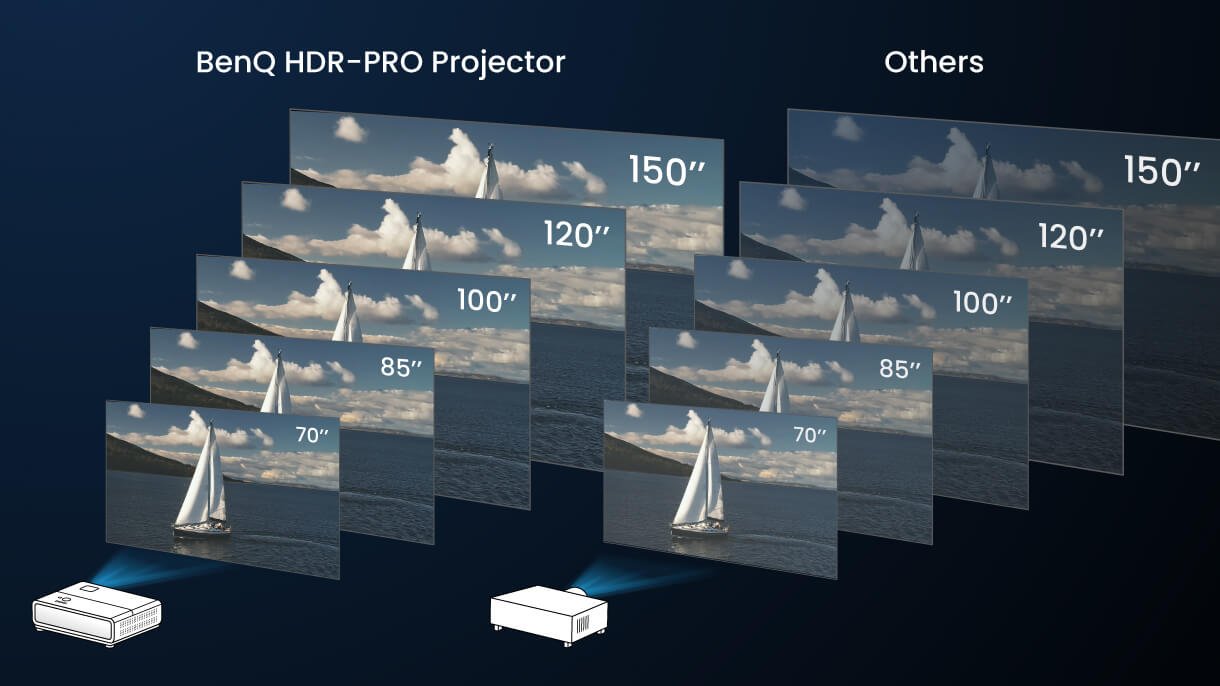
Unlike HDR displays, where brightness is fixed by the signal assigned to them, HDR projector brightness varies depending on factors such as the distance between the projector and the screen, screen size (larger screens yield darker measurements), and screen material, affecting overall image brightness. Hence, BenQ HDR-PRO projectors offer five different recommended HDR brightness levels for five common home projector screen sizes*. They also feature brightness control, allowing users to adjust brightness levels based on screen size for the best viewing experience. (*Common home projector screen sizes are 80, 100, 120, 150, and 200 inches.)

Moreover, BenQ's HDR-PRO technology not only focuses on providing maximum brightness to showcase a broader dynamic range but also offers ample and comfortable brightness choices to prevent long-term eye fatigue. This feature presents images in a comprehensive, detailed, and authentic manner, optimized for human vision.

Find the right projector for your movie room. 

Explore All 4K Projector Models

Was this article helpful?

Yes No

Recommended Products

  • Save {{currency}}{{item.saveAmount| numberThousandsCommas | numberDecimalPoint}}
    Save {{item.savePercent| numberThousandsCommas | numberDecimalPoint}}%

    {{item.productWordingTag}}

    {{item.title}}

    • {{point}}

    {{currency}}{{item.finalPrice| numberThousandsCommas | numberDecimalPoint}} Save {{currency}}{{item.saveAmount | numberThousandsCommas | numberDecimalPoint}} Save {{item.savePercent | numberThousandsCommas | numberDecimalPoint}}%

    new device price{{currency}}{{item.regularPrice| numberThousandsCommas | numberDecimalPoint}}