azure-location

Get FREE shipping in the US for orders over $35 + FREE returns within 30 days

Get FREE shipping in the US for orders over $35 + FREE returns within 30 days

Movie Nights @ 1 Hotel

1 Flick & Chill

Movie Nights @ 1 Hotel

1 Flick & Chill

Relive Halloween 2025 at 1Hotel West Hollywood

A Better Way to Experience Movies with the W4100i

HDR Pro
AI Cinema Mode
Out-of-the-Box Color Accuracy
HDR PRO
W4100i AI
  • Experience ideal HDR performance with BenQ's HDR-PRO technology, featuring an advanced "multi-stage" light control technique. This technology enhances authentic HDR viewing, effectively balancing brightness and optimizing contrast.
  • AI Cinema Mode analyzes image composition in real-time and automatically optimizes HDR, color saturation, and sharpness for a clearer, more immersive viewing experience.
  • Unpack and immediately dive into stunning, Hollywood colors. Each W4100i projector is factory-calibrated for 100% DCI-P3 and optimized Rec. 709, guaranteeing true, lifelike color performance.

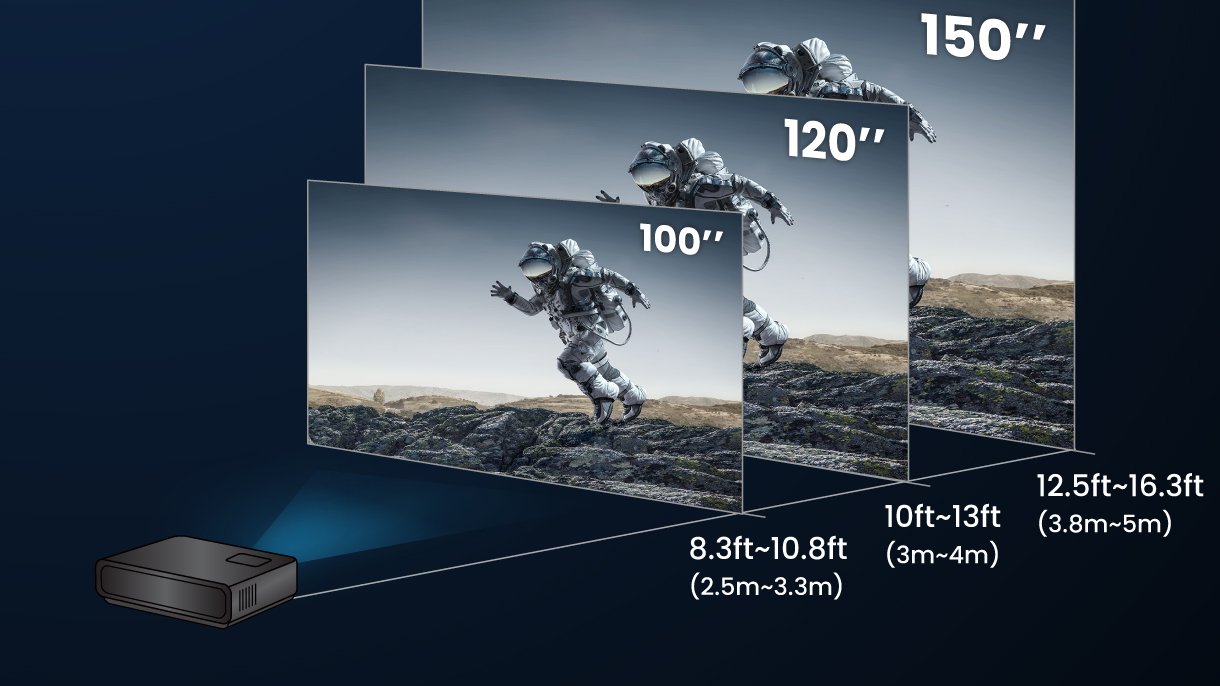
Projection Distance

1.3x zoom maximizes available space with a range of throw distances for big-screen entertainment without the hassle of complicated installation.

W4100i projection distance

4-way Lens Shift

The projector offers the 4-way lens shift (vertical 0%-60% and horizontal ±15% max.) to provide a perfectly straight-edged image with no loss of resolution, allowing for more flexible installation and placement options.

*When the vertical lens shift is set to 60%, it will affect the range of horizontal lens shift.

Aligned vertical and horizontal lens shift

Make Every Night a Memorable One with the TK705 Series

Auto 2D Keystone
Auto Cinema Mode
Digital Zoom
  • Automatically corrects vertical and horizontal keystone for properly aligned images—no manual adjustments needed.
  • Instantly adapts image tone and brightness based on wall color and ambient light, ensuring visuals always stay natural and optimized in any room setup.

    Learn more about BenQ Auto Cinema Mode

  • Adjust image size digitally without moving the projector—perfect for quick setup in compact or adaptable spaces.
  • BenQ optical moto / digital zoom icon

    Optical Moto / Digital Zoom

  • BenQ auto 2D keystone icon

    Auto 2D Keystone

  • BenQ auto focus icon

    Auto Focus in Seconds

  • BenQ auto cinema mode icon

    Auto Cinema Mode

  • BenQ auto screen fit icon

    Auto Screen Fit

  • BenQ auto obstacle avoidance icon

    Auto Obstacle Avoidance

  • BenQ digital shift icon

    Digital Shift

  • BenQ auto eye protection icon

    Auto Eye Protection

Note: Feature availability may vary by model. Please refer to individual product specifications for details.

150" Screen That Brings Everyone In

Get everyone in on the action with ultra-clear split screen on a massive 150” display—perfect for party games and team play.

Group playing party game on BenQ home entertainment projector with massive 150-inch screen in living room

Integrated Google TV for Effortless Streaming

Enjoy Netflix, YouTube, Prime Video, and more—all built-in, no extra devices needed. Just press play.

Group playing party game on BenQ home entertainment projector with massive 150-inch screen in living room

Take this survey for a chance to win a BenQ TK705i, TK705STi, or W4100i projector + more!

The Movie Night Bundle

Recommended Products

  • Premium 4K Theater Experience — 4K HDR-PRO, AI Cinema Mode and deep contrast levels for the best home theater immersion.

    W4100i

  • 4K HDR 3000lm Short Throw Home Entertainment Projector for Movies and Gaming

    TK705STi

  • Experience True-to-Life Colors: 98% Rec. 709 color coverage

    TK705i

BenQ AR Projector Planner

Visualize screen size, distance, and placement right in your room.

*Compatibility Notice: BenQ AR Planner works with iPhones and iPads that support ARKit. Requires iOS 11 or later and an A9 chip or newer. For best performance—including LiDAR-based room scanning—we recommend using supported iPhone Pro or iPad Pro models.

BenQ AR Projector Planner

Visualize screen size, distance, and placement right in your room.

*Compatibility Notice: BenQ AR Planner works with iPhones and iPads that support ARKit. Requires iOS 11 or later and an A9 chip or newer. For best performance—including LiDAR-based room scanning—we recommend using supported iPhone Pro or iPad Pro models.

BenQ ESG sustainable product infographic

.

.

BenQ ESG sustainable product infographic

.

.

Terms and Conditions

BenQ is committed to protecting and respecting your privacy, and we’ll only use your personal information to administer your account and to provide the products and services you requested from us. From time to time, we would like to contact you about our products and services, as well as other content that may be of interest to you but only based on your consent and you can unsubscribe from these communications at any time. Your personal data might be transferred within the BenQ group – if we do so, it will be solely for the purposes above, and we will implement all necessary measures to safeguard your privacy and data security. You may inquire about, correct, or delete your personal information at any time. If you want to do so, or have any question about your privacy rights, please contact us. For more information on our privacy practices, please review our Privacy Policy and Terms & Conditions.

Temporarily unavailable.

Link under maintenance.