azure-location

Get FREE shipping in the US for orders over $35 + FREE returns within 30 days

Get FREE shipping in the US for orders over $35 + FREE returns within 30 days

You need advice? our online chat connects you with real experts instead of bots!

Chat with us today

You need advice? our online chat connects you with real experts instead of bots!

In this article
  • What Is Laser Speckle and Why Does It Happen?
  • Does Projector Screen Material Affect Laser Speckle?
  • How Do Projectors Reduce Laser Speckle?
  • How Does BenQ Reduce RGB Laser Speckle?
What Is Laser Speckle? Causes and Solutions for BenQ RGB Laser Projectors
  • BenQ
  • 2026-11-05

Laser speckle is a fine, grain-like interference pattern that can appear in RGB laser projection. Its visibility depends on the laser light source, projector optics, screen material, and viewing conditions. Choosing a suitable screen and using optical speckle-reduction technologies can help make these patterns less noticeable.

RGB laser projectors unlock exceptionally wide color possibilities by using dedicated red, green, and blue laser light sources. But the same laser characteristics that make vibrant colors possible can also introduce an optical challenge: laser speckle.

If you've noticed fine, shimmering grains across a projected image, you may have encountered this phenomenon. Laser speckle is not necessarily a projector defect. It's a natural optical effect that can vary depending on the laser system, projection screen, and viewing conditions.

So, what causes laser speckle, how can it be reduced, and what technologies help deliver a clearer viewing experience?

What Is Laser Speckle and Why Does It Happen?

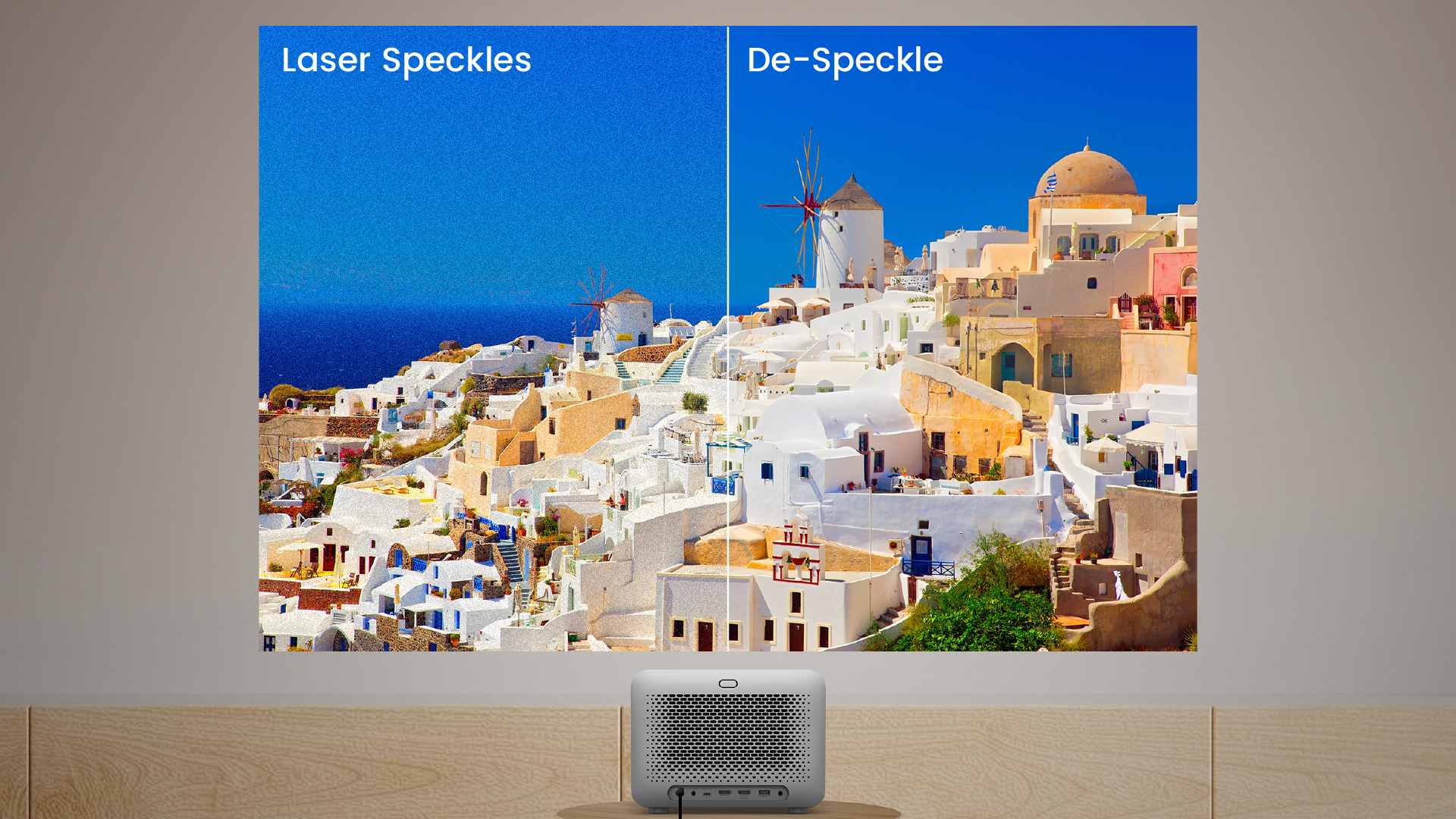
Laser speckle is a grain-like pattern of bright and dark spots caused by the interference of coherent laser light. It occurs when reflected light waves reinforce or cancel one another, creating fine patterns that can become visible across a projected image.

What Does Laser Speckle Look Like?

Laser speckle may appear as tiny grains, sparkling points, or a subtle shimmering texture, particularly across large, relatively uniform areas such as bright skies, snow scenes, or solid-color backgrounds.

Its visibility varies depending on the projector, screen surface, and viewing position. Not all RGB laser projectors produce equally noticeable speckle.

#1 知識文
#1 知識文

How Does Laser Speckle Form?

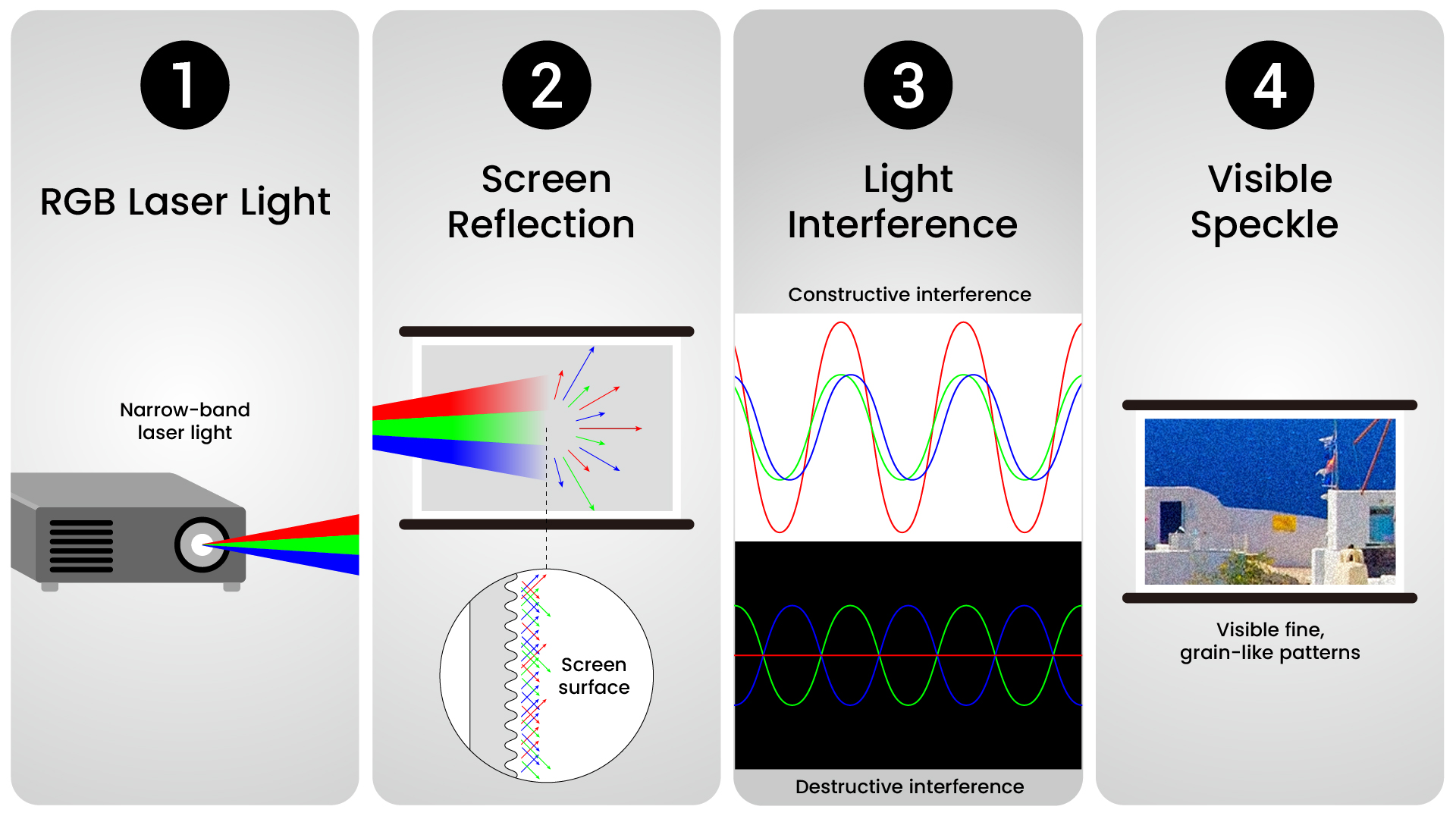
Laser speckle develops through four basic steps:

  1. Coherent light: RGB laser projectors emit relatively narrow-band laser light with a degree of coherence.
  2. Screen reflection: Light reflects from microscopic variations on the projection screen.
  3. Light interference: Reflected waves overlap, creating brighter areas through constructive interference and darker areas through destructive interference.
  4. Visible speckle: These variations form fine, grain-like patterns that may appear to shimmer across the image.


How Can You Tell Laser Speckle from Other Image Noise?

Not every grainy image is caused by laser speckle. Here's how to distinguish it from other common image effects.

Image Effect

How to Recognize It

Laser Speckle

Fine shimmering patterns that may change with viewing position or screen material, even on a uniform image

Digital Noise

Random artifacts associated with video signals, compression, or image processing

Film Grain

Texture inherent to the video content, also visible on other displays

Low Resolution

Reduced sharpness and detail rather than shimmering grains

Display Defects

Persistent abnormal pixels, patches, or other image irregularities

To investigate suspected laser speckle, try displaying a uniform image and changing your viewing position slightly. If the texture changes noticeably, optical speckle may be involved. This is a useful observation, though not a definitive diagnostic test.

Does Projector Screen Material Affect Laser Speckle?

Yes. Projection screen material can significantly affect how visible laser speckle appears. Screens with highly directional or reflective surfaces may make speckle more noticeable, while surfaces that diffuse light more evenly may help reduce its visibility.

Here are some screen characteristics to consider:

  • High-Gain Screens: Their directional reflection may make speckle more noticeable, particularly around brighter areas or hotspots.
  • Ambient Light Rejecting (ALR) Screens: Some ALR screens use microstructures or reflective coatings that may accentuate laser speckle, depending on their optical design.
  • Smooth, Uniform Surfaces: Certain smooth or highly reflective finishes may make speckle patterns more apparent than surfaces with controlled light diffusion.
  • Matte White Screens: Neutral-gain matte white screens with suitable surface texture can be a practical starting point for reducing visible speckle in light-controlled rooms.

Laser speckle doesn't necessarily indicate a defective screen or projector. Its visibility depends on the combination of projector, screen material, and viewing conditions. If speckle is a concern, consider testing different screen materials under similar conditions.

For real-world screen comparisons and more guidance on screen type, gain, and material, see The Hook Up's Projector Screen Buyer's Guide 2025.

While choosing a suitable screen may help reduce visible speckle, the projector's built-in optical design plays a crucial role in controlling it at the source.

How Do Projectors Reduce Laser Speckle?

Beyond screen selection, projectors can reduce laser speckle through built-in optical technologies that introduce variations in the light's direction, timing, or wavelength. These techniques help average out interference patterns, making speckle less noticeable.

Unlike digital image noise, laser speckle cannot generally be eliminated through ordinary sharpness or noise-reduction settings.

Projector engineers use several optical approaches, including these three:

Technology

How It Works

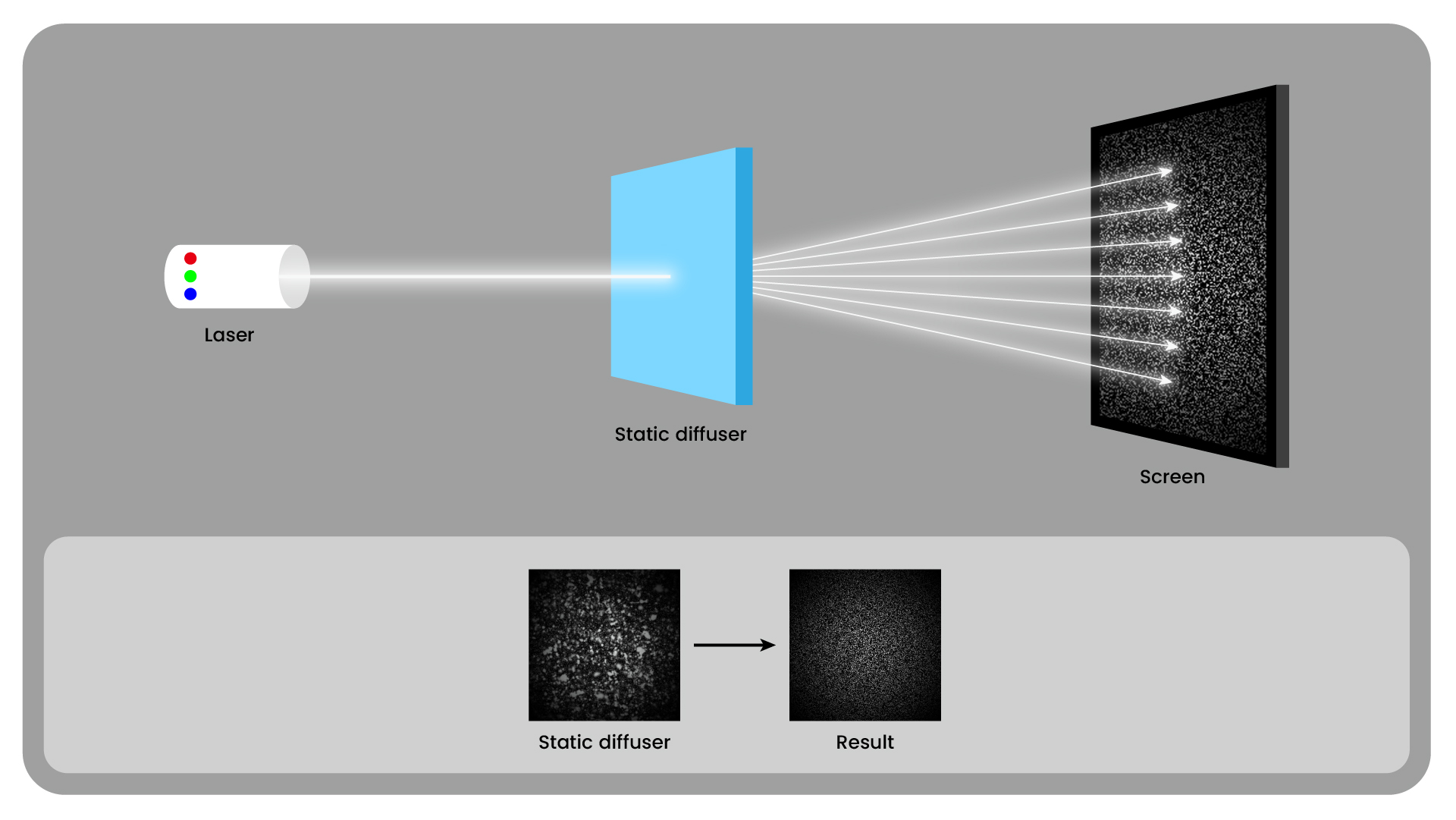
Static Diffuser

Introduces angular diversity to help reduce visible interference patterns

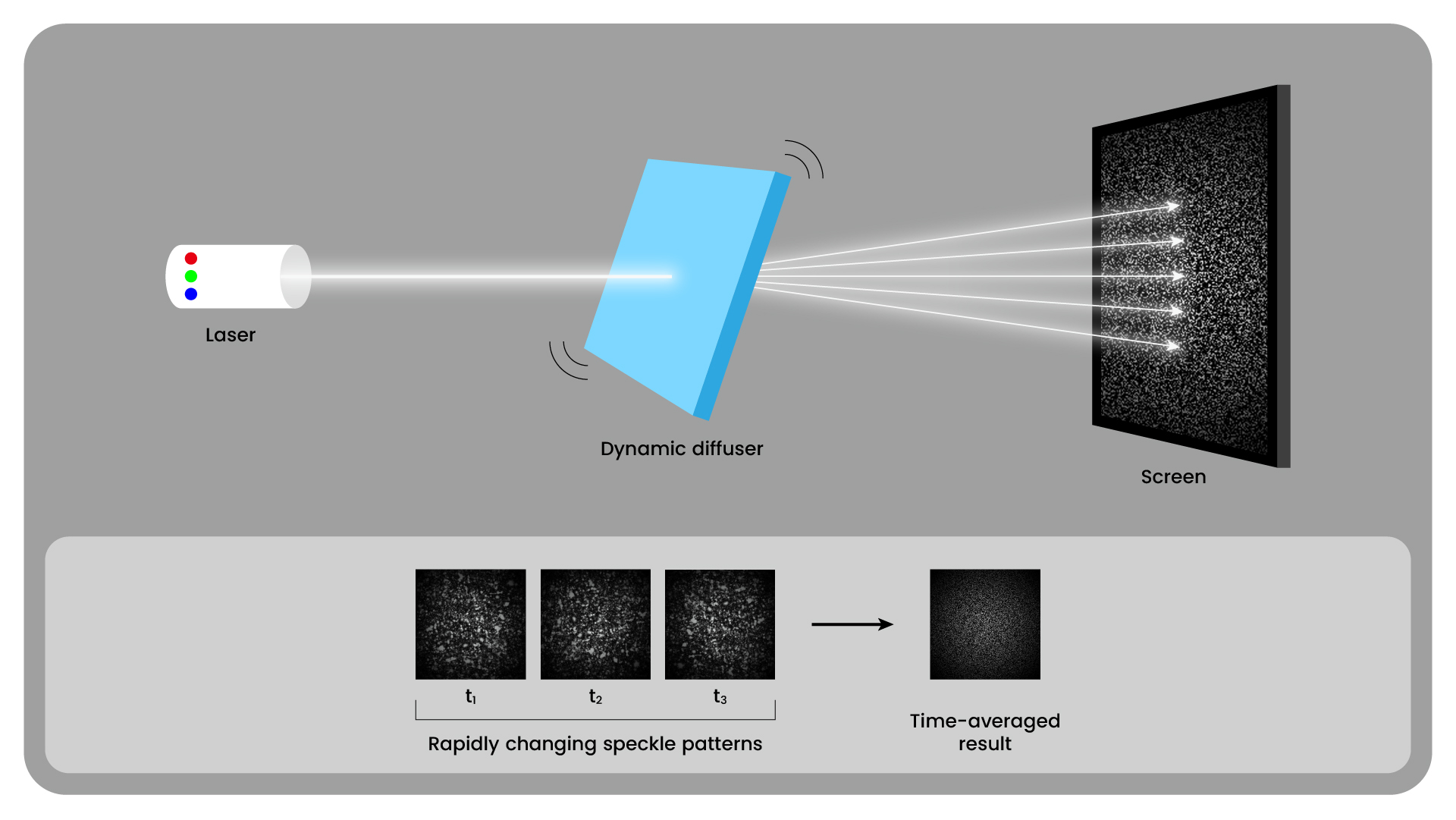
Dynamic Diffuser

Rapidly changes speckle patterns over time, allowing them to be visually averaged

Multi-wavelength Laser

Uses multiple nearby wavelengths to generate different speckle patterns that can be averaged together

Each approach addresses a different optical factor. Combining complementary methods can help further reduce visible speckle, although actual effectiveness depends on the projector's optical design.

How Does BenQ Reduce RGB Laser Speckle?

BenQ combines Nichia RGB laser light-source technology with BenQ Exclusive De-Speckle Design, an optical approach developed to reduce visible laser speckle while supporting the wide color capabilities of RGB laser projection.

1. Next-Generation Nichia QuaLas® 42 RGB Laser Light Source

BenQ's RGB Laser Home Projectors feature the latest-generation Nichia QuaLas 42 RGB laser light source, designed to improve three key aspects of projection performance:

  • Reduced Speckle: Enhanced wavelength characteristics help reduce interference effects for a more refined viewing experience.
  • Wider Color Gamut: Improved wavelength coverage supports broader BT.2020 color reproduction.
  • Greater Brightness Efficiency: Improved laser efficiency makes more effective use of light output.

These advancements provide the optical foundation for balancing wide color performance with reduced visible speckle. Learn more about Nichia's laser diode technology for projection.

2. BenQ Exclusive De-Speckle Design

BenQ Exclusive De-Speckle Design combines complementary optical approaches to help reduce visible laser speckle. These include techniques involving light diffusion and wavelength diversity, along with BenQ's Hyper-wavelength Laser technology.

BenQ's Hyper-wavelength Laser technology is designed to go further by coordinating additional wavelength groups across primary colors during color-display intervals. This approach aims to increase wavelength diversity and reduce visible speckle while managing the intended color output.

Because speckle control and accurate color reproduction are both important to image quality, the projector's optical control and color management must work together to deliver the intended visual result.

Final Thoughts: A Clearer RGB Laser Viewing Experience

Laser speckle is a natural optical phenomenon, but its visibility can be reduced through thoughtful projector design and screen selection.

By combining the latest-generation Nichia QuaLas 42 RGB laser light source with four-layer speckle-reduction technology, including Hyper-wavelength Laser, BenQ helps minimize distracting speckle while preserving the rich color potential of RGB laser projection.

Explore BenQ’s latest RGB laser home projectors to find the right fit for your home entertainment setup.

Was this article helpful?

Yes No

Recommended Products

  • Save {{currency}}{{item.saveAmount| numberThousandsCommas | numberDecimalPoint}}
    Save {{item.savePercent| numberThousandsCommas | numberDecimalPoint}}%

    {{item.productWordingTag}}

    {{item.title}}

    • {{point}}

    {{currency}}{{item.finalPrice| numberThousandsCommas | numberDecimalPoint}} Save {{currency}}{{item.saveAmount | numberThousandsCommas | numberDecimalPoint}} Save {{item.savePercent | numberThousandsCommas | numberDecimalPoint}}%

    new device price{{currency}}{{item.regularPrice| numberThousandsCommas | numberDecimalPoint}}