BenQ respect your data privacy. We use cookies and similar technologies to ensure you get the best experience when visiting our website. You can either accept these cookies by clicking “Accept Cookies”, or click “Only Required Cookies” to refuse all non-essential technologies. You can customise your cookie settings here at any time. For further information, please visit our Cookie Policy and our Privacy Policy.
Page updated: May 2020
Some essential features on BenQ sites just won’t work without cookies. And having other cookies switched off can seriously affect the way you’ll be able to enjoy our services.
Please check your cookie settings below and turn on any cookies you’re happy with.
“Strictly necessary” cookies can’t be turned off. But Functional and Performance cookies can be turned on or off below. You can learn more about cookies and what they do on our other pages.
If you've chosen to block third-party cookies on your browser, your cookie preferences won't carry over from benq.eu to benq.xx and vice versa. Please make sure to set your cookie preferences in both places.
On
These cookies are essential so that you can move around the website and use its features. Without these cookies services you have asked for cannot be provided.
On
Off
These cookies allow the website to remember choices you make to give you better functionality and personal features.
On
Off
Performance cookies
These cookies help to improve the performance of BenQ. If you want to opt-out of advertising cookies, you have to turn-off performance cookies. We also use Google Analytics, SessionCam and Hotjar to track activity and performance on the BenQ website. You can control the information provided to Google, SessionCam and Hotjar. To opt out of certain ads provided by Google you can use any of the methods set forth here or using the Google Analytics opt out browser add-on here. To opt-out of SessionCam collecting data, you can disable tracking completely by following link:https://sessioncam.com/choose-not-to-be-recorded/. To opt-out of Hotjar collecting data, you can disable tracking completely by following link:https://www.hotjar.com/privacy/do-not-track/.
Advertising cookies
These cookies are used to track your activity on the BenQ website and other websites across the Internet, help measure the effectiveness of our advertising campaign and deliver advertisements that are more relevant to you and your interests. We use various advertising partners, including Amazon, Facebook, and Google. These cookies and other technologies capture data like your IP address, when you viewed the page or email, what device you were using and where you were. You can find out how to avoid them below.
BenQ respect your data privacy. We use cookies and similar technologies to ensure you get the best experience when visiting our website. You can either accept these cookies by clicking “Accept Cookies”, or click “Only Required Cookies” to refuse all non-essential technologies. You can customise your cookie settings here at any time. For further information, please visit our Cookie Policy and our Privacy Policy.
Projector
Explore Business Projector
Professional Installation Exhibition & Simulation Conference Room Meeting Room Education ProjectorsMonitor
Lighting
Interactive Display | Signage
Stellar color performance can take your monitor viewing experience from mundane to magical. Today’s pro-grade desktop monitors boast specs that can blow your mind, and also leave your head spinning. One spec that causes a lot of confusion is color bit depth, which determines the total number of colors your monitor can display. We’ll discuss the different ways monitors add color to your work and your world.
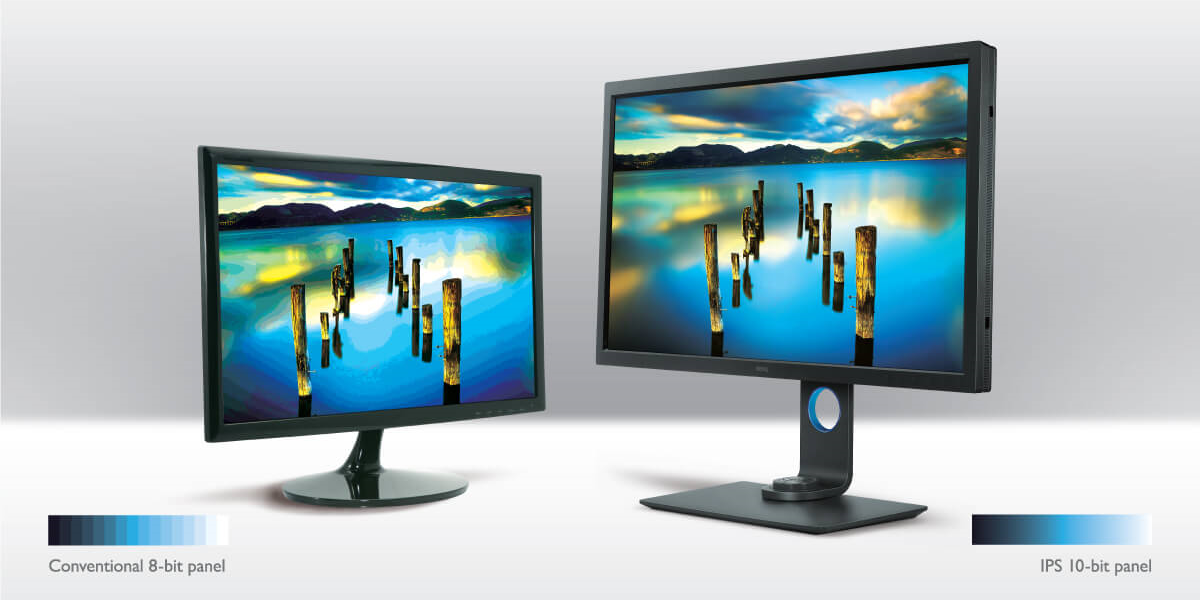
1.07 billion hues. That is what you get from 10-bit color. This can be achieved in two ways. The right way for you depends on how you use your display. True 10-bit displays have 10 bits per pixel, for 1024 shades of RGB color (Red, Green, Blue). Cube that and you get to those 1.07 billion shades. Expect smooth gradations and improved realism in photography and video content. Amazing. Beautiful. Also expensive and sometimes more than you need.
When you move down to 8-bit, you still access an impressive 16.77 million colors from 256 RGB tones produced from this tech. Will you notice a difference if you compare 8-bit to 10-bit? Yes. You will. Colors can still appear vivid and brilliant, but shading will be less fluid and gradations can appear less subtle. In an ideal world, you’d be able to access 10-bit color at an 8-bit cost. That’s where Frame Rate Control comes in.
There is a way to experience all the colors of 10-bit with an 8-bit monitor. Frame Rate Control manipulates pixels so they flash two alternating colors so quickly that you perceive any of the shades in a billion color experience. Does the monitor display those billion+ colors? No. Will you be able to tell? Likely, not.
Also likely, if you work in the creative space, you have been or already are working on an 8-bit or 8-bit + FRC monitor, as this is the most common setup today.
While 8-bit + FRC is a stellar solution for most, there are situations that call for true 10-bit.
If you're working in a high-end Hollywood retouching studio or in retouching where individual pixels are zoomed to more than 500%, you'll probably require 10-bit. But for most of the rest of us the 8-bit + FRC monitor is adequate, accessible, and affordable.
As for quality of display, 8-bit + FRC monitors have won the prestigious TIPA Award for Best Professional Photo Monitor for the past two years. This global award from the Technical Image Press Association recognizes the world's best in photo/video innovation. Each of those winning displays was manufactured by BenQ.
Only you can decide the best monitor for your needs. Hopefully, this article leaves you better informed and empowered to make that call.
Thanks for your feedback!