Page updated: May 2020
Some essential features on BenQ sites just won’t work without cookies. And having other cookies switched off can seriously affect the way you’ll be able to enjoy our services.
Please check your cookie settings below and turn on any cookies you’re happy with.
“Strictly necessary” cookies can’t be turned off. But Functional and Performance cookies can be turned on or off below. You can learn more about cookies and what they do on our other pages.
If you've chosen to block third-party cookies on your browser, your cookie preferences won't carry over from benq.eu to benq.xx and vice versa. Please make sure to set your cookie preferences in both places.
On
These cookies are essential so that you can move around the website and use its features. Without these cookies services you have asked for cannot be provided.
On
Off
These cookies allow the website to remember choices you make to give you better functionality and personal features.
On
Off
Performance cookies
These cookies help to improve the performance of BenQ. If you want to opt-out of advertising cookies, you have to turn-off performance cookies. We also use Google Analytics, SessionCam and Hotjar to track activity and performance on the BenQ website. You can control the information provided to Google, SessionCam and Hotjar. To opt out of certain ads provided by Google you can use any of the methods set forth here or using the Google Analytics opt out browser add-on here. To opt-out of SessionCam collecting data, you can disable tracking completely by following link:https://sessioncam.com/choose-not-to-be-recorded/. To opt-out of Hotjar collecting data, you can disable tracking completely by following link:https://www.hotjar.com/privacy/do-not-track/.
Advertising cookies
These cookies are used to track your activity on the BenQ website and other websites across the Internet, help measure the effectiveness of our advertising campaign and deliver advertisements that are more relevant to you and your interests. We use various advertising partners, including Amazon, Facebook, and Google. These cookies and other technologies capture data like your IP address, when you viewed the page or email, what device you were using and where you were. You can find out how to avoid them below.
當你忙完一整天工作,眼睛又酸又累,有時甚至覺得看不太清楚拼命揉眼睛…,此時發現身邊越來越多同事朋友買了護眼螢幕來保護眼睛健康,覺得自己好像也該買一台,但內心許多疑問「什麼是護眼螢幕?」、「和一般螢幕差在哪」、「我需要嗎?」,尤其現在市面上護眼螢幕琳瑯滿目,該怎麼選?
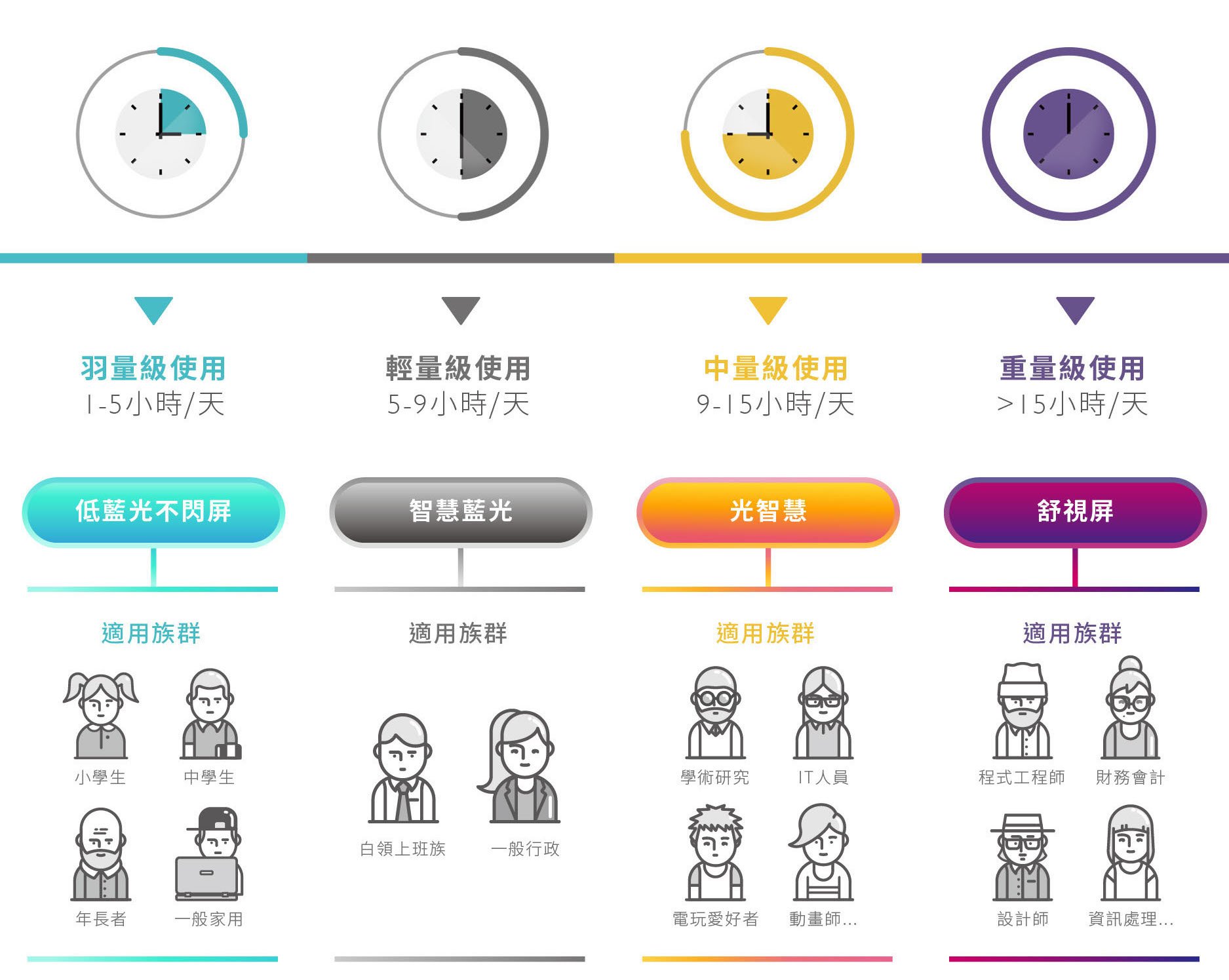
就像是電影分級制,不同的族群與使用習慣搭配不同的護眼螢幕。檢視的方式可以先從自己的工作和平常使用螢幕的環境,以及使用習慣來看,一個平常用螢幕與遠方孫子視訊半小時的老爺爺與鎮日緊盯螢幕和數字搏鬥的金融會計師,對於護眼螢幕的級數當然差別很大!
另一案例是一般公司行政人員可能覺得自己好像沒有必要用到高階的護眼螢幕,但其實殊不知每日文書處理時間也遠超過8小時,下班更持續用韓劇歐爸來放鬆身心,其眼睛壓力早已破表。以經常在外辛苦奔波的業務,在辦公室使用的螢幕時間很少,但每日深夜待家人休息後,黑暗中打打電玩舒緩壓力,其護眼又是另一種不同需求。
螢幕對於現代人來說,不僅僅只是電腦的輸出,由於長時間的使用,更應該注意護眼的功能與其他功能的符合需求。
護眼螢幕分級制
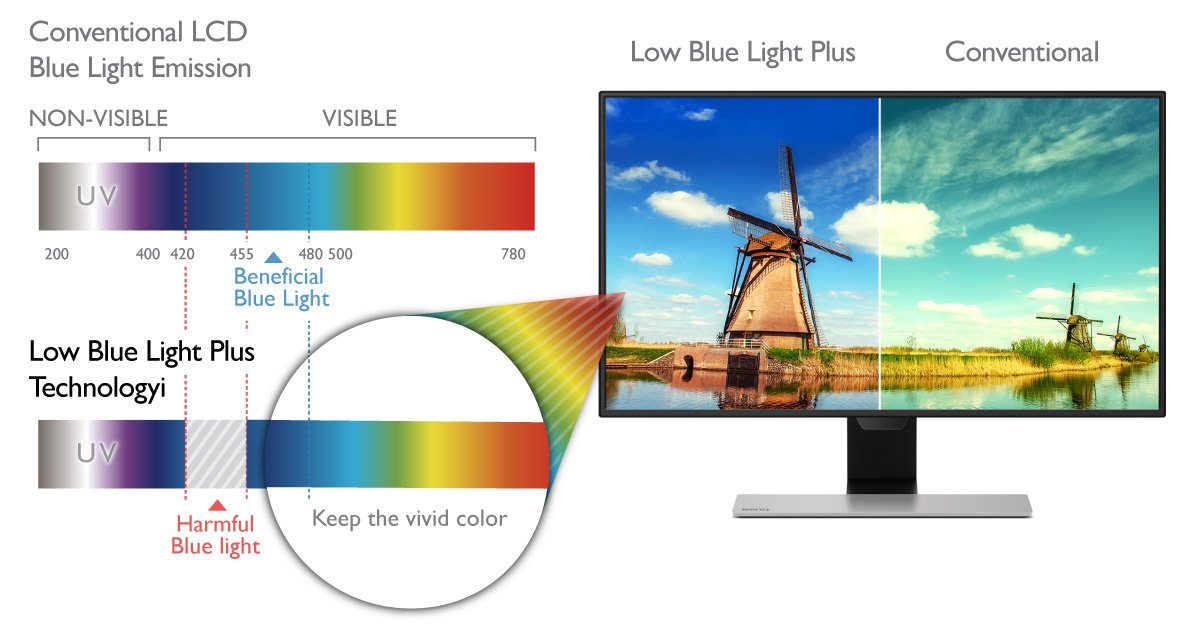
舉例來說:如果你是屬於長時間操勞眼睛的螢幕重度使用者,除了設計所注重的影像清晰度與色彩呈現外,對於護眼功能,也可以選擇兼具護眼與色彩雙兼顧的產品,目前也業者推出「智慧藍光」、「光智慧」功能的螢幕,跟市面上一般濾藍光的螢幕相比,同樣具有保護眼睛不受藍光刺激與傷害外,智慧藍光撿取對人眼友善的長波藍光(靠近綠色),因此能保留RGB三原色,色彩當然真實鮮豔。;同時光智慧功能更能隨環境光自由切換模式,讓你在任何環境下都能看的舒服。
智慧藍光將一般螢幕有害藍光波段,移到對眼睛較好波段
四段式智慧藍光模式
標準模式
影音娛樂模式
辦公文書模式
暗房模式
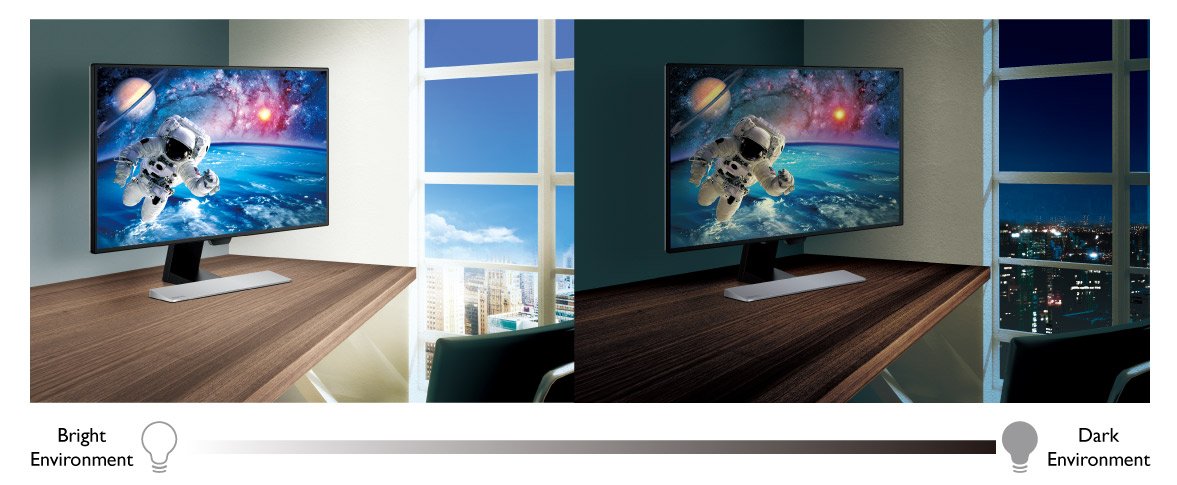
而如果你平常工作學習已經大量使用螢幕,休閒更是上網聊天、追劇、找拍賣的重度使用者,有極大機會從早到晚都在用螢幕,環境光源會隨時間變化,如果能選擇一台能自動偵測環境光源,自動呈現相配的色溫與亮度,眼睛就能感受更舒適。譬如說如果使用舒視屏護眼螢幕,強調「黃金三角」功能,其「黃金光學」色溫與亮度智慧調整,不管窗外的光線如何變化或室內開關燈,舒視屏都能為根據環境,客製化每個人適合的螢幕色溫與亮度,即使長時間盯螢幕也能舒緩眼睛壓力,真正能滿足重度使用者的護眼需求。
除了評估使用時間和環境,達人也建議大家,還要注意有沒有專業認證,消費者使用後的口碑 …等,才能買到真正適合自己,又能長期安心使用的護眼螢幕。
Thanks for your feedback!