Page updated: May 2020
Some essential features on BenQ sites just won’t work without cookies. And having other cookies switched off can seriously affect the way you’ll be able to enjoy our services.
Please check your cookie settings below and turn on any cookies you’re happy with.
“Strictly necessary” cookies can’t be turned off. But Functional and Performance cookies can be turned on or off below. You can learn more about cookies and what they do on our other pages.
If you've chosen to block third-party cookies on your browser, your cookie preferences won't carry over from benq.eu to benq.xx and vice versa. Please make sure to set your cookie preferences in both places.
On
These cookies are essential so that you can move around the website and use its features. Without these cookies services you have asked for cannot be provided.
On
Off
These cookies allow the website to remember choices you make to give you better functionality and personal features.
On
Off
Performance cookies
These cookies help to improve the performance of BenQ. If you want to opt-out of advertising cookies, you have to turn-off performance cookies. We also use Google Analytics, SessionCam and Hotjar to track activity and performance on the BenQ website. You can control the information provided to Google, SessionCam and Hotjar. To opt out of certain ads provided by Google you can use any of the methods set forth here or using the Google Analytics opt out browser add-on here. To opt-out of SessionCam collecting data, you can disable tracking completely by following link:https://sessioncam.com/choose-not-to-be-recorded/. To opt-out of Hotjar collecting data, you can disable tracking completely by following link:https://www.hotjar.com/privacy/do-not-track/.
Advertising cookies
These cookies are used to track your activity on the BenQ website and other websites across the Internet, help measure the effectiveness of our advertising campaign and deliver advertisements that are more relevant to you and your interests. We use various advertising partners, including Amazon, Facebook, and Google. These cookies and other technologies capture data like your IP address, when you viewed the page or email, what device you were using and where you were. You can find out how to avoid them below.
近年來隨著電視、電腦螢幕、投影機等顯示設備規格不斷成長,而依些如 Netflix、YouTube、愛奇藝、iTunes Movie、Google Movie等推出4K影片,讓我們現在幾乎全面進入4K世界,而且部分電視頻道開始測試8K節目轉播,很明顯的,8K世界級在不久的將來。
因此,我們許多早期使用的HDMI線已經不符合4K、8K的需求。過往1080p所使用的HDMI線多採用銅線製成,但銅線會有許多阻抗、限制了高畫質傳輸的頻寬;而且即使可傳輸8K訊號的HDMI銅線最長長度約3公尺,較不利於長距離的高畫質影像傳輸。
根據這個深奧的問題,我們將以三個面向,帶大家認識光纖HDMI與4K、8K的關聯性:
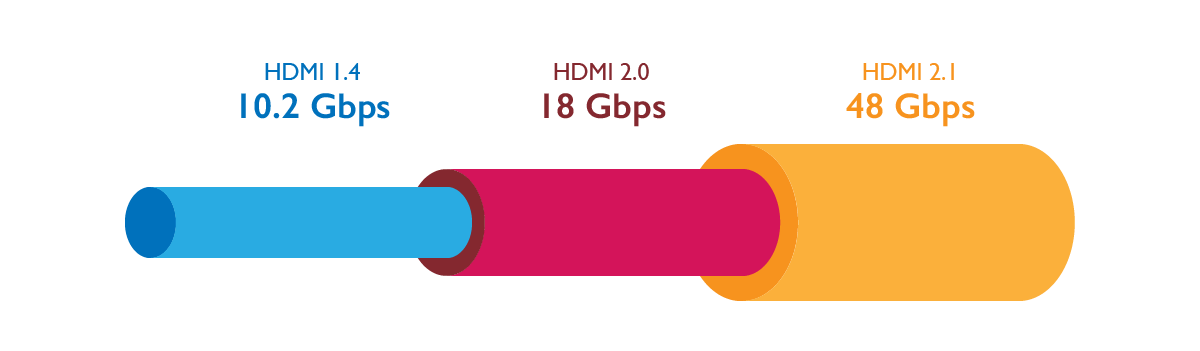
目前市面上有三個版本HDMI線。
HDMI V1.4 為 1080p 解析度版本,最大頻寬可傳輸10.2Gbps;
HDMI V2.0 則為 4K 高解析度版本,最大頻寬可傳輸18Gbps;
而目前最高的HDMI V2.1則為8K高畫質版本,最大頻寬可達48Gbps。
1. 光纖材質非常輕,所以線材可以做得非常輕巧。
2. 非常適合長距離傳輸,每公里所損耗的數據量非常的少、少到可以忽略,因此目前光纖HDMI線約可傳輸100~200公尺。
3. 由於光纖是採用光數據傳輸,因此可避免周遭電線的電磁波干擾。
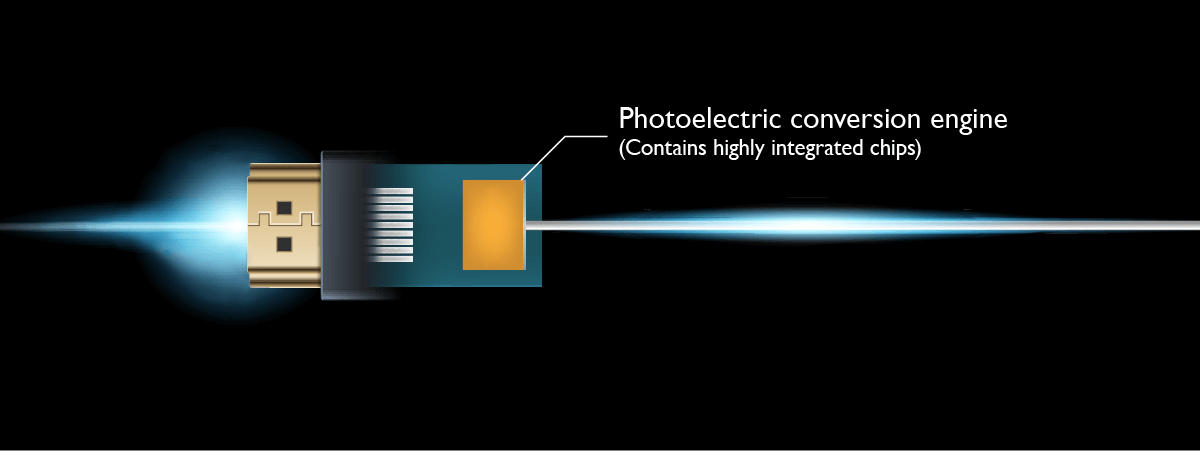
光纖的運作原理,是將從訊號輸出的電子訊號,轉換為高速的雷射光訊號;這些雷射光訊號通過筆人髮還細的光纖線。這些雷射光訊號抵達輸入端時,會再被轉換回電子訊號,然後被顯示器接收。
儘管光纖HDMI線可以解決高畫質影像長距離傳輸的問題,但HDMI線纜也必須處理傳輸非常複雜、困難的電子訊號,例如:幀率、色彩採樣、HDR訊號等)。
在使用 HDMI 光纖線的時候,有以下幾點注意事項:
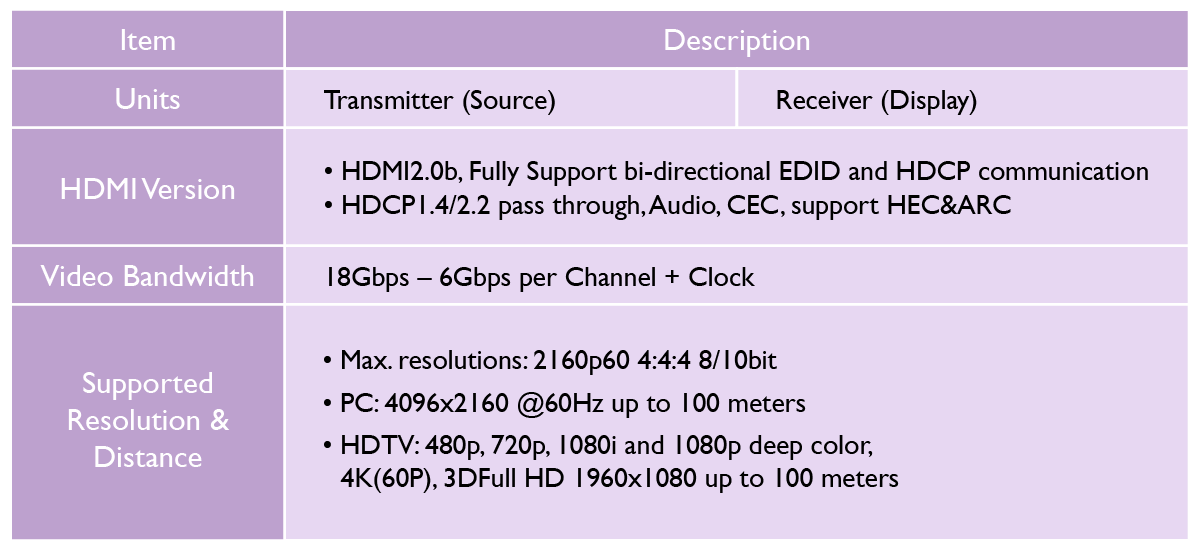
每一條HDMI線都有不同的規格,使用前先注意該 HDMI 線的版本、支援的頻寬傳輸量、支援的最高解析度、是否支援3D等等。
光纖 HDMI 線的電纜有固定的方向性。也就是說,當光纖 HDMI 線必須將發送端接到播放機,而將接收端接到顯示設備 (電視、投影機的 HDMI 埠)。
有時候在使用光纖 HDMI 線域到相容性問題時,常不知道問題是來自於播放器(Apple TV、BD播放機、PlayStation 4、XBox、電腦、機上盒)、還是顯示器(電視、投影機、電腦螢幕)、擴大機、還是光纖HDMI線。找出問題的最好方法,就是換上短距離的銅製 HDMI 線,藉此逐一排除找出問題。
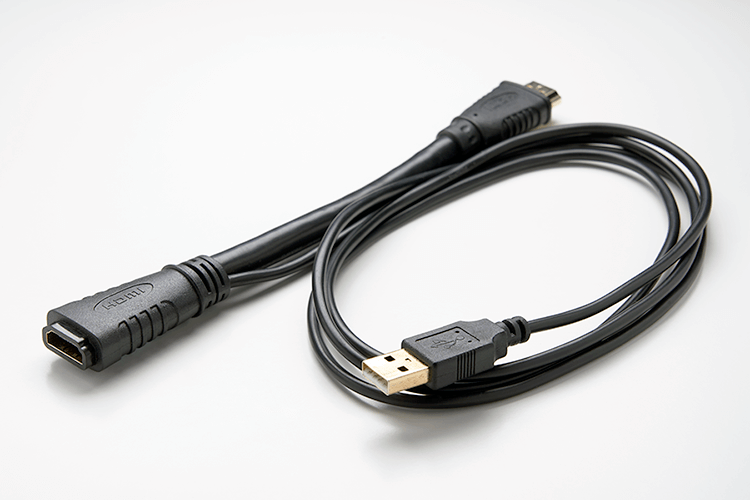
因為光纖 HDMI 線有嵌入式光電轉換器,意味著需要有 HDMI 接口需具有 5V 的電力,而這也是最常遇見、但也最難解的問題。以 Apple TV為例,其 HDMI 接口的輸出功率為500mW (5V/100mA),如果您的光纖 HDMI 線需要超過 500mW 的電力,則無法使用該 HDMI 線,或是降轉為較低解析度的畫面。如要解決此問,則需要搭配使用額外的 5V 電源適配器,如下圖:
Thanks for your feedback!