Page updated: May 2020
Some essential features on BenQ sites just won’t work without cookies. And having other cookies switched off can seriously affect the way you’ll be able to enjoy our services.
Please check your cookie settings below and turn on any cookies you’re happy with.
“Strictly necessary” cookies can’t be turned off. But Functional and Performance cookies can be turned on or off below. You can learn more about cookies and what they do on our other pages.
If you've chosen to block third-party cookies on your browser, your cookie preferences won't carry over from benq.eu to benq.xx and vice versa. Please make sure to set your cookie preferences in both places.
On
These cookies are essential so that you can move around the website and use its features. Without these cookies services you have asked for cannot be provided.
On
Off
These cookies allow the website to remember choices you make to give you better functionality and personal features.
On
Off
Performance cookies
These cookies help to improve the performance of BenQ. If you want to opt-out of advertising cookies, you have to turn-off performance cookies. We also use Google Analytics, SessionCam and Hotjar to track activity and performance on the BenQ website. You can control the information provided to Google, SessionCam and Hotjar. To opt out of certain ads provided by Google you can use any of the methods set forth here or using the Google Analytics opt out browser add-on here. To opt-out of SessionCam collecting data, you can disable tracking completely by following link:https://sessioncam.com/choose-not-to-be-recorded/. To opt-out of Hotjar collecting data, you can disable tracking completely by following link:https://www.hotjar.com/privacy/do-not-track/.
Advertising cookies
These cookies are used to track your activity on the BenQ website and other websites across the Internet, help measure the effectiveness of our advertising campaign and deliver advertisements that are more relevant to you and your interests. We use various advertising partners, including Amazon, Facebook, and Google. These cookies and other technologies capture data like your IP address, when you viewed the page or email, what device you were using and where you were. You can find out how to avoid them below.
光線分成可見光與不可見光,紅外線、紫外線屬於不可見光,紅橙黃綠藍靛紫光屬於可見光,射入黃斑部時形成影像與顏色,所以人體才有了視覺。而藍光是能量較強的可見光,包括藍、靛、紫光,靠近紫光(UV)的短波藍光能夠穿透角膜與水晶體直涉入黃斑部,造成黃斑部感光細胞的損傷。
一般螢幕在光線產生的過程中會有肉眼看不見的閃爍,一秒並高達250次,一天如面對螢幕八小時,即被閃動了5,760,000,長時間注視電腦螢幕這種光源產生的微小忽明忽暗現象仍能經嚴重影響人眼的健康,尤其在校學生與社會工作者需整日長時間依靠電腦者更容易造成疲勞、不專心進而影響學習效果與工作效率。BenQ不閃屏護眼螢幕使用獨家顯示穩定迴路技術讓畫面不在閃爍,減緩因長時間注視螢幕而產生的眼壓增高及眼睛疲累的現象。
小學生
中小學生
年長者
一般文書處理
照片點閱
網路資料搜尋
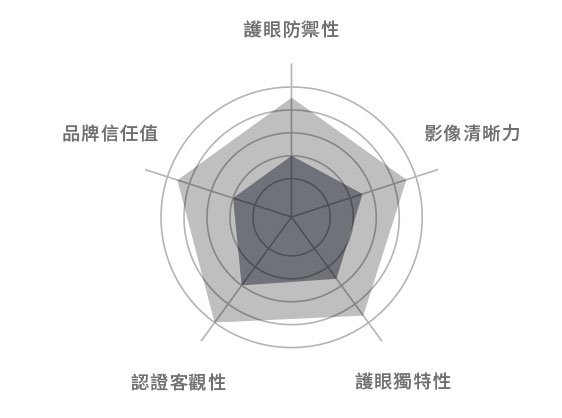
● 護眼防禦力: 螢幕具護眼功能數量 ● 護眼獨特性: BenQ首創與獨有的護眼功能
● 影像清晰力: 影像解析度+真色彩呈現 ● 時尚美觀性: 纖薄邊框+特殊設計
BenQ不閃屏
一般閃屏螢幕
低藍光-BenQ低藍光技術能依照不同的使用情境自行調整藍光強度(30-70%),包含閱讀模式、上網模式、影音娛樂與文書模式,有效保護雙眼,減緩因藍光帶來的眼睛疲勞、酸澀與疲勞感,但讓影像保有真實動人的色彩表現。
不閃屏-一般螢幕有著肉眼看不見的閃爍,一秒並高達 250 次,一天如面對螢幕八小時,即被閃動了 5,760,000 次!BenQ不閃屏能有效防止螢幕呈現肉眼看不見的抖動閃爍,進一步有效減少眼睛疲勞、更能防止長時間注視螢幕,產生的老花眼年輕化。
即使長時間觀看,BenQ低藍光不閃屏護眼功能讓畫面清晰穩定,更能保有豐富色彩,結合舒適與護眼的使用效果,是護眼螢幕入門最佳選擇,亦適合短時間與或家庭娛樂等多重用途。
Thanks for your feedback!