Cookie 設定
How can I change my BenQ cookie settings?
Page updated: May 2020
Some essential features on BenQ sites just won’t work without cookies. And having other cookies switched off can seriously affect the way you’ll be able to enjoy our services.
Please check your cookie settings below and turn on any cookies you’re happy with.
“Strictly necessary” cookies can’t be turned off. But Functional and Performance cookies can be turned on or off below. You can learn more about cookies and what they do on our other pages.
If you've chosen to block third-party cookies on your browser, your cookie preferences won't carry over from benq.eu to benq.xx and vice versa. Please make sure to set your cookie preferences in both places.
On
Strictly necessary cookies
These cookies are essential so that you can move around the website and use its features. Without these cookies services you have asked for cannot be provided.
On
Off
Functional cookies
These cookies allow the website to remember choices you make to give you better functionality and personal features.
On
Off
Performance cookies and advertising cookies
Performance cookies
These cookies help to improve the performance of BenQ. If you want to opt-out of advertising cookies, you have to turn-off performance cookies. We also use Google Analytics, SessionCam and Hotjar to track activity and performance on the BenQ website. You can control the information provided to Google, SessionCam and Hotjar. To opt out of certain ads provided by Google you can use any of the methods set forth here or using the Google Analytics opt out browser add-on here. To opt-out of SessionCam collecting data, you can disable tracking completely by following link:https://sessioncam.com/choose-not-to-be-recorded/. To opt-out of Hotjar collecting data, you can disable tracking completely by following link:https://www.hotjar.com/privacy/do-not-track/.
Advertising cookies
These cookies are used to track your activity on the BenQ website and other websites across the Internet, help measure the effectiveness of our advertising campaign and deliver advertisements that are more relevant to you and your interests. We use various advertising partners, including Amazon, Facebook, and Google. These cookies and other technologies capture data like your IP address, when you viewed the page or email, what device you were using and where you were. You can find out how to avoid them below.
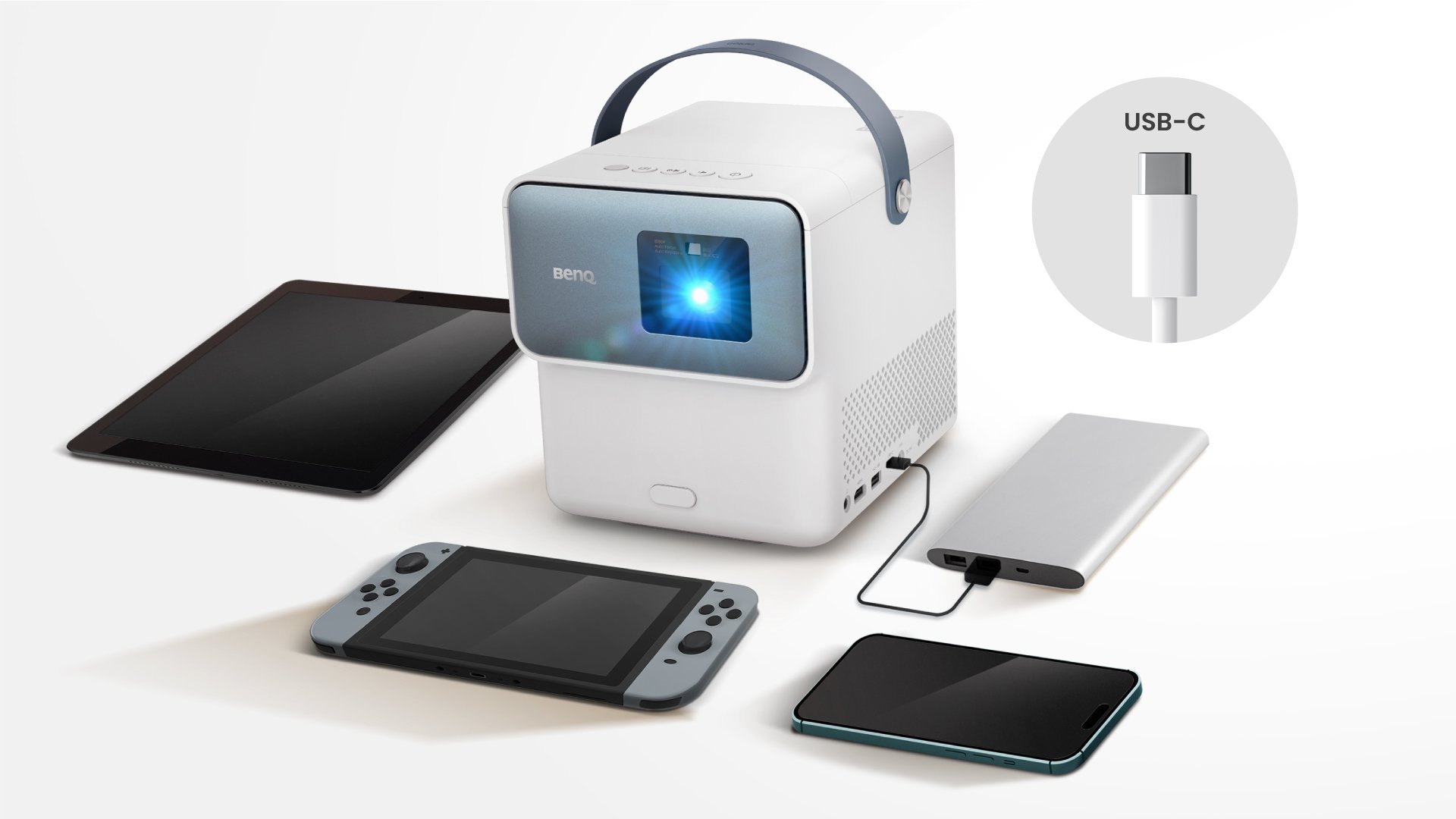
在現今科技發達的生活中,USB-C 介面隨處可見,帶來極高的連接便利。然而,各款 USB-C 接口的功能規格各有不同,支援度會直接影響器材的實際表現。這點在高度依賴 USB-C 的便攜式投影機上尤其關鍵。為了讓大家充分發揮便攜投影機的連接潛能,以下整理了一份實用的設定指南。
如欲深入了解 USB-C 接口的各項功能細節、產品兼容度判斷及相關規格知識,可參閱我們的 USB-C 基礎知識專題文章。
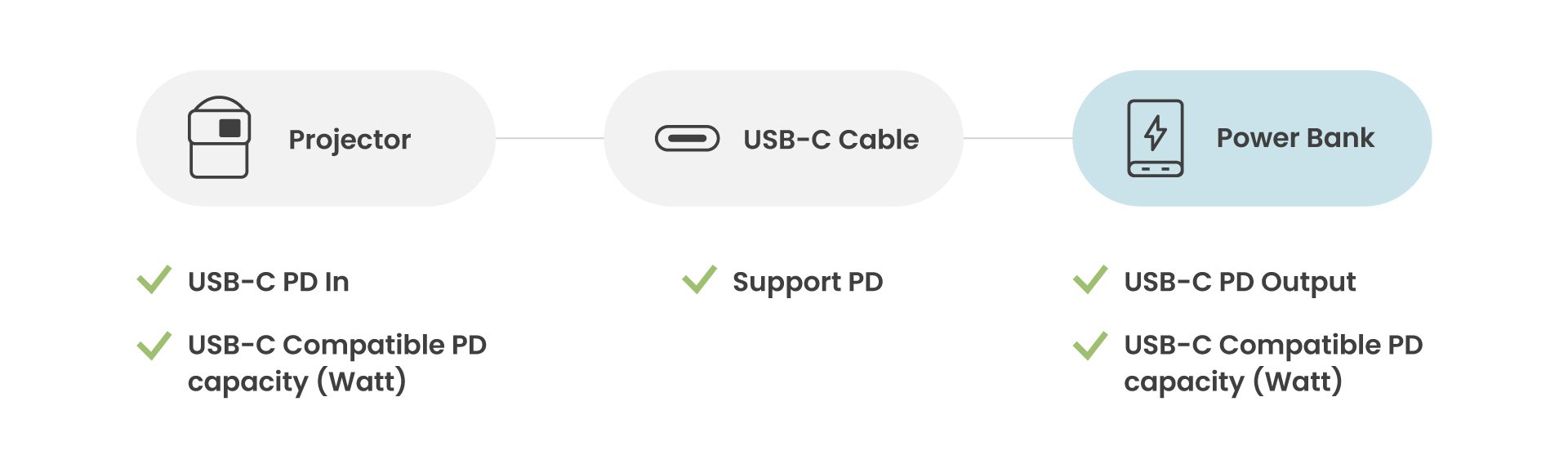
將便攜式投影機接駁外置充電器,方便在沒有電源插座的戶外或偏遠環境下繼續觀影。確保投影機、USB-C 連接線與外置充電器三者規格互相配合,即可順利供電:
●步驟一:選用合適的 USB-C 線材
必須使用支援 USB-C Power Delivery(PD)協定的連接線。若線材不支援 PD 快速充電協定,外置充電器便無法正常為投影機供電。
●步驟二:確認投影機的供電規格
在物色外置充電器前,先查閱投影機的規格表,特別留意其「PD 輸入」(PD In)所需的電壓與功率(PD Capacity)門檻。
●步驟三:核對外置充電器的輸出功率
檢視外置充電器的規格標籤,確保其 USB-C 輸出口提供的電壓與電流(瓦數)達到投影機的最低運作要求,方能確保供電穩定順暢。
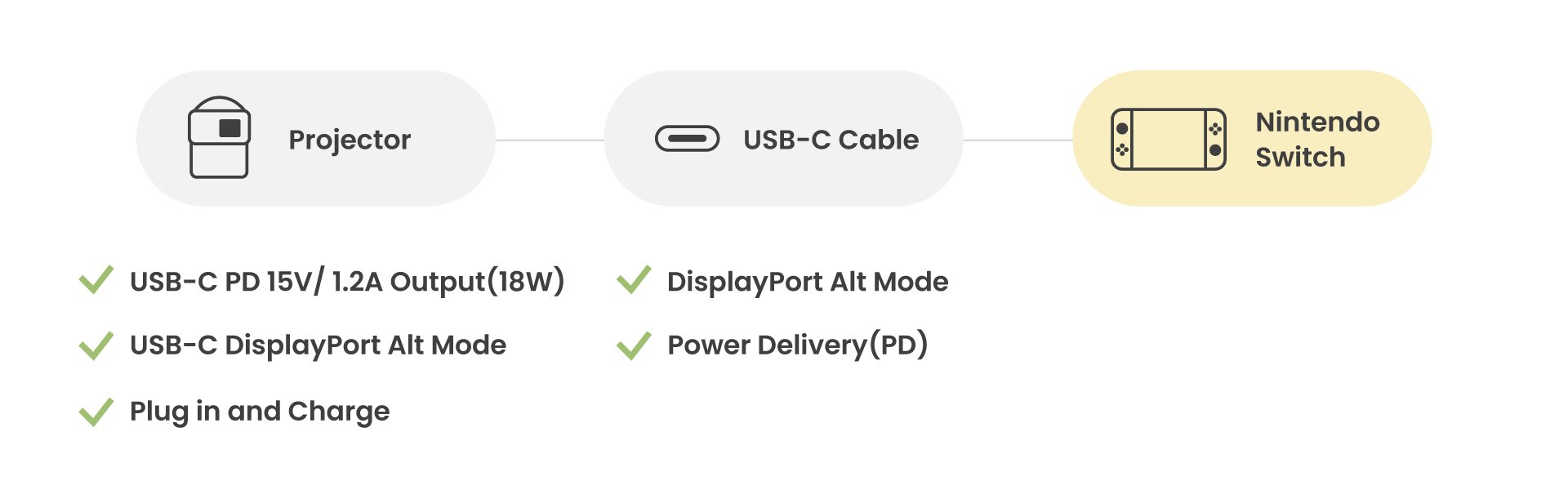
打算用投影機暢玩 Nintendo Switch 時,只需透過單一條 USB-C 線即可同步輸出畫面並為主機補充電量:
請確保您的投影機和 USB-C 線材符合指定要求,以確保能成功為您的 Nintendo Switch 充電。
●步驟一:選用合適的 USB-C 線材
務必準備同時支援 Power Delivery(PD)充電與 DisplayPort Alt Mode(DP 視訊輸出)的 USB-C 連接線,才能同時處理影像訊號傳輸與電力供應。
●步驟二:檢查投影機的 USB-C 接口規格
要一邊投放 Switch 遊戲畫面一邊為主機充電,投影機的 USB-C 接口必須支援 DisplayPort Alt Mode,同時提供至少 15V / 1.2A(即 18W)的 PD 電源輸出。若投影機接口輸出功率未達此標準,則需透過原裝火牛及電源線將投影機連接至牆身插座。
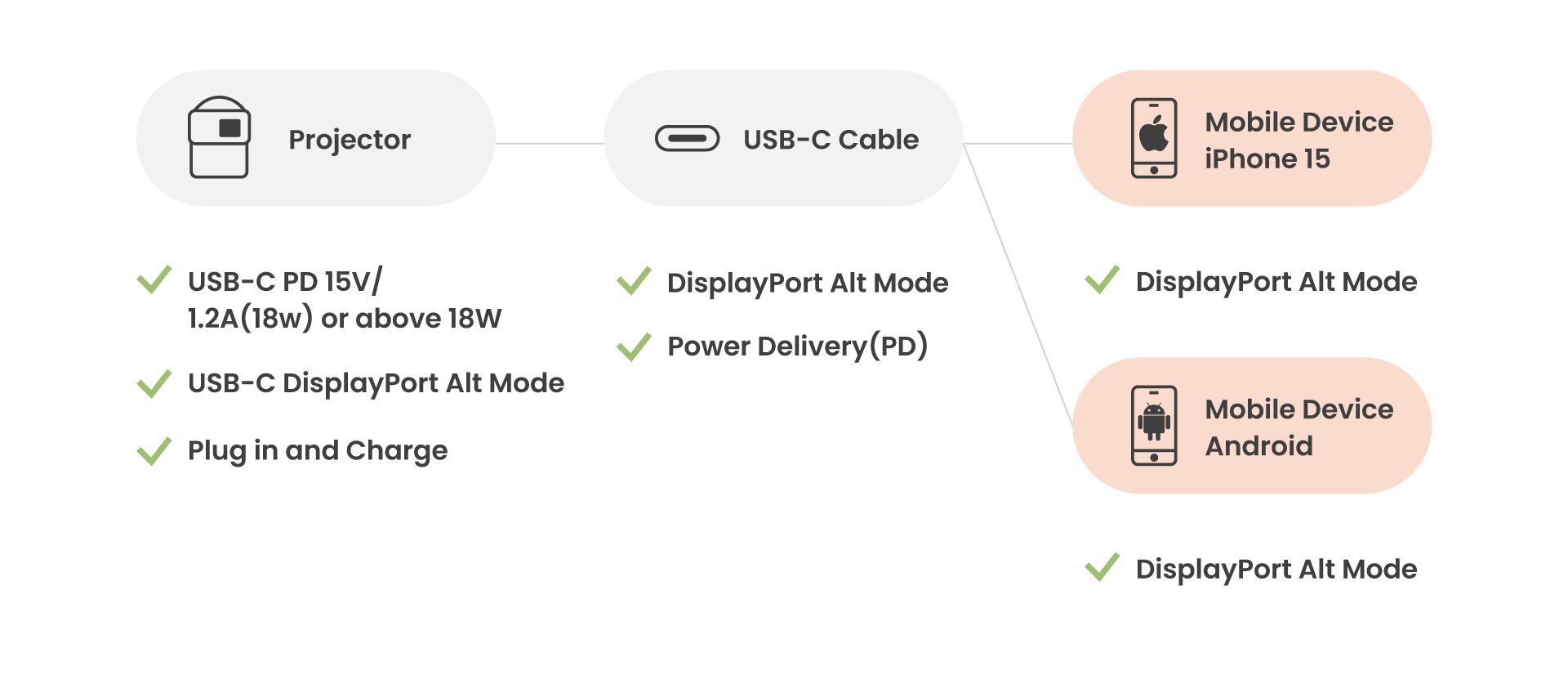
便攜投影機亦支援將流動裝置的畫面即時鏡像投射,同時為裝置補充電力,確保娛樂過程不會因電量不足而中斷:
請確認您的投影機、USB-C 線和行動裝置符合上述規格要求,以確保行動裝置能夠順利充電及投影機。
●步驟一:確認線材規格齊全
連接線同樣需要具備 USB-C Power Delivery(PD)充電及 DisplayPort Alt Mode 視訊傳輸能力,缺一不可。
●步驟二:確認投影機接口支援雙向功能
確認投影機的 USB-C 接口支援 DisplayPort Alt Mode 影像輸入,並提供至少 18W 的反向供電輸出。若供電規格不足,建議將投影機接駁原裝火牛運作。
●步驟三:檢查流動裝置的兼容度
根據您的設備,您需要檢查相容性:
Android 裝置:
確認手機或平板支援 PD 充電協定,並具備 DisplayPort Alt Mode 影像輸出功能。用家可於 Google Play 下載「Type-C Video Checker」應用程式進行檢測。
For iPhone:
iPhone 8 起支援 PD 快速充電,由 iPhone 15 系列開始才同步支援 PD 與 DisplayPort Alt Mode 視訊輸出。連接 iPhone 14 或更早期的 Lightning 介面機型時,使用 USB-C 轉 Lightning 連接線僅能進行充電,無法輸出視訊畫面。
總結
充分善用便攜投影機的 USB-C 接口,關鍵在於按實際使用場景挑選規格相符的線材,並預先核對投影機、連接線與外接裝置的功率與視訊協定,從而發揮 USB-C 跨裝置一線通的便利,獲得穩定清晰的投影效果。
{{item.productWordingTag}}
{{currency}}{{item.finalPrice| numberThousandsCommas | numberDecimalPoint}} Save {{currency}}{{item.saveAmount | numberThousandsCommas | numberDecimalPoint}} Save {{item.savePercent | numberThousandsCommas | numberDecimalPoint}}%
new device price{{currency}}{{item.regularPrice| numberThousandsCommas | numberDecimalPoint}}