BenQ Palette Master Element Renk Kalibrasyon Yazılımı
Donanım kalibrasyon sayıları. Bir ekran dikkatli bir şekilde donanımla kalibre edildikten sonra, gerçekçi veya stilize sonuçlar için görüntüleri değiştirirken hassas kontrol sağlar.

Trend Olan Kelimeye Göre
4K UHD (3840×2160) Kısa Atım 2B, Dikey/Yatay Keystone LED Lazer Android TV ile Düşük Giriş Gecikmesi ileKurumsal Projektörü Keşfedin
Simulasyon Projektörü SmartEco Projektör Golf Simülatörü Toplantı Odası ProjektörüProjektör
Trend Olan Kelimeye Göre
4K UHD (3840×2160) Kısa Atım 2B, Dikey/Yatay Keystone LED Lazer Android TV ile Düşük Giriş Gecikmesi ileKurumsal Projektörü Keşfedin
Simulasyon Projektörü SmartEco Projektör Golf Simülatörü Toplantı Odası ProjektörüMonitör
İnteraktif Ekranlar
Çerez Ayarları
How can I change my BenQ cookie settings?
Page updated: May 2020
Some essential features on BenQ sites just won’t work without cookies. And having other cookies switched off can seriously affect the way you’ll be able to enjoy our services.
Please check your cookie settings below and turn on any cookies you’re happy with.
“Strictly necessary” cookies can’t be turned off. But Functional and Performance cookies can be turned on or off below. You can learn more about cookies and what they do on our other pages.
If you've chosen to block third-party cookies on your browser, your cookie preferences won't carry over from benq.eu to benq.xx and vice versa. Please make sure to set your cookie preferences in both places.
On
Strictly necessary cookies
These cookies are essential so that you can move around the website and use its features. Without these cookies services you have asked for cannot be provided.
On
Off
Functional cookies
These cookies allow the website to remember choices you make to give you better functionality and personal features.
On
Off
Performance cookies and advertising cookies
Performance cookies
These cookies help to improve the performance of BenQ. If you want to opt-out of advertising cookies, you have to turn-off performance cookies. We also use Google Analytics, SessionCam and Hotjar to track activity and performance on the BenQ website. You can control the information provided to Google, SessionCam and Hotjar. To opt out of certain ads provided by Google you can use any of the methods set forth here or using the Google Analytics opt out browser add-on here. To opt-out of SessionCam collecting data, you can disable tracking completely by following link:https://sessioncam.com/choose-not-to-be-recorded/. To opt-out of Hotjar collecting data, you can disable tracking completely by following link:https://www.hotjar.com/privacy/do-not-track/.
Advertising cookies
These cookies are used to track your activity on the BenQ website and other websites across the Internet, help measure the effectiveness of our advertising campaign and deliver advertisements that are more relevant to you and your interests. We use various advertising partners, including Amazon, Facebook, and Google. These cookies and other technologies capture data like your IP address, when you viewed the page or email, what device you were using and where you were. You can find out how to avoid them below.
localNavigation.type = g6-product-overview-page
Palette Master Element
{{currency}}{{finalPrice.final | numberThousandsCommas | numberDecimalPoint}}
{{currency}}{{regularPrice.final | numberThousandsCommas | numberDecimalPoint}}
BenQ Palette Master Element Renk Kalibrasyon Yazılımı
Donanım kalibrasyon sayıları. Bir ekran dikkatli bir şekilde donanımla kalibre edildikten sonra, gerçekçi veya stilize sonuçlar için görüntüleri değiştirirken hassas kontrol sağlar.
BenQ Palette Master Element Renk Kalibrasyon Yazılımı
Donanım kalibrasyon sayıları. Bir ekran dikkatli bir şekilde donanımla kalibre edildikten sonra, gerçekçi veya stilize sonuçlar için görüntüleri değiştirirken hassas kontrol sağlar.
Donanım kalibrasyonu için BenQ'ya özel yazılım olan Palette Master Element, monitörünüzün donanımını kalibre etmenize yardımcı olur. Minimalist kullanıcı arayüzü ile donanım kalibrasyonunuzu sadece birkaç tık uzağınızda bitirebilirsiniz. Calibrite / Datacolor kolorimetreyi tam olarak desteklemek için BenQ PhotoVue Monitörlerde renk motorunun ince ayarını yapmak için Palette Master Element uygulayın.
Palette Master Element ile Renk Doğruluğunda Görme Sağlayın
Donanım kalibrasyonu için BenQ'ya özel yazılım olan Palette Master Element, monitörünüzün donanımını kalibre etmenize yardımcı olur. Minimalist kullanıcı arayüzü ile donanım kalibrasyonunuzu sadece birkaç tık uzağınızda bitirebilirsiniz. Calibrite / Datacolor kolorimetreyi tam olarak desteklemek için BenQ PhotoVue Monitörlerde renk motorunun ince ayarını yapmak için Palette Master Element uygulayın.
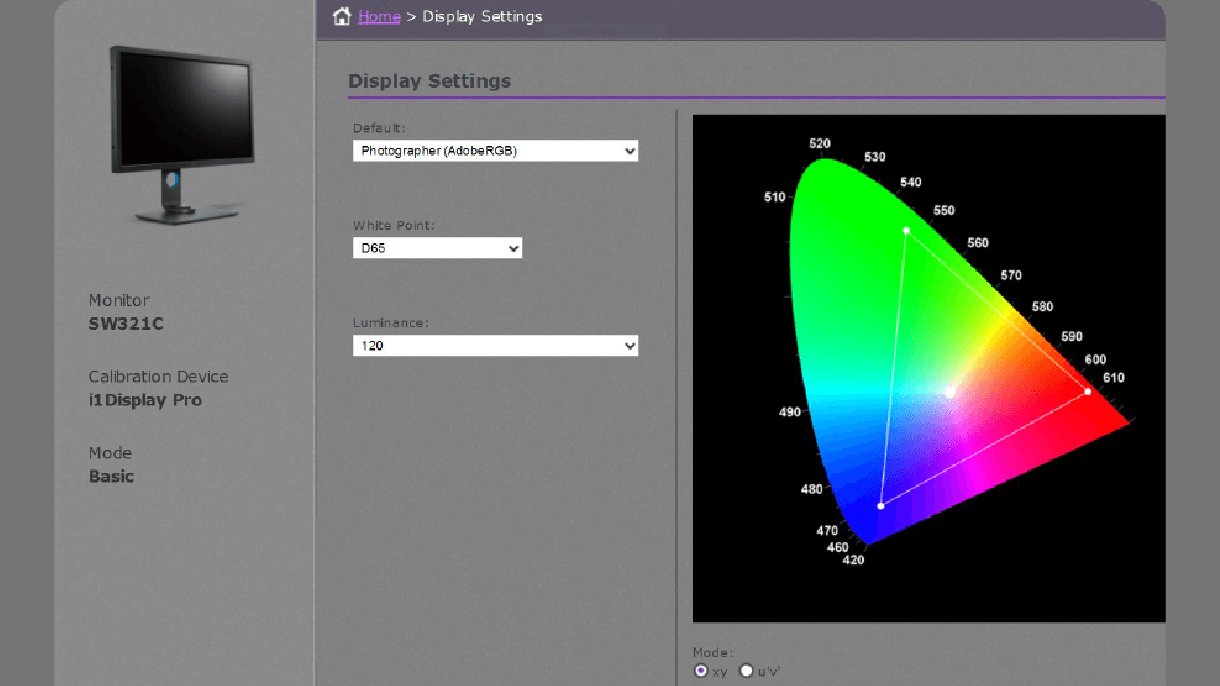
Monitör kalibrasyonu için doğru varsayılan profil, beyaz nokta ve parlaklıkla başlayın. Basit bir kullanıcı arayüzü ile renk doğruluğunu elde etmek kolaydır.
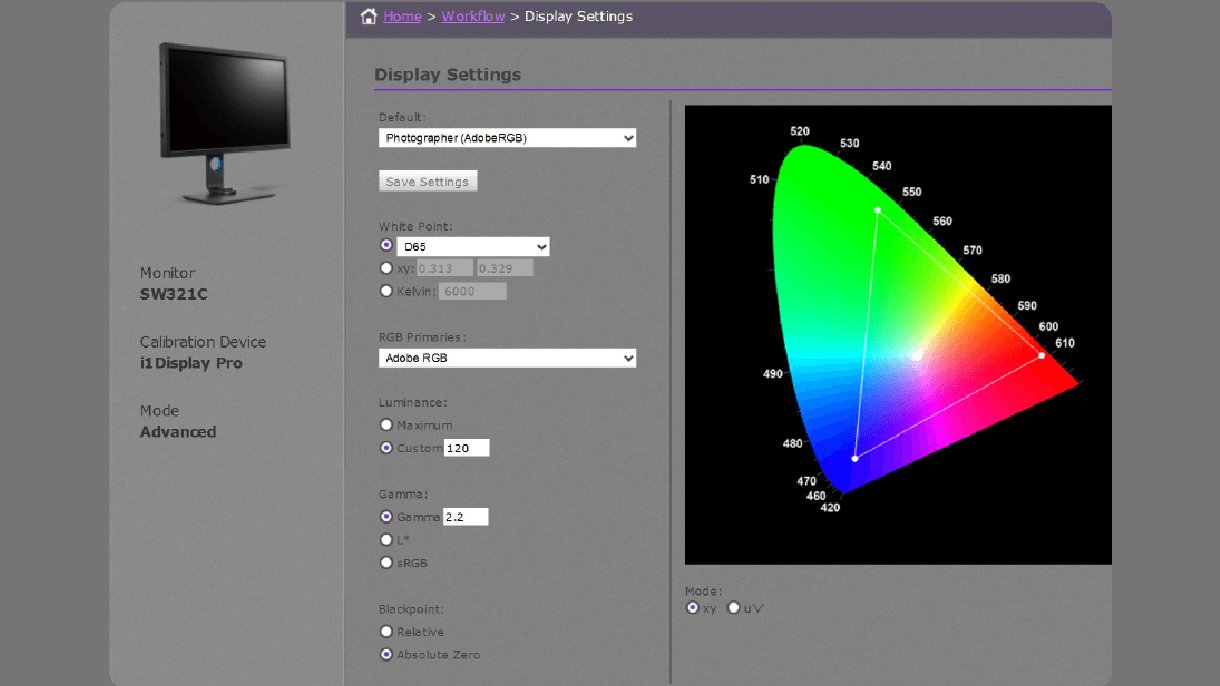
Profesyonel renk kalibrasyonunuz, daha rafine ayarlamalar elde etmek için özelleştirilmiş RGB birincilleri, beyaz nokta, parlaklık, gama ve siyah nokta ayarlarıyla tamamlanır.
Palette Master Element ile donanım kalibrasyonunun nasıl yapıldığını göstermek için BenQ marka elçisi Art Suwansang'a bir göz atın. BenQ Palette Master Element'in monitörlerinize donanım kalibrasyonunda nasıl yardımcı olabileceğinin faydalarını öğrendikten sonra.