BenQ ScreenBar Halo สุดยอดนวัตกรรมแห่งแสงสว่าง เพิ่มประสิทธิภาพให้คนยุคใหม่บนโต๊ะทำงาน

ดูทั้งหมด

BenQ ScreenBar Halo สุดยอดนวัตกรรมแห่งแสงสว่าง เพิ่มประสิทธิภาพให้คนยุคใหม่บนโต๊ะทำงาน

localNavigation.type = g6-series-page

จอภาพ Home Series

เปรียบเทียบ
GW series eye care monitors caring for your eyes while working

ถนอมดวงตาของคุณ ระหว่างการทำงาน

BenQ Triple Eye Protection ผสาน 3 เทคโนโลยีถนอมสายตา ทั้ง Flicker-Free และ Low Blue Light ที่ผ่านการรับรองจาก TÜV ร่วมกับ Visual Optimizer (เดิมคือ B.I.+) เพื่อรักษาสมดุลระหว่างการทำงานและสุขภาพดวงตา โดยไม่ต้องตั้งค่าให้ยุ่งยาก

ถนอมดวงตาของคุณ ระหว่างการทำงาน

BenQ Triple Eye Protection ผสาน 3 เทคโนโลยีถนอมสายตา ทั้ง Flicker-Free และ Low Blue Light ที่ผ่านการรับรองจาก TÜV ร่วมกับ Visual Optimizer (เดิมคือ B.I.+) เพื่อรักษาสมดุลระหว่างการทำงานและสุขภาพดวงตา โดยไม่ต้องตั้งค่าให้ยุ่งยาก

จ้องหน้าจอนานเกินไปหรือเปล่า?

การอยู่หน้าจอนานๆ ส่งผลมากกว่าแค่เรื่องดวงตา คุณอาจไม่ทันสังเกตว่ามันส่งผลต่อร่างกายอย่างไร? นอกจากอาการตาล้าแล้วมันยังส่งผลต่อ สมาธิ ท่าทางในการทำงาน และสุขภาพโดยรวมของคุณในระยะยาว

  • Eye Fatigue

    ตาล้า

    การจ้องแสงสีฟ้าและการกะพริบของหน้าจอเป็นเวลานาน ไม่เพียงก่อให้เกิดความไม่สบายตา แต่อาจส่งผลกระทบถาวรต่อสุขภาพดวงตาได้

  • Poor Posture

    สรีระไม่เหมาะสม

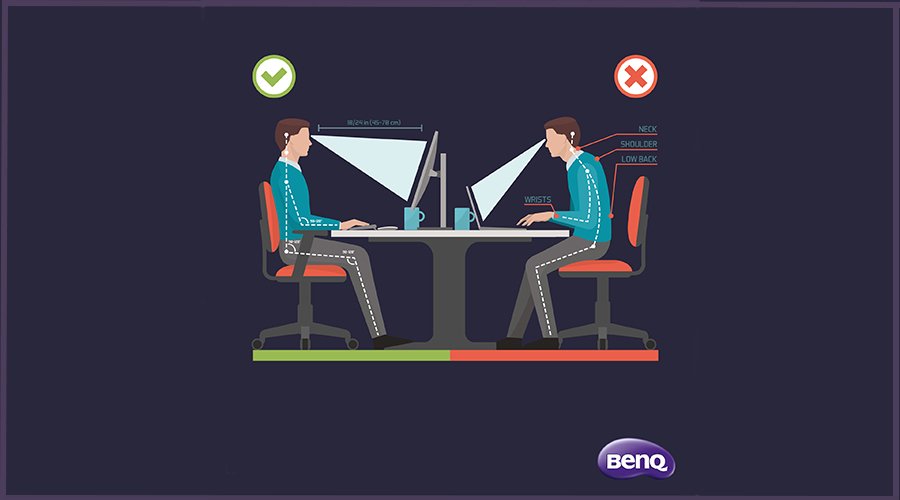
    กำลังก้มตัวงออยู่หน้าแลปท็อปใช่ไหม? การนั่งในสรีระท่าทางที่ไม่ดีเป็นเวลานาน อาจนำไปสู่อาการปวดเรื้อรัง รวมถึงปัญหากล้ามเนื้อและกระดูกที่ไม่อาจแก้ไขได้

  • Mental &  Physical Fatigue

    ความเหนื่อยล้าทางร่างกายและจิตใจ

    การใช้งานหน้าจอเป็นเวลานานทำให้เกิดความเหนื่อยล้าทั้งทางร่างกายและจิตใจสะสม ซึ่งอาจส่งผลกระทบต่อความเป็นอยู่ที่ดีและสุขภาพโดยรวมในระยะยาว

Triple Eye Protection. ใช้ง่ายสบายตา

มอบความสบายในการใช้งาน ทั้งในที่ทำงาน ที่บ้าน และหลังเลิกงาน

Low Blue Light เป็นเพียงจุดเริ่มต้นเท่านั้น ความสบายตาที่แท้จริงมาจากเทคโนโลยีที่ปรับให้เข้ากับคุณ จอมอนิเตอร์ถนอมสายตาของ BenQ ก้าวล้ำกว่ามาตรฐานการรับรองจาก TÜV ด้วย Triple Eye Protection ซึ่งประกอบด้วย Visual Optimizer (เดิมคือ B.I.+) Low Blue Light และ Flicker-Free เพื่อมอบความสบายตาอย่างต่อเนื่องตลอดทั้งวัน

Visual Optimizer

หน้าจอที่เข้าใจทุกสภาพแสง

เมื่อแสงเปลี่ยนไป หน้าจอของคุณจะรู้ได้ทันที Visual Optimizer (เดิมคือ B.I.+) มาพร้อมเซนเซอร์ในตัวเพื่อปรับความสว่างและอุณหภูมิสีให้เข้ากับสภาพแวดล้อมของคุณโดยเฉพาะ มอบการรับชมที่สบายตาพร้อมสีสันที่สดใสโดยอัตโนมัติ ไม่ต้องเดา ไม่ต้องปรับเอง ให้ความสบายตาต่อเนื่องตลอดทั้งวัน

บอกลาการกะพริบที่มองไม่เห็น
ปกป้องดวงตาของคุณจากแสงสีฟ้าที่เป็นอันตราย
Say Goodbye to Invisible Flicker
Shield Your Eyes from Harmful Blue Light
  • แม้หน้าจอจะดูปกติ แต่ก็อาจมีการกะพริบที่เบาบางจนคุณมองไม่เห็น แต่ดวงตาของคุณยังคงได้รับผลกระทบ เทคโนโลยี Flicker-Free ของ BenQ ที่ผ่านการรับรองจาก TÜV ช่วยให้ภาพบนหน้าจอมีความเสถียร ลดการกะพริบ เพื่อให้ดวงตาของคุณรู้สึกสบาย แม้ต้องทำงานต่อเนื่องเป็นเวลานาน
  • เทคโนโลยี Low Blue Light ที่ได้รับการรับรองจาก TÜV ของ BenQ นั้นเหนือกว่าแบรนด์อื่น โดยถูกออกแบบมาเพื่อปกป้องดวงตาของคุณตลอดการทำงานที่ยาวนาน โดยไม่ทำให้หน้าจอของคุณกลายเป็นสีเหลือง นอกจากนี้คุณยังสามารถปรับระดับแสงสีฟ้าได้อย่างละเอียดเพื่อให้ได้สมดุลที่สมบูรณ์แบบ งานของคุณจึงยังคงมีสีสันที่ถูกต้องตามที่ควรจะเป็นเสมอ
BenQ Eye-CareU
 BenQ Eye-CareU

Eye-CareU

คุณทำงาน เราดูแล

ด้วย built-in eye-care assistant ซึ่งถูกออกแบบมาเพื่อจอมอนิเตอร์ BenQ GW โดยเฉพาะ พร้อมความสามารถในการติดตามพฤติกรรมและรายงานการใช้สายตา ที่เครื่องมือจากภายนอกไม่สามารถทำได้ ด้วยการควบคุมบนหน้าจอที่ใช้งานง่าย ช่วยให้คุณมีสมาธิกับงานได้ไม่มีสะดุด

*รองรับทั้งโหมดสว่าง (Light theme) และโหมดมืด (Dark theme) เพื่อความสบายตาของคุณ

Eye-CareU

คุณทำงาน เราดูแล

ด้วย built-in eye-care assistant ซึ่งถูกออกแบบมาเพื่อจอมอนิเตอร์ BenQ GW โดยเฉพาะ พร้อมความสามารถในการติดตามพฤติกรรมและรายงานการใช้สายตา ที่เครื่องมือจากภายนอกไม่สามารถทำได้ ด้วยการควบคุมบนหน้าจอที่ใช้งานง่าย ช่วยให้คุณมีสมาธิกับงานได้ไม่มีสะดุด

*รองรับทั้งโหมดสว่าง (Light theme) และโหมดมืด (Dark theme) เพื่อความสบายตาของคุณ

We Adjust. You View Comfortably.

We Adjust. You View Comfortably

No more bad posture. Beyond the laptop screen limitations, the GW series monitors offer more freedom with multiple angles and height flexibility for a better viewing experience.

*Stand adjustability varies by model. Please check specifications before purchase.

We Adjust. You View Comfortably

No more bad posture. Beyond the laptop screen limitations, the GW series monitors offer more freedom with multiple angles and height flexibility for a better viewing experience.

*Stand adjustability varies by model. Please check specifications before purchase.

  • Pivot

    Pivot

  • Swivel

    Swivel

  • Tilt

    Tilt

  • Height Adjustable

    Height Adjustable

Protect Your Eyes with Ease

We know how hard it can be to balance work, health, and family. But protecting your eyes shouldn’t add to the burden. With a simple setup, you can ease eye strain, stay focused, and make screen time more comfortable—so you can be your best, for yourself and those you love.

  • Connect

    to auto-activate Flicker-Free & Low Blue Light

  • Tap

    the hotkey for Visual Optimizer

  • Done

    to get lasting eye comfort

*The Visual Optimizer hotkey is available on GW2490C, GW2490TC, GW2790C, and GW2790TC models.

Which Monitors is Right for You?

All models feature BenQ Eye-Care Technology and are designed for work, video calls, or multitasking—whatever your day looks like.

  • GW2490C

    GW2490C

    24” eye-care monitor for long screen hours

    24” Full HD (1920 x 1080) USB-C (Alt Mode) Tilt only 144Hz

  • GW2790C

    GW2790C

    27” eye-care monitor for long screen hours

    27” Full HD (1920 x 1080)) USB-C (Alt Mode) Tilt only 144Hz

  • GW2490TC

    GW2490TC

    24” eye-care monitor with ergonomic stand

    24” Full HD (1920 x 1080) USB-C (20W) Tilt / Pivot / Swivel / Height (HAS) 144Hz

  • GW2790TC

    GW2790TC

    24” eye-care monitor with ergonomic stand

    27” Full HD (1920 x 1080) USB-C (20W) Tilt / Pivot / Swivel / Height (HAS) 144Hz

USB-C for Higher Efficiency

A single USB-C cable provides fast power and data transfer for a more efficient workflow, while downstream ports keep your phone and other devices connected. Smart port placement reduces clutter, helping you stay focused.

* I/O port configurations vary by model. Please refer to the individual product specifications for details.

IPS Panel for All-Day Comfort and Clarity

IPS Panel for All-Day Comfort and Clarity

BenQ's IPS panels provide balanced visuals and wide viewing angles, ensuring a comfortable and strain-free experience, whether you’re working or sharing the screen with family.

IPS Panel for All-Day Comfort and Clarity
BenQ Eye-CareU

BenQ Home Entertainment Monitors

Exceptional Joy for Your Personal Moments

Not just here for work? We’ve got something for your downtime too.

BenQ Home Entertainment Monitors

Exceptional Joy for Your Personal Moments

Not just here for work? We’ve got something for your downtime too.

BenQ ESG sustainable product infographic

BenQ sustainable monitor showing carbon footprint reduction journey and eco design innovation

Home Series

Compare all Home Monitors
23.8"~25"
27"~28"
31"~32"

Without HDR

Without HDR

เริ่มต้น {{currency}}{{ n[1]| numberThousandsCommas | numberDecimalPoint }} -

เรียนรู้เพิ่มเติม

IPS

Panel Type

Up to

72% NTSC

Color Gamut

Up to

1080p (1920x1080)

Resolution

130 mm

Height Adjustment Stand

Up to

1W Stereo Speaker

Audio Output

With HDR
Without HDR

With HDR

High Dynamic Range to achieve lifelike images

เริ่มต้น {{currency}}{{ n[1]| numberThousandsCommas | numberDecimalPoint }} -

เรียนรู้เพิ่มเติม

Up to

VESA DisplayHDR 400

High Dynamic Range

IPS

Panel Type

Up to

95% P3

Color Gamut

Up to

4K (3840x2160)

Resolution

110 mm

Height Adjustment Stand

Daisy Chain

Topology

USB-C

Connectivity

Up to

5W Stereo Speaker

Audio Output

Without HDR

เริ่มต้น {{currency}}{{ n[1]| numberThousandsCommas | numberDecimalPoint }} -

เรียนรู้เพิ่มเติม

-

High Dynamic Range

IPS

Panel Type

Up to

99% sRGB

Color Gamut

Up to

2K (2560x1440)

Resolution

Up to

130 mm

Height Adjustment Stand

Daisy Chain

Topology

USB-C

Connectivity

Up to

Noise Filter Speaker (2Wx2)

Audio Output

With HDR
Explore Other BenQ Monitors

บทความ

ทำไมจอภาพ USB-C จึงจำเป็นสำหรับคุณ

การเรียนรู้ผ่านสื่ออิเล็กทรอนิกส์ด้วยจอมอนิเตอร์ถนอมสายตา: เตรียมความพร้อมให้กับลูกของคุณ

การเลือกจอมอนิเตอร์สำหรับใช้งานวันละหลายชั่วโมง

5 เหตุผลที่ควรใช้จอคอมถนอมสายตา

ศูนย์บริการสนับสนุน

แจ้งขอความช่วยเหลือ

ติดต่อเรา

ต้องการติดต่อ