{{item.name}}
Price: {{currency}}{{item.price| numberThousandsCommas | numberDecimalPoint}}
Qty: {{item.amount}}


When golfers invest in a projector for a golf simulator, they typically focus on brightness, resolution, throw ratio, and cost. Yet one of the most overlooked factors affecting image quality is pixel sharpness. Two projectors may both be marketed as 4K, but the way they create those pixels is fundamentally different, which can often be seen on the screen.
One reason BenQ 4K DLP projectors are popular among golf simulator enthusiasts is their ability to produce sharp, crisp images. While 4K resolution is a big part of it – much of the reason comes down to how the image is produced on the screen. BenQ 4K projectors use a single DLP chip, while 3LCD 4K projectors rely on three separate imaging panels that must remain aligned.
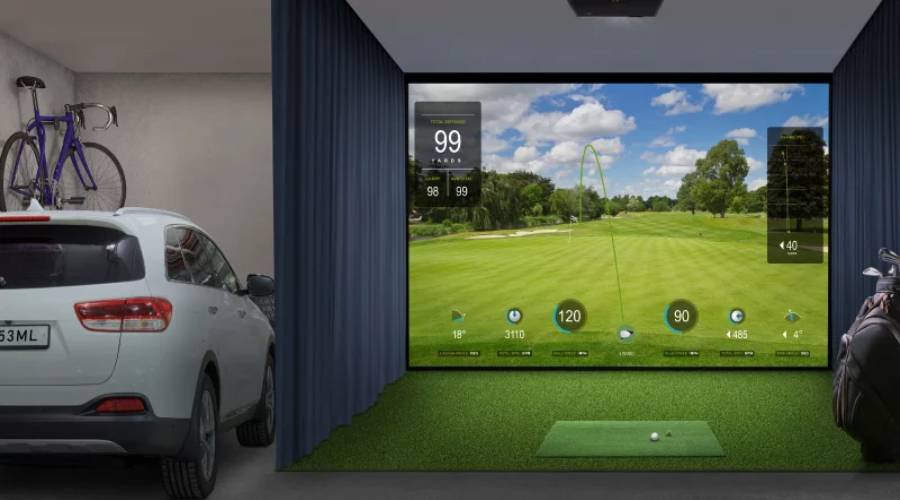
Figure 1 – Sharp pixel structure is critical for resolving both the realistic course design of software platfroms like GSPro and the critical data and metrics overlaid on the simulation screen.
At the heart of a BenQ projector is a DLP chip with millions of microscopic mirrors that tilt thousands of times per second to create pixels on the screen. With a BenQ 4K DLP projector, each mirror is programmed to create four different pixels, using the same technique developed for commercial cinema 3D movies. Because the same mirror generates each pixel position, pixel registration is inherently precise.
The critical advantage is simple:
The same physical mirror creates all four pixel positions.
Because the same mirror is responsible for generating those pixels, the projected image maintains sharpness using state-of-the-art microchip technology.
A 3LCD 4K projector functions very differently.
Rather than using a single imaging device, 3LCD technology splits light into red, green, and blue components. Each color passes through its own liquid crystal display panel. The three separate images are then recombined through a prism before being projected onto the screen. While 3LCD projectors are known for strong brightness and overall image quality, their three-panel architecture introduces alignment challenges that do not exist in single-chip DLP systems.
In a 4K 3LCD projector, the red, green, and blue panels must remain precisely aligned across the entire image. Even small alignment variations can reduce apparent sharpness and introduce visible color bleeding.
Consider a single white pixel on a simulator screen. In a DLP system, that pixel originates from one mirror. In a 3LCD system, that same white pixel requires:
All three must overlap with microscopic precision.
If one panel shifts even slightly relative to the others, the result may include:
The industry refers to this as panel convergence or panel misalignment.
In fact, many higher end 3LCD projectors include panel alignment controls specifically to compensate for convergence variations. Epson provides panel alignment adjustments on numerous models because maintaining perfect alignment across three separate imaging panels is challenging.
The existence of panel alignment systems highlights an important reality: three-panel projectors require convergence management because convergence affects image quality.
One of the most amazing aspects of a BenQ 4K projector is how a single mirror can create multiple pixels. Because the speed of the mirrors creating the pixels has improved with each generation of microchip technology, each mirror can create four pixels in the time it used to take to create one. This enables a full 8.3-million-pixel 4K UHD image without sacrificing image sharpness. In 2026, these chips are complimented with new video processors with AI technology that can make the image look even better.
Because the same mirror creates each pixel:
In contrast, a 3LCD projector requires all the pixels on three separate imaging panels to remain precisely synchronized for every one of the 8.3 million pixels generated on the screen.
The commercial cinema industry offers compelling proof that the BenQ DLP solution works reliably and effectively to create sharp pixels. DLP Cinema technology helped launch digital cinema and became the dominant platform for commercial movie projection. The ability to precisely create multiple pixels with a single mirror has enabled hundreds of 3D cinema films such as Avatar and is used in IMAX theaters. The precision and stability required for giant theater screens made DLP technology attractive to cinema operators around the world.
4K golf simulators demand similar image quality. Simulator software displays fine text, shot data, and highly detailed course graphics. Because players often stand only a few feet from a large impact screen, image softness becomes easier to detect than it might be in a traditional home theater. Since many golf simulators setups also include a 4K television in the room, once you’ve seen it, you can’t unsee it.
For golf simulator owners seeking the most defined text, crisp interface elements, and highly detailed virtual courses, DLP technology remains one of the strongest options available. Its precision single-chip architecture, commercial cinema heritage, and ability to avoid panel convergence issues help explain why many users perceive 4K DLP projectors as producing sharper and cleaner images than comparable 3LCD alternatives.
Sharper pixel boundaries help create a more realistic and immersive environment. Newer BenQ models also incorporate advanced image processing technologies designed to enhance contrast, detail, and overall image quality.
Although both BenQ DLP and 3LCD projectors can deliver impressive 4K images, they create those images using fundamentally different pixel architectures.
BenQ 4K projectors rely on a single DLP chip. Because one imaging chip creates the entire image, pixel positions maintain precise geometric alignment.
By contrast, 3LCD projectors depend on three separate LCD panels whose red, green, and blue liquid crystal cells must remain perfectly aligned while creating multiple pixels. Even slight convergence errors can reduce apparent sharpness and introduce subtle image softness.
Bottom line: BenQ's DLP projectors generate razor sharp pixels using the same core imaging architecture that helped drive the digital cinema revolution, commercial 3D movie exhibition, and many IMAX installations. Pixel sharpness in golf simulator environments enables golfers to see the small details like rake lines in bunkers and individual blades of grass to enable a more immersive and realistic image both in golf simulators, as well as other video content.
BenQ has trained staff to help you find the perfect golf simulator projector – within your room size and budget. To help you make the best decision, you can reach out to one of our experts to set up anything from a chat to a complete online demo, to help you find the right projector for your needs.
{{item.productWordingTag}}
{{currency}}{{item.finalPrice| numberThousandsCommas | numberDecimalPoint}} Save {{currency}}{{item.saveAmount | numberThousandsCommas | numberDecimalPoint}} Save {{item.savePercent | numberThousandsCommas | numberDecimalPoint}}%
new device price{{currency}}{{item.regularPrice| numberThousandsCommas | numberDecimalPoint}}


