{{item.name}}
Price: {{currency}}{{item.price| numberThousandsCommas | numberDecimalPoint}}
Qty: {{item.amount}}


Trying to choose between a purpose built golf simulation projector or a brighter projector with lower resolution? Check out our detailed comparison and decide for yourself which projector is right for you.
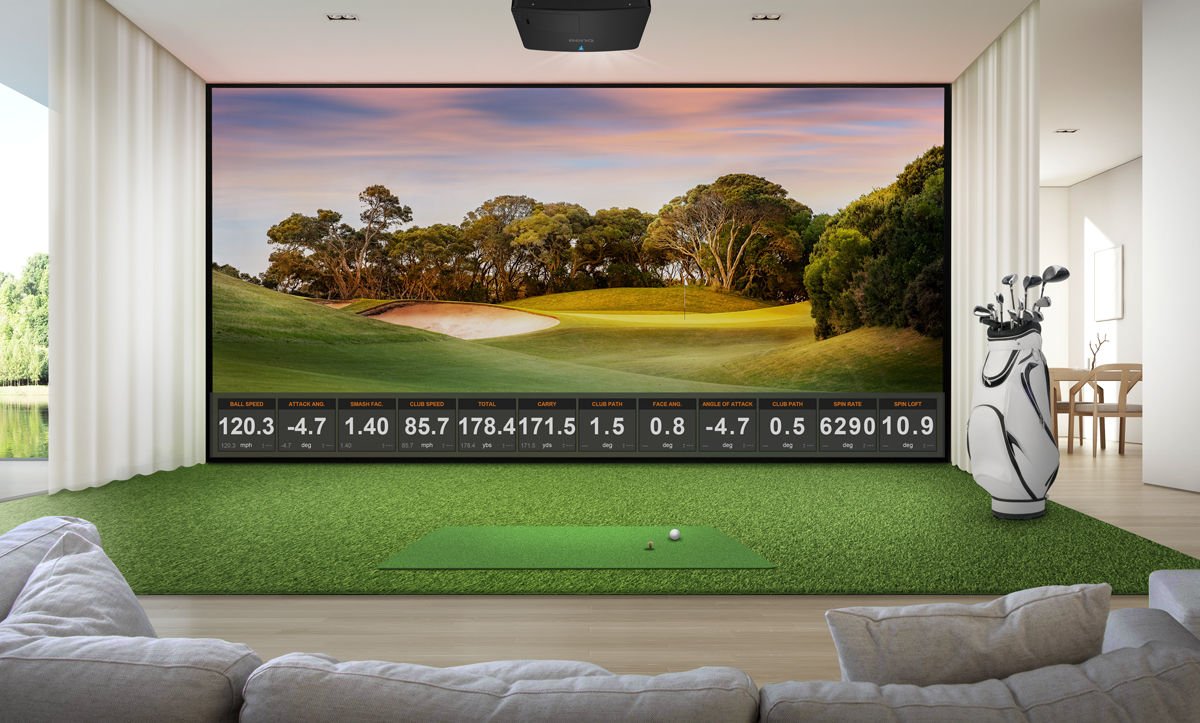
Like cars, projectors have many features that are fine-tuned for different applications. In 2026, the two premium short throw projectors most often compared are designed for two different applications. The BenQ AK900ST is designed to create the most realistic golf courses, stunning movies, and family gaming for home or commercial golf simulators. The Epson L795SE is focused on maximum brightness for conference rooms, hybrid workplaces, and golf simulation. So, if you’re looking for a golf simulator projector for your TrackMan, Foresight, Uneekor, or other launch monitor, we have put together detailed comparison that takes a close look at how these two units compare in a golf simulation ecosystem using the following criteria.
4K Resolution vs. WUXGA “4K Enhancement” Resolution
Color accuracy & HDR Support
Easy Setup for different aspect ratios and curved screens
Ability to use for Movies and Gaming
Maintenance requirements
24/7 Use and Power Usage
Let’s start with what they both have in common. First, they both have short throw lenses and lens shift to make installation easier. The BenQ AK900ST is rated at 6000 ANSI lumens, which is the most conservative measurement standard, while the Epson L795SE is rated at 7000 ISO lumens, which is a more liberal standard according to Projector Central. You can see how one brand represents both ISO Lumens and ANSI lumens on the same projector and showing ISO lumen number about 9% higher than ANSI. Both are bright and the Epson L795SE does have a slight brightness advantage over the BenQ AK900ST. But what features do you give up for getting those extra lumens on the screen?
The first major difference is the resolution. The BenQ AK900ST is the only projector of the two that delivers true 4K UHD resolution standard set by the Consumer Technology Association (CTA) with 8.3 million pixels. The top eight golf simulation software platforms are designed specifically for 4K UHD projectors, enabling you to see every little detail on the course. With the BenQ AK900ST, it can render every pixel exactly as the designer intended on the following golf simulator software platforms.
Trackman Virtual Golf 3
Yes
GSPro
Yes
Uneekor Gameday
Yes
FSX Play
Yes
E6 Connect/Apex
Yes
TGC 2019
Yes
Infinite Tee
Yes
ProTee Play
Yes
The Epson L795SE does not have 4K UHD resolution, despite its “4K Enhancement” name that may lead you to believe otherwise (it’s a proprietary marketing term owned by Epson).
The Epson L795SE uses the “4K Enhancement” term for the process adding more pixels to lower resolution LCD panels, but it is about 3.5 million pixels short of the number needed to achieve the industry 4K UHD standard used by every television, monitor, and 4K UHD camera. What’s worse is that half of those pixels cannot be directly addressed by software and the projector uses interpolation to define what the pixels will look like.
Without all 8.3 million addressable pixels, the computer and projector can struggle to find the right way to render those details correctly. Epson does make a 6000-lumen projector with true 4K UHD resolution but charges $16,999 for its QL3000 model not including the lens.
The second problem with “4K Enhancement” resolution is the pixel density. For a larger impact screen of 300 diagonal inches – the BenQ AK900ST 4K projector will generate 216 pixels in every square inch (about the size of your thumbnail) on your screen. On the Epson L795SE at its native resolution, it can only deliver 57 addressable pixels in the same space. With “4K Enhancement” technology, the projector will double the number of pixels in that area, but it may not render those pixels as the course designer intended as the projector is deciding the content, not the golf simulator software.
The other difference is how the pixels are made. The BenQ AK900ST uses the latest DLP imaging chip from Texas Instruments where a single mirror can precisely create four different pixels for a crisp, sharp image. The Epson L795SE requires the use of three different LCD panels, and all the imaging elements on these panels must be perfectly aligned or else the image will begin to look softer and show color fringing on details and text. This is called convergence error, and Epson provides a panel alignment tool to fix this when it happens.
The third and last problem of this resolution is that over 60% of golf simulators setups are used for sports / video streaming, movie watching, and family gaming. Apple TV, Netflix and other have direct support for 4K UHD resolution using the industry standard, but there is no published support for Epson’s proprietary “4K Enhancement” resolution, and there is no way to upgrade the projector’s resolution.
The next significant difference is color performance. Today’s newest golf simulator software platforms can create complex realistic images that are very demanding for a projector. Although both BenQ and Epson have color accurate home theater models, what about projectors used for golf simulation?
The BenQ AK900ST is engineered for high color accuracy and realism. With 97% Rec. 709 (the standard used by TV’s and monitors) color accuracy, it stands out as one of the most color-accurate projectors in its brightness category. To make the image look even more realistic, the BenQ AK900ST has an advanced AI level video processor that adds color depth to accurately render more difficult organic colors like Augusta bentgrass greens, Troon pot bunkers, and Pinehurst’s nasty wiregrass and pine needle roughs. This advanced processor is powerful enough to adjust the colors in real time for near perfect realism.
Here, the Epson L795SE shows its conference room roots. The projector does not have any Rec. 709 color accuracy specifications and there is no dedicated video processor or golf mode to enhance the image realism.
One new feature for a better image is BenQ’s Ambient Light Enhancement feature which adjusts the image hue, saturation, and brightness based on how much ambient light is on your screen. On the AK900ST, the AI video processor is trained to compare what the image is supposed to look like versus what it sees from the integrated camera on the projector and refines the image for the ambient light in the room.
With complex courses that have lots of details like Pebble Beach, or fantasy courses like the Carl’s Place GSPro “Old Game” set in Scotland, the BenQ AK900ST’s video processor can eliminate the pixel noise from moving grasses and accurately render pond reflections properly. It also creates a smooth skyscapes and shadows during those twilight rounds.
Most golf simulation customers have never set up a projector before, so it’s tempting to call in an expert to do this. But in 2026 with the introduction of Auto Screen Fit, the BenQ AK900ST automated nearly every part of the projector setup process to ensure a near perfect image in a fraction of the time it takes to set up a traditional projector.
In addition to its lens shift, motorized zoom and focus, the BenQ AK900ST has the latest generation AI Auto screen fit technology that uses an advanced video processor and integrated cameras to make the projector set up a breeze. First, you can use the BenQ Golf Sim Planning Tool to get detailed measurements to start your installation. Then the magic happens. Once you get your projector mounted in a location that can cover the entire screen, the projector’s camera will analyze the image and make all the corrections needed. In seconds. It will adjust the aspect ratio of your impact screen, use the motorized zoom and motorized focus to create a sharp image, then map the image to every corner of your screen – all with a touch of a button on the remote.
In addition to six different aspect ratios such as 1:1, 4:3, 5:4, and others, the BenQ AK900ST will also support automatic screen fit of curved screens. The integrated camera and the AI video processor do all the work for you, figuring out how to warp the image to fit the screen for a true pixel mapped wraparound immersive golf sim image that makes you feel like you’re there.
The Epson L795SE doesn’t have any auto screen fit, integrated camera, or AI video processor to aid installation. The lens shift and focus adjustments are both manual, so if you’re mounting it on the ceiling, you’ll need a ladder. There is limited support for different aspect ratios, so you may need to program your graphics card to make the image look correct if you’re not using a 16:10 screen.
According to a national survey of golf sim owners and buyers, nearly 2 out of 3 said they were planning to use their simulator to watch movies, golf, and play games on the large screen. With a screen size over 8 times the area of a 75 inch TV, golf simulators are a natural for family entertainment beyond golf. So how do these projectors compare for this application?
If you want your golf simulation projector to double as a “SimTheater” or giant TV when you’re not using it for golf, you’ll need HDR support to get the maximum effect out of video streaming services and traditional media players. The BenQ AK900ST has built in HDR10 and HLG support and with 6000 ANSI lumens of overhead, the effect looks amazing.
Even though HDR has been available for over 10 years, the new Epson L795SE does not have the ability to support any HDR or HLG signals from media players, broadcast TV, or streaming services. Here’s a list of 4K HDR enabled streaming services that will work on the BenQ AK900ST in true 4K resolution but not on the Epson L795SE.
If you enjoy watching movies, you’ll appreciate the 24p playback mode on the AK900ST that enables the projector to replicate the same frame rate as a commercial cinema projector used at an AMC, Regal, or Cinemark movie theater. The projector also has a frame-by-frame contrast enhancement algorithm that optimizes the different parts of the picture for maximum realism that delivers the director’s intent. The Epson L795SE doesn’t have either 24p playback or any contrast enhancement algorithms for home theater content.
The BenQ AK900ST also can save up to five different projector settings, or scenes. This is especially helpful if you have a 4:3, 16:10, or other aspect ratio impact screen. This enables you to have one setting for golf, then with a touch of the remote change the aspect ratio, color mode, source, and other settings to watch movies and play games. For example, you can change your 4:3 impact screen into a 16:9 scenes with optimized color modes and aspect ratios for golf, broadcast TV for major golf tournaments, HDR Cinema, and HDR gaming with low lag time with a single press of the button. The Epson L795SE can save three different settings.
If you want to use your projector for family gaming and entertainment the BenQ AK900ST has Automatic Low Latency Mode (ALLM) making it easy to connect a PlayStation, Xbox, or Nintendo Switch to your system. The projector can run at 240Hz frame rates and can deliver input lag times as fast as 4.8 ms – more than enough for a family game of Mario Kart or Madden. It will also support HDR for games.
The Epson L795SE uses older LCD technology that’s fine for conference room PowerPoints, but not very fast. The projector does not have ALLM mode, only supports 60Hz, and does not specify its input lag. There is no support for HDR in gaming either.
For a projector to be used as part of a multipurpose golf simulation / theater, the ability to support premium audio is a key factor. Traditional conference room and classroom projectors have small speakers that might be handy for light ambient golf sim sounds, but if you want to create a immersive sound experience for golf and video content, the BenQ AK900ST has an integrated e-ARC (Audio Return Channel) connector to pass through the audio signal to your AV receiver or wireless sound bar that can support Dolby Atmos audio.
Currently all the major US streaming services support Dolby Atmos either in their free or premium service levels. A simple connection from the projector to any wireless sound bar, Sonos, or AV system, and you can have an immersive 3D audio experience with sound that moves above, around, and behind you with pinpoint accuracy as well as an immersive cinematic experience.
The Epson L795SE doesn’t have any support for eARC or Dolby Atmos.
According to a national survey of golf simulator buyers, a maintenance free projector was one of the most important attributes for purchase consideration. The BenQ AK900ST projector uses an advanced sealed laser engine that has been dust torture tested by a third-party laboratory using the same IP5X standard as the latest Apple watch. There are no scheduled maintenance requirements.
By contrast, the Epson L795SE has filters that must be kept clean to keep the projector cool – and keep dust from getting inside the laser engine. The filter cleaning interval for this unit is every 5000 hours but could be more often depending on use and conditions since it is not IP5X certified. For example, other online sources such as projector resellers and golf simulator brands that sell Epson models recommend filter cleaning from as often as every 100 hours as you can see below. The warranty language on the Epson L795SE specifically excludes coverage if the projector is damaged from lack of maintenance or excessively dusty conditions, so you’ll want to keep an eye on how dirty your filter gets over time. Replacement filters cost about $60.
Another advantage of BenQ AK900ST over the Epson L795SE is the DLP chip technology used in nearly every commercial cinema today. This enables the projector to be used 24/7 without the risk of yellowing, a big plus if you are using the projector for a commercial golf simulator or at a country club. The Epson projector must be turned off daily, and failure to do so can result in the warranty being voided for “excessive use”.
The BenQ AK900ST uses 25% less electricity than the Epson L795SE, even though it has higher resolution and added features like an AI video processor, integrated camera, and Auto Screen fit. For a commercial golf simulator operation, this can save up to $150 per year per hitting bay in operating costs for power alone.
The projector is only part of the total golf simulation solution, so BenQ has a nice 3D planning tool that enables you to plan your impact screen, launch monitor type, hitting location, and room size to ensure that you won’t get shadows on your screen or driver marks on your ceiling. You can find it here. Epson only provides a traditional 2D throw calculator.
This is a choice between a meeting room projector vs. a purpose built projector for golf. With both projectors set at the midpoint zoom, the Epson L795SE generates just five more onscreen nits (141 for the BenQ AK900ST vs. 146 for the Epson) when using a 9 foot high impact screen. But for this increase in brightness, you lose millions of pixels of resolution, color accuracy, HDR support, advanced setup tools, and will be needing to check and clean the filter throughout the life of the projector.
The BenQ AK900ST has the advanced resolution and color accuracy features of the Epson QL3000 projector, and is less expensive than the L795SE, enough to pay for an extra year’s subscription to your favorite golf sim software platform.
BenQ has trained staff to help you find the perfect golf simulator projector – within your room size and budget. To help you make the best decision, you can reach out to one of our experts to set up anything from a chat to a complete online demo, to help you find the right projector for your needs.
{{productsCount}}Result
{{displaySortType}}
{{item}}
{{item.productWordingTag}}
{{currency}}{{item.finalPrice| numberThousandsCommas | numberDecimalPoint}} Save {{currency}}{{item.saveAmount | numberThousandsCommas | numberDecimalPoint}} Save {{item.savePercent | numberThousandsCommas | numberDecimalPoint}}%
new device price {{currency}}{{item.regularPrice| numberThousandsCommas | numberDecimalPoint}}
{{item}}
{{itemTag.title}}
Compare Products
{{item.title}}
{{currency+' '}}{{item.finalPrice | numberThousandsCommas | numberDecimalPoint}}
Save {{currency}}{{item.saveAmount | numberThousandsCommas | numberDecimalPoint}}
Save {{item.savePercent | numberThousandsCommas | numberDecimalPoint}}%
{{currency+' '}}{{item.regularPrice | numberThousandsCommas | numberDecimalPoint}}
Max 4 products to compare reached.