{{item.name}}
Price: {{currency}}{{item.price| numberThousandsCommas | numberDecimalPoint}}
Qty: {{item.amount}}


The two leading 0.5 short throw lens golf simulation projectors go head-to-head. Which one is right for you?
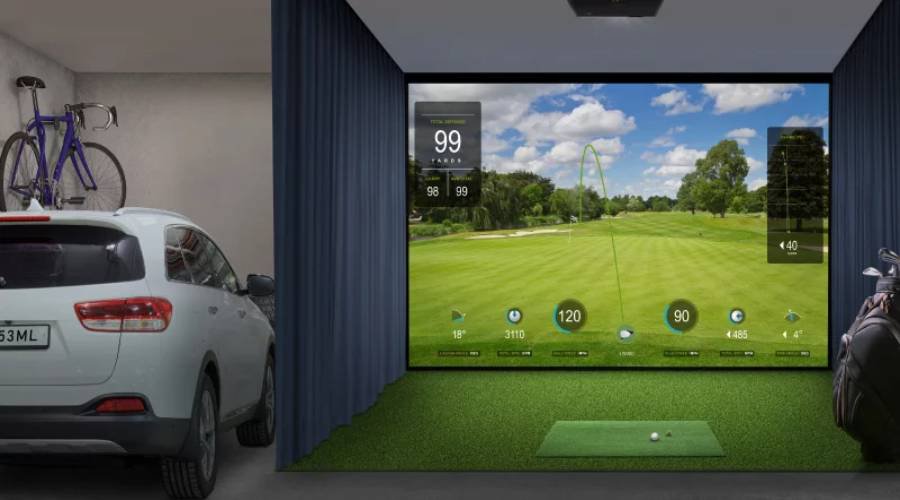
If you want to create a big image in a small space, a short throw projector with a 0.5 throw ratio is the easiest way to make sure you have enough room to safely mount the projector. These models are now becoming popular in golf simulation, especially in simulators located in smaller spaces like garages. We’ll look at the two most popular short throw projectors from BenQ and Optoma and break down the differences between them so you can decide which one would be best for your facility. Here are the top five things we’ll look at in this article.
Both projectors use DLP technology and can support larger screens than similar LCD short throw projectors. In addition, both are rated for 24/7 use, have sealed laser engines that eliminate having to constantly clean filters like on other models, and have smaller cases that enable them to easily fit into popular floor mounting boxes. So, let’s take a closer look at what separates the BenQ AH500ST from the Optoma GT2400HDR.
According to a national survey of simulator owners and buyers the #1 thing they want is a projector that is easy to set up. With short throw projectors, it is more important to get the projector mounted in the correct location to ensure that the image properly fills the screen or space properly. To get started, the BenQ AH500ST has an advanced 3D golf simulation planning tool that will enable you to try out different models to find the best projector mounting location based on your screen size and shape, location of your golf simulator launch monitor, and also make sure the projector doesn’t generate a shadow on the screen from your hitting area. Optoma has a limited planner that recommends a projector based on answering questions about player height and room size.
The BenQ AH500ST has the advantage of being able to create a larger image on a wall or screen without tilting the projector. This is due to the way the projector lens is “offset” or shifting the image up/down on the wall. The Optoma GT2400HDR has a higher offset which is better in meeting room use, but a disadvantage when used in a golf simulator. In a room where both projectors are ceiling mounted 8 feet from the ground, the BenQ AH500ST can create an image around just over 7.2 feet high, while the Optoma GT2400HDR can only create an image 6.9 feet high without any tilting. The BenQ AH500ST also has twice the amount of keystone correction to enable you to correct for tilting and mounting errors without having to remount the projector.
Unlike televisions, some projectors are optimized only for brightness and sacrifice color accuracy to achieve a higher lumen rating.
The BenQ AH500ST is designed for higher color accuracy and uses the Rec. 709 color standard specification that is required in flat screen televisions. This ensures that a golf course or simulated image on the screen looks realistic and immersive, since many of these colors are complex organic hues like sand, grass, and clouds that we see every day. The BenQ also has a built-in “Golf Mode” setting that optimizes the picture for golf simulation engines such as GSPro, FSX Play, TGC2019, and other popular software platforms.
Optoma doesn’t provide any color accuracy specifications on the GT2400HDR. However, the Wired review called the color performance for movies “bland and greyed out” so this projector may have difficulty replicating complex colors in higher end golf simulator platforms.
Both projectors use a 1080p DLP chip to create a sharp 16:9 aspect ratio image, but what if you want to use it with a different aspect ratio screen, such as a narrower 4:3 screen or even a square 1:1 aspect ratio screen? For a home theater, doing this is practically blasphemy, but in golf simulators about 75% of golf simulators use a non-native aspect ratio impact screen – and 1:1 screens are the fastest growing segment. The BenQ AH500ST has the ability to natively support all the common non-native aspect ratios used in simulators including 16:10, 4:3, and even 1:1. What is really nice is that the projector reconfigures the picture to eliminate any distortion on the new aspect ratio (no squished pictures) and will tell your PC exactly how to feed it the resolution it needs, so you don’t have to waste your time re-programming your graphics card.
The setup for the Optoma GT2400HDR is improved from the GT2100HDR, but doesn’t natively support 1:1 aspect ratio in their specifications on the projector. For the projector to change the resolution to support different aspect ratios, you’ll have to download and use a smartphone app to tell the projector what aspect ratio is, and have it calculate the new resolution. You may still need to go into your video card custom resolution to use the new resolution to ensure the image isn’t stretched or squished.
Figure 1- The BenQ AH500ST can easily support 4:3 and 1:1 aspect ratios without squishing the screen.
Just like wide angle lenses on cameras, short throw lenses on projectors can be trickier to focus. To make it easier, the BenQ AH500ST has an integrated camera sensor that enables you to re-focus the projector with a touch of the button on the remote. The projector will display a test pattern, then use its AI engine to automatically make the tiny adjustments needed for a crisp sharp picture in just a few seconds. This is especially helpful in a commercial golf simulation setup with multiple projectors, or if the projector is mounted in a difficult to reach or hidden location. The Optoma GT2400HDR uses a traditional focus ring that requires you to physically adjust the focus manually, which might require you to climb a ladder.
Because it's nearly impossible to see these two projectors next to each other in a real golf sim, third party video reviews are very helpful. The AH500ST has been reviewed by the biggest names in golf simulation. You can see detailed images and opinions on the AH500ST in videos from Golf Simulator Videos, Pixel Golf, Unreal Golf, BRDE Golf, Goin' FORE! It, and others to help you better understand the projector’s capabilities and limitations in different golf simulator setups.
The Optoma GT2400HDR doesn’t have any human third party video reviews using golf simulators as of October 2026, only affiliate reviews that create videos for commission referrals from channels like Deals Discovery Hub. This makes it difficult to determine how the projector will perform on a specific platform like GSPro or Uneekor Gameday when someone looking for something beyond basic capabilities.
The BenQ AH500ST costs more than the Optoma GT2400HDR, but is purpose built for golf simulation, designed for color accuracy, easy installation on most impact screens, and has an integrated camera that enables you to refocus the projector right from the remote whenever it’s needed. The Optoma GT2400HDR doesn’t have any color accuracy specifications, requires a smartphone app for fitting your screen, and there are no human third party videos to show how realistic the projector looks on a golf simulation screen. Finally, the BenQ AH500ST has a 3-year warranty, while the Optoma GT2400HDR has only a one-year warranty.
Here’s a table of how these two projectors stack up.
Key Feature
BenQ AH500ST
Optoma GT2400HDR
3D Golf Sim Planning Tool
Yes
Limited
Golf Color Mode
Yes
No
Color Accuracy
83% Rec. 709
Not specified
Screen Fill support for different aspect ratios
Yes – 16:9, 16:10, 4:3, and 1:1
Via smartphone app
Auto Focus with Camera
Yes
No
Brightness
4000 ANSI Lumens
4200 ISO lumens
Warranty
3 Year Warranty
1 Year Warranty
BenQ has trained staff that can provide you with the tools you need to find the perfect home theater or golf simulator projector – within your room constraints and budget. Just give us a call – or open the chatbot box.
{{item.productWordingTag}}
{{currency}}{{item.finalPrice| numberThousandsCommas | numberDecimalPoint}} Save {{currency}}{{item.saveAmount | numberThousandsCommas | numberDecimalPoint}} Save {{item.savePercent | numberThousandsCommas | numberDecimalPoint}}%
new device price{{currency}}{{item.regularPrice| numberThousandsCommas | numberDecimalPoint}}


