{{item.name}}
Price: {{currency}}{{item.price| numberThousandsCommas | numberDecimalPoint}}
Qty: {{item.amount}}


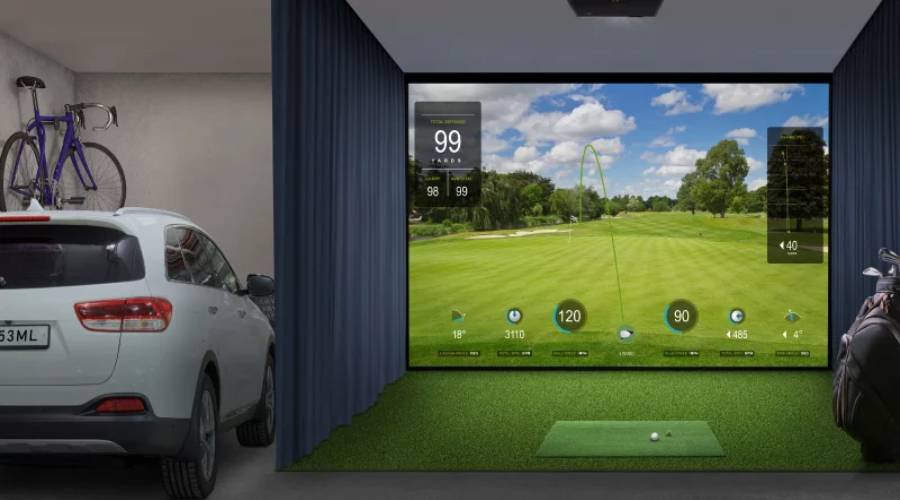
The popularity of home golf simulators continues to increase, likely driven by the pandemic and of course the availability of ever-improved technology. With more sophisticated and realistic depictions of golf courses from around the world as well as fictional locations, home simulators allow devoted golfers to keep practicing and enjoying themselves at any time. To get the most from the home golfing experience, you need a display device that provides utmost fidelity to take advantage of the latest in simulator graphics. Projector that’s optimized for 4K HDR offers the best support for what you want for big screen depiction of golf sim graphics.
The most advanced golf simulators have been optimized for use with software that support 4K outputs. To get the most popular software such as E6 CONNECT or TGC 2019 with their latest updates, you need a 4K projector. Dropping the resolution while maintaining a large projection screen results in visuals that appear muddy, soft, and washed out. Only a true 4K projector delivers a display that’s faithful to the source content, and is therefore the most realistic and immersive version available.
Beautiful graphics and maximum detail help ensure a compelling experience that does justice to the efforts that golf sim developers put into creating their software. It’s essential to get details right when rendering famous locations such as Old Course at St. Andrews, Bethpage Black, Pinehurst No. 2 and many others. Each course has unique features, lighting, and atmosphere, and the highest resolution currently possible is what you need to get the complete experience. The nuances of locations simply don’t come across as clearly in lower resolutions, and you don’t want to miss out. Not only does the experience not look as good, but you also don’t get the same level of practice. One of the main goals of a simulator is to prepare you for a real location, but if the graphics are lacking then your level of practice and preparation suffers.
Clarity of detail is essential for graphics, obviously. The higher the pixel resolution of your display device, the more crisp, clear, and detailed the image you get. Higher pixel counts aren’t just numbers for bragging rights, they tell you how much detail and data go into each frame of the display, and translate directly into the level of experience you get.
Whether WUXGA, 1080p, or 4K, besides pixel resolution, you should also take into account the perception of each pixel by our eyes via the retina, called pixel angular size. You may have heard of Apple’s Retina displays. These claim to match human eyesight so well, that people can’t notice individual pixels on the screen, resulting in smooth and believable visuals. The same applies to golf simulator projection. If you have enough pixels displayed, the angular size of each pixel becomes so small that they’re no longer distinguishable.
To choose the right projector and display surface, some calculations are in order. In general, to get the best experience you want to balance pixel count with viewing distance. Pixels disappear in any resolution given enough distance, but that means getting a very small screen size. To reach “retina” clarity with 1080p, you’d need a smaller screen or a big screen viewed from farther away. Both aren’t ideal solutions, when 4K offers the best resolution for larger screens from reasonable distances.
Therefore, a 4K projector working with a 7-foot tall screen provides an image that looks best from 11 feet to 20 feet away. As you can see in the chart below, 4K best matches the ideal hitting distance of most golf simulators, located in their sweet spot. Research shows most home golf simulators use a screen 7-11 feet high with a hitting distance of 6 feet to 18 feet, and those figures fall mostly within the best performance range for 4K. WUXGA and 1080p need 20 feet or more in viewing distance to look their best, or twice the distance for 4K. That’s double the distance for a quarter of the pixels. The case for 4K projectors is clearly very strong. Again, remember that from far enough all resolutions become essentially the same. A 4K image viewed from 22 feet, for example, looks like 1080p or even less to most people. This adds to the importance of balancing resolution, screen size, and viewing or hitting distance.
If you want sharp 4K detail, accurate color, and enough brightness to fill a large impact screen, BenQ’s 4K golf projector lineup offers several options to match different spaces and setup needs.
The AK900ST, LK936ST, AK800ST, AK700ST, and LK830ST combine short-throw projection with high brightness and wide Rec. 709 color coverage for accurate, consistent color reproduction across golf simulation and other entertainment content. BenQ’s dedicated Golf Mode further enhances course visuals, helping greens, skies, water, and other course details appear more natural and immersive.
For premium or larger installations, the AK900ST and LK936ST offer higher brightness and greater installation flexibility. For more typical home setups, the AK800ST, AK700ST, and LK830ST provide a balanced mix of 4K image quality, easy installation, and everyday versatility.
| BenQ AK700ST |
BenQ AK800ST
BenQ LK936ST
BenQ AK900ST
BenQ LK830ST
Brightness
4000 lumens
5000 lumens
5100 lumens
6000 lumens
4000 lumens
Auto Screen Fit 2.0
No
Yes
No
Yes
No
Auto Screen Fit
Yes
No
No
No
No
Optical Lens Shift
No
No
Yes
Yes
No
Throw Ratio
0.69-0.83 |
0.69-0.83 |
0.81-0.89
0.81-0.89
0.5
Rec. 709 Color Accuracy
95%
97%
92%
97%
93%
Golf Mode
Yes
Yes
Yes
Yes
Yes
BenQ has trained staff to help you find the perfect golf simulator projector – within your room size and budget. To help you make the best decision, you can reach out to one of our experts to set up anything from a chat to a complete online demo, to help you find the right projector for your needs.
{{item.productWordingTag}}
{{currency}}{{item.finalPrice| numberThousandsCommas | numberDecimalPoint}} Save {{currency}}{{item.saveAmount | numberThousandsCommas | numberDecimalPoint}} Save {{item.savePercent | numberThousandsCommas | numberDecimalPoint}}%
new device price{{currency}}{{item.regularPrice| numberThousandsCommas | numberDecimalPoint}}


