{{item.name}}
Price: {{currency}}{{item.price| numberThousandsCommas | numberDecimalPoint}}
Qty: {{item.amount}}


Important
Not all “4K” golf projectors support the industry standard resolution used on monitors and TVs. Here are the key differences between these resolutions as they relate to a golf simulator projector.
If you’re thinking about putting in a new golf simulator, or upgrading your current system, you’re probably aware of the improvements in golf simulator software that has dramatically improved the realism of nearly every golf simulator launch monitor platform. But how do you make sure the image on your impact screen looks as good as those on web pages? The answer is a 4K UHD resolution projector – the same resolution used on the monitor and TVs used to create those images. But some projectors advertise “4K Enhancement” or “4K Ready” and imply that the image looks almost the same. But if you want your golf simulator to look as realistic as possible, we’ll break down the five most important differences between proprietary “4K Enhancement” projectors and the real 4K UHD projectors that have with all 8.3 million addressable pixels required by official Consumer Trade Association specifications.
What major golf simulator software platforms support 4K UHD resolution?
Why do 4K Enhancement projectors have only half the resolution of 4K UHD?
How golf simulator software creates tiny detail on the screen
How much better is 4K UHD than “4K Enhanced Resolution” for golf simulators?
Why are consumers not fooled by faux resolution techniques?
If you are looking for a midrange or higher end golf simulator, chances are your platform supports a native 4K UHD resolution in their software stack. YouTube is now awash with videos highlighting the amazing details of these systems from GSPro, TrackMan, Uneekor, TruGolf, E6, and ProTee from this year’s PGA show, and Golfzon’s TwoVision NX was the newest entry into the 4K UHD club. These use highly advanced rendering engines from companies like Unity or Unreal that can quickly calculate and render amazing details quickly to all 8.3 million pixels on the impact screen. Here are the major platforms that support – and don’t support a true 4K UHD image as of May 2026.
Brand
Primary Simulator Software
4K UHD Support
GSPro
GS Pro v3.1.6.20
✅ Yes
Trackman
TrackMan Performance Studio (TPS) 10.2
✅ Yes
Foresight
FSX Play
✅ Yes
Uneekor
Gameday
✅ Yes
Trugolf
E6 Connect / E6 Apex
✅ Yes (PC)
Golfzon
TwoVision NX
✅ Yes
Full Swing
Full Swing GOLF
❌ No
FlightScope
FS Golf / FS Skills
❌ No
Rapsodo
Rapsodo Simulator App
❌ No
A lot of people think that a projector with “4K Enhancement” has more pixels than a standard 4K UHD TV or projector. But the reality is that “4K Enhancement” is a proprietary description for an Epson projector that typically has only around 4 million pixels – half of the resolution needed to achieve the required 4K UHD standard of 8.3 million pixels.
For many years, Epson did not produce a projector with the required 8.3 million addressable pixels. Instead, they trademarked the term “PRO-UHD” for their projectors that had more pixels than 1080p resolution, but not enough to achieve the 4K UHD industry standard. Since then, they’ve created other terms for this approach like “Epson 4K Enhancement Technology”, “4K Enhancement (4Ke)”, and “4K PRO‑UHD®” that sound like they are as good or better than the current crop of 4K TV’s and projectors but only half the resolution of a real 4K UHD projector. No other company or other display technology uses this resolution description, only Epson. All BenQ 4K projectors comply with all the 4K UHD industry standard specifications.
Unlike movies and video streams that are replicating actual pictures, golf simulator software uses rendering engines to realistically render the thousands of trees on the course, and millions of grass blades with the correct lighting, transparency, and micro details found on tree bark and sand textures. These programs enable your computers GPU to address each pixel to properly replicate the fine detail needed to replicate an azalea or rake mark in a sand trap.
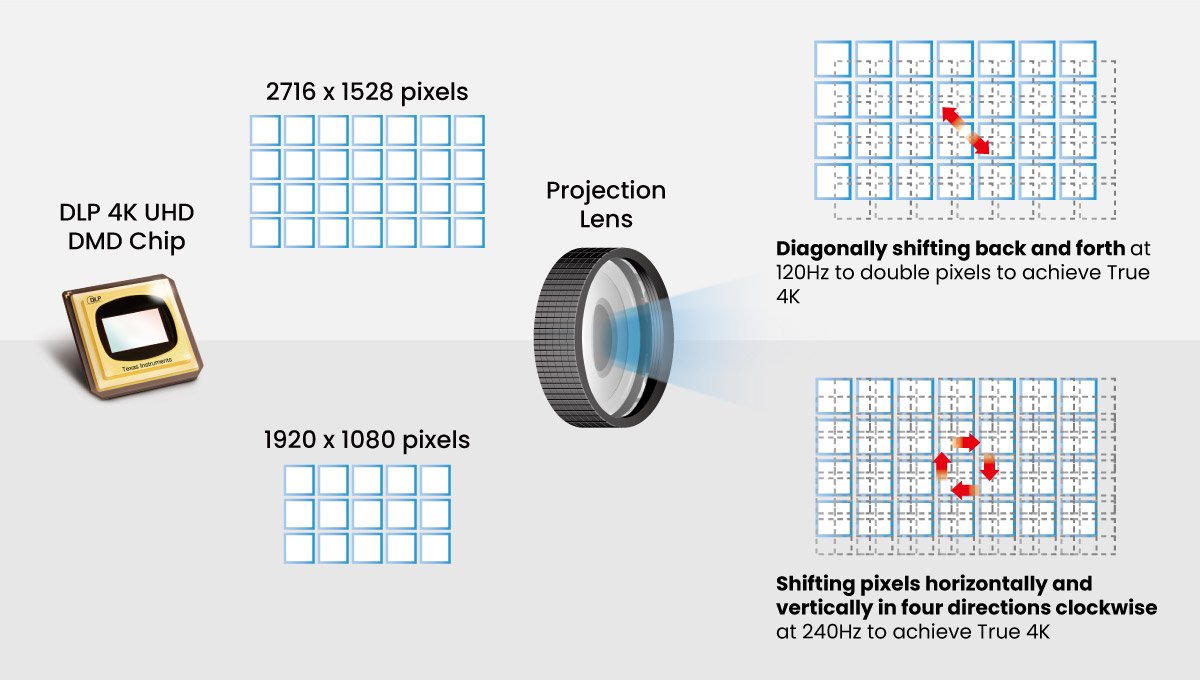
True 4K DLP Technology generates 8.3 million distinct pixels, achieved by doubling the DMD's 2716x1528 pixels or quadrupling 1920x1080 pixels. This results in genuine 4K resolution of 8.3 million pixels with a rapid pixel shifting rate.
Looking at a comparison image on a monitor between a lower resolution 4K Enhancement image and a true 4K image doesn’t tell the whole story. Golf simulator screens are typically large screens over 200 diagonal inches, where the player is standing less than 10 feet away – easily enough to see the difference in the details.
The easiest way to explain this is to use the addressable pixel density metrics used with smartphones- how many pixels are squeezed into every square inch of your impact screen. For our example, we’ll use a 9’6” high impact screen with a 232” diagonal with the $4899 BenQ LK936ST 4K UHD projector and the $6350 Epson L795SE “4K Enhancement” resolution projector to compare the number of pixels that can be controlled by the 4K UHD software programs listed above.
On this size screen the BenQ 4K UHD projector with 8.3 million pixels generates 358 addressable pixels in every square inch of the screen. This enables the rendering engine to precisely calculate the hue, saturation, and brightness of each pixel to maximize the realism the engine can deliver with your GPU.
In the Illustration below we use an example of tiny area (~1/4 of a square inch) of the screen and the 36 pixels that are addressed and controlled by the golf simulator software for hue, saturation, and brightness as real golf balls that you would use on when playing a round.
Figure 1 - Every pixel on a 4K UHD projector can be addressed directly by golf simulator software for maximum realism. The white golf balls represent a pixel that can be directly controlled by the software
The resolution description for this projector states “WUXGA with 4K Enhancement1 (1920 x 1200 x2)” on their specification sheet. WUXGA has only 2.4 million pixels, and these pixels are doubled to create more pixels. But since these pixels are not directly addressable by the software, the projector (not the golf sim software) determines what these pixels look like. The result is a lower base pixel density of 95 pixels per square inch, doubled to 190 pixels per square inch on the same size screen. In the illustration below, the two different golf ball types represent the two different pixel types – one that can be directly addressed by the golf sim software (white) and the other controlled by the projector (yellow)
Figure 1 - Every pixel on a 4K UHD projector can be addressed directly by golf simulator software for maximum realism. The white golf balls represent a pixel that can be directly controlled by the software
Today, Epson projectors are the only display products that market resolution using interpolation while using CTA industry standard terms like “4K.” The last company to do this was FujiFilm, who challenged the Canon PowerShot 4MP digital camera with their “6MP” (3.3 million pixels that were doubled) camera at the same price.
Figure 3 – In 2001 the "6MP" Fuji FinePix 6900Z with interpolation tried to challenge the true 4MP Canon PowerShot. Customers rejected this camera and Fuji rapidly lost their leadership in digital camera market.
Because the FujiFilm FinePix 6900Z camera had to interpolate (mathematically “guess”) the missing detail, it soon became obvious that customers wanted the true native resolution on their devices – not a manufacturer's interpretation of what the details were “supposed” to look like. Fuji rapidly lost its 20% market share after this and is no longer a major camera brand. Since then, no camera or display brand has ever used interpolation until Epson trademarked “PRO-UHD” and began selling projectors with “4K Enhancement” resolution.
Many of the latest Epson projectors marketed for golf simulation appear to promise the ability to replicate all the tiny details that platforms like GSPro and TrackMan Studio can deliver to an impact screen. But because these projectors don’t deliver the 8.3 million addressable pixels that the industry standard specification requires – you may not be able to see some of the details on the screen that are included in your subscriptions since it has lower pixel density, and the projector (not your software) is determining what half of those pixels look like. These lower resolution projector models like the Epson L695SE cost more than the popular BenQ LK935ST 4K projector even though they are missing key features like HDR, eARC, Rec. 709 Color accuracy, and don’t have a sealed laser engine to protect it from dust (you need to regularly clean the filters).
BenQ has trained staff to help you find the perfect golf simulator projector – within your room size and budget. To help you make the best decision, you can reach out to one of our experts to set up anything from a chat to a complete online demo, to help you find the right projector for your needs.
{{item.productWordingTag}}
{{currency}}{{item.finalPrice| numberThousandsCommas | numberDecimalPoint}} Save {{currency}}{{item.saveAmount | numberThousandsCommas | numberDecimalPoint}} Save {{item.savePercent | numberThousandsCommas | numberDecimalPoint}}%
new device price{{currency}}{{item.regularPrice| numberThousandsCommas | numberDecimalPoint}}