In this article
  • Before Comparing: What Does Good Workspace Lighting Need to Do?
  • Monitor Light Bars: Centered Lighting for Screen-Based Work
  • Desk Lamps: Movable Lighting for Different Tasks
  • Dual Monitor Desk Lamps: Wider Lighting for More Complex Setups
  • Monitor Light Bar vs. Desk Lamp vs. Dual Monitor Desk Lamp
  • Which Lighting Option Fits Your Workspace?
  • Final Thoughts: Choose a Light That Fits the Way You Work
The Great Battle of Light Sources: Monitor Light Bar vs. Desk Lamp
  • BenQ
  • 2026-08-25

A monitor light bar and a desk lamp can both improve workspace lighting, but they deliver light in different ways. A monitor light bar places the light above the screen and directs it toward the desk, while a desk lamp offers greater freedom to move and angle the light across different task areas.

The better choice depends on more than brightness. You also need to consider where the light lands, whether it creates reflections on the screen, how much desk space it uses, and whether it fits the way you work.

For wider or dual-monitor setups, the choice can be more complex. A standard monitor light bar may not cover the entire workspace, while a traditional desk lamp may require careful positioning to avoid glare. Newer dual monitor desk lamps provide another option by offering wider lighting designed for more complex screen arrangements.

In this guide, we compare monitor light bars, traditional desk lamps, and dual monitor desk lamps based on lighting coverage, glare control, flexibility, desk space, and suitable work scenarios, so you can choose the right lighting solution for your workspace.

Before Comparing: What Does Good Workspace Lighting Need to Do?

Before choosing between a monitor light bar and a desk lamp, consider three things: where the light lands, how evenly it covers the workspace, and whether it fits your setup.

Direct Light Away from the Screen and Eyes

Good task lighting should illuminate the keyboard, documents, and desk without shining onto the display or directly into your eyes. The American Optometric Association (AOA) recommends reducing screen glare and adjusting room lighting to help minimize visual discomfort during prolonged computer use.

Provide Sufficient and Even Coverage

A high center brightness does not necessarily mean the full workspace is well lit. Around 500 lx is commonly used as a reference for office work, but coverage and uniformity matter just as much, especially for ultrawide or dual-monitor desks.

Fit the Workspace Setup

The right light should work with the number and arrangement of your monitors, available desk or clamp space, webcams, monitor arms, and the way you move between screen-based and physical tasks. The U.S. Occupational Safety and Health Administration (OSHA) notes that lighting needs differ by task and that light position, angle, and intensity should be adjustable.

These criteria provide a practical basis for comparing monitor light bars, traditional desk lamps, and dual monitor desk lamps.

Monitor Light Bars: Centered Lighting for Screen-Based Work

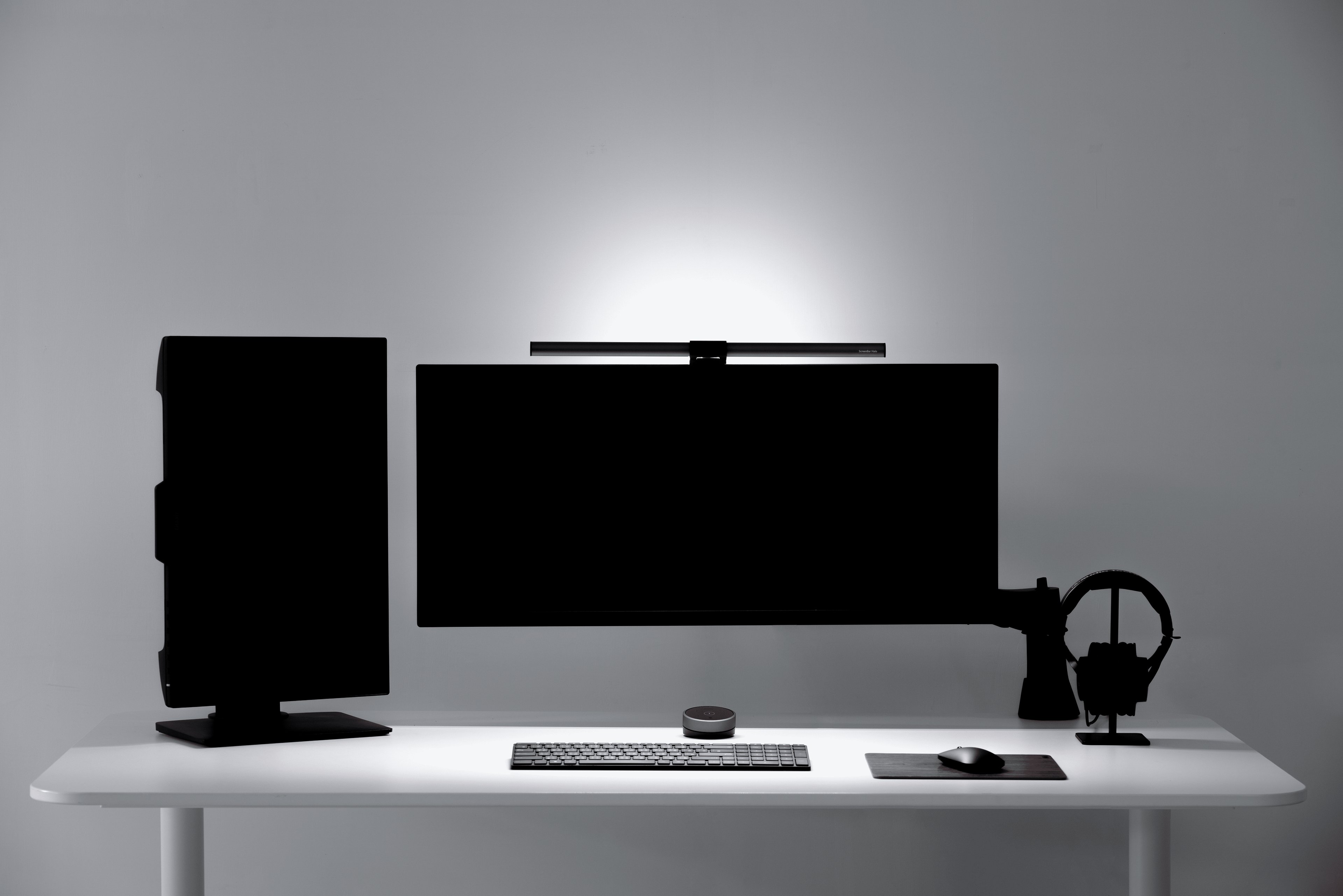
A monitor light bar mounts above the display and directs light toward the desk, providing centered illumination for screen-based work without taking up desk space.

A monitor light bar is a compact lighting hardware with a specially designed clip that allows you to attach it to the top or sides of your monitor.

Key Advantages

  • Helps control screen reflections: Models with directional or asymmetrical optics are designed to direct light toward the desk rather than the display.

  • Saves desk space: It mounts on the monitor instead of using a lamp base or occupying the work surface.

  • Keeps lighting centered: The fixed position helps maintain consistent lighting across the main area in front of the screen.

  • Requires less repositioning: Once installed and adjusted, the light can remain in a stable position for everyday computer work.

  • Supports a cleaner setup: Its compact form integrates more naturally into monitor-centered workspaces. 

Limitations to Consider

  • Monitor compatibility varies: Fit depends on the monitor’s thickness, curvature, bezel, and rear design.

  • Webcam placement may be affected: Some light bars may compete for space with external webcams or interfere with built-in cameras.

  • Less flexible for off-screen tasks: Because the light stays centered above the monitor, it is less suitable for work performed at the side of the desk.

  • Coverage may be limited: A standard monitor light bar may not fully illuminate a wide or deep desk, especially when your work extends beyond the central area in front of the screen.

  • Performance depends on optical design: Glare control and lighting uniformity can vary depending on the beam pattern, shielding, and installation angle.


Learn more about the benefits of using a monitor light bar, including how it saves space, directs light toward the desk, and supports screen-based work.

Desk Lamps: Movable Lighting for Different Tasks

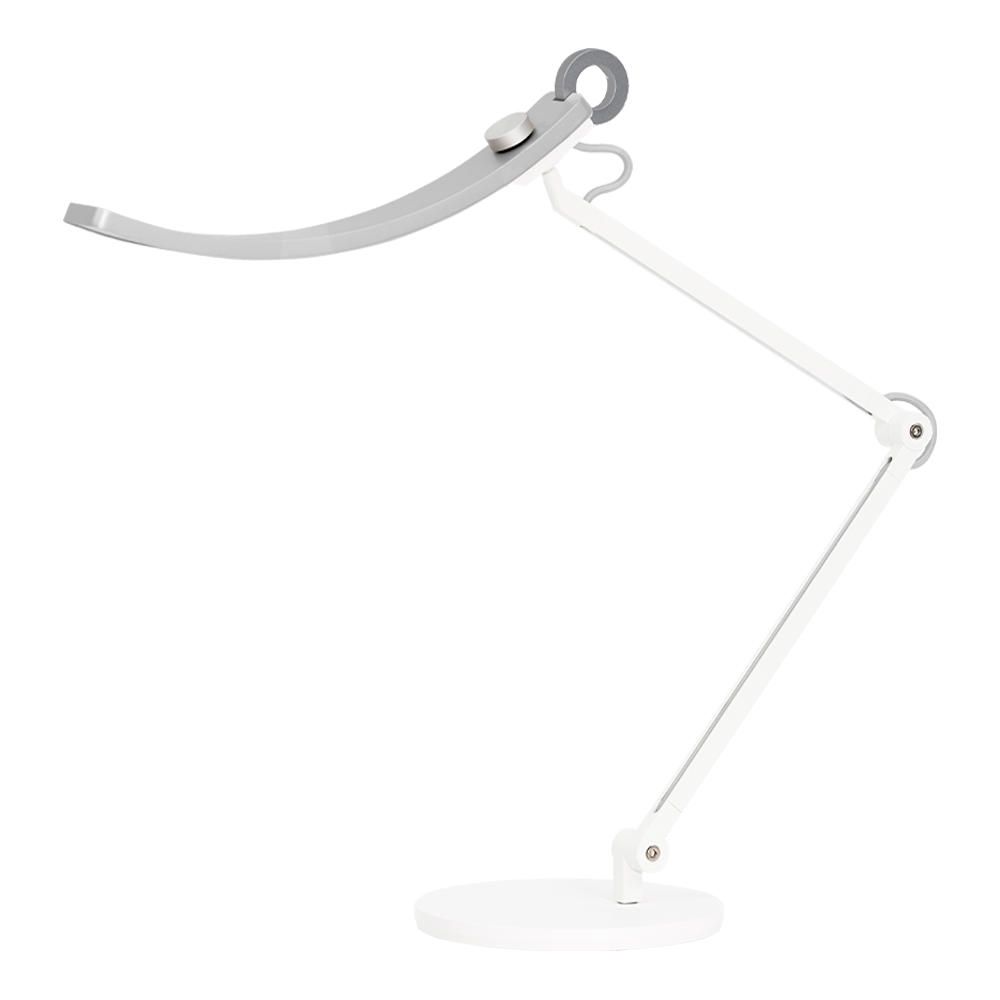
A desk lamp can be repositioned to illuminate different parts of the workspace, making it useful for tasks that extend beyond the screen, such as reading documents, writing, drawing, or working with physical objects. Most desk lamps provide localized task lighting, with their main strength being the ability to direct light toward a specific area rather than evenly illuminate the entire workspace. 

People who struggle to see their workstations due to poor <strong>illumination in small spaces like an office desk can use desk lamps to illuminate specific room areas.

Key Advantages

  • Moves between task areas: The lamp can be repositioned to illuminate different parts of the desk.

  • Supports off-screen tasks: It works well for paperwork, sketching, reading, and other activities performed away from the monitor.

  • Doesn’t depend on monitor design: Compatibility is generally less affected by screen thickness, curvature, or rear structure.

  • Offers more design choices: Desk lamps come in a wider range of shapes, materials, and styles. 

Limitations to Consider

  • May occupy desk or clamp space: Base lamps take up desk space, while clamp models require a suitable desk edge.

  • Placement affects screen reflections: Poor positioning may cause light to reflect offthe display.

  • The light source may remain visible: A bright lamp head within the user’s line of sight can create direct glare.

  • Coverage may be uneven: A concentrated beam may leave other parts of a wide or deep workspace noticeably darker.

  • May require frequent repositioning: The lamp may need to be moved when switching between tasks or work areas.


Desk lamps now include traditional base lamps, clamp lamps, architect lamps, and extra-wide designs. For wider workspaces, including dual-monitor setups, some models are designed to provide broader coverage than a traditional desk lamp.

Dual Monitor Desk Lamps: Wider Lighting for More Complex Setups

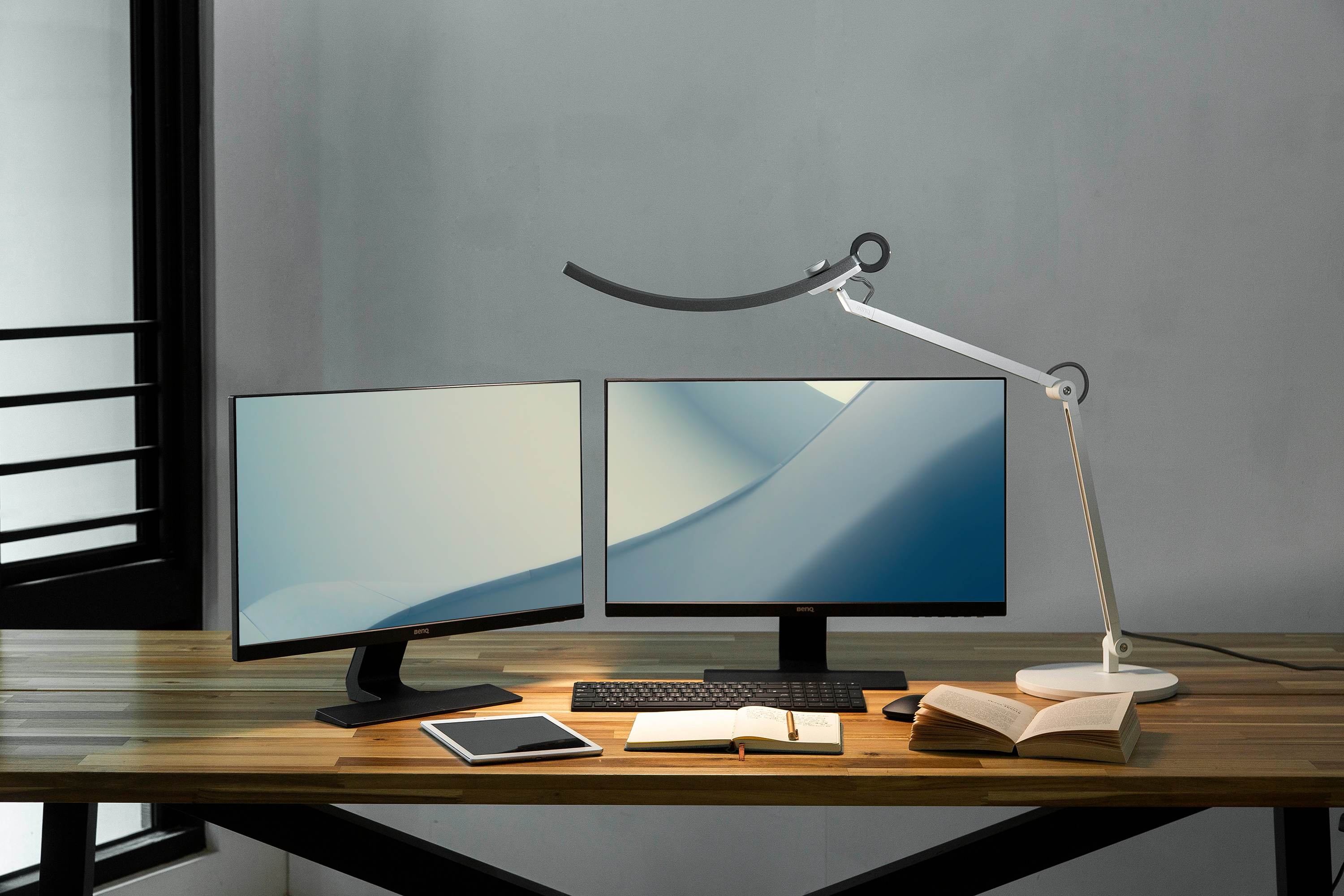
Dual-monitor workspaces often require a wider illuminated area, especially when the screens are angled, stacked, or paired in different sizes. In these setups, a standard monitor light bar may not cover the full work area, while a traditional desk lamp may only brighten one section at a time.

A dual monitor desk lamp is designed to provide broader task lighting across a wider workspace. Some models use extra-wide lamp heads or adjustable arms, while others are built with optical designs intended to direct light around multiple displays. 

People who struggle to see their workstations due to poor <strong>illumination in small spaces like an office desk can use desk lamps to illuminate specific room areas.

Key Advantages

  • Covers a wider work area: Designed for desks where the main task area extends beyond the center of a single screen.

  • Supports more complex monitor layouts: Better suited to angled, vertical, stacked, or mixed-size displays.

  • Reduces the need for multiple lamps: One lighting solution may replace two separate desk lamps or monitor light bars.

  • Keeps more of the desk surface clear: Many models use a clamp-mounted design instead of a traditional lamp base. 

Limitations to Consider

  • A wider lamp does not guarantee even lighting: Coverage and uniformity still depend on beam design, height, and placement.

  • Screen glare may still occur: Light can reflect from either display if the beam is not properly controlled.

  • Desk compatibility must be checked: Clamp thickness, available desk edge, and overall structure can affect installation.

  • Larger designs require more adjustment: Height, reach, and lamp angle may need to be set carefully for different monitor arrangements.


Learn more about what a dual monitor desk lamp is, the workspace problems it is designed to solve, and what to consider before choosing one.

Monitor Light Bar vs. Desk Lamp vs. Dual Monitor Desk Lamp

The main difference between these lighting options is not simply brightness. It is how the light is positioned, how much of the workspace it covers, and how well it fits the way you work.

Factor

Monitor Light Bar

Desk Lamp

Dual Monitor Desk Lamp

Placement

Mounted above the monitor

Placed on or clamped to the desk

Placed on or clamped to the desk

Main Lighting Area

Central area in front of the screen

A selected area of the desk

A broader area across the workspace

Desk Space Requirement

No desk surface required

Uses desk space or a desk clamp

Usually clamp-mounted to save desk space

Screen Glare Considerations

Asymmetrical optics help glare away from the display

Glare control depends on position, height, and beam direction

More precise asymmetrical optics are needed for varied monitor layouts

Light Direction Adjustment

Lamp head angle can be adjusted

Lamp head or arm can be moved and angled

Height, reach, and angle can be adjusted

Coverage Pattern

Central area; may be limited on wider desks

Localized area that moves with the lamp

Wider area; uniformity varies by design

Setup Compatibility

Depends on monitor and accessory fit

Less dependent on monitor design

Depends on desk clamp and monitor layout

Best Suited For

Screen-centered work and compact setups

Paperwork, drawing, and tasks across different desk areas

Wide or multi-monitor workspaces needing broader coverage

Each option serves a different workspace need: monitor light bars keep lighting centered around the screen, desk lamps can be moved between task areas, and dual monitor desk lamps are designed to provide broader coverage across wider or more complex setups.

Which Lighting Option Fits Your Workspace?

Choose based on where your work happens, how much of the desk needs to be illuminated, and how often the light needs to move.

Choose a Monitor Light Bar If...

  • Most of your work happens directly in front of the screen

  • You want to keep the desk surface clear

  • You prefer lighting that stays centered and requires little repositioning

  • Your monitor and webcam setup are compatible 

  • The main work area is concentrated around the center of the desk

Choose a Desk Lamp If...

  • You frequently work with paper, drawings, or physical objects

  • You need to move the light between different areas of the desk

  • Your tasks are not always centered around the monitor

  • You prefer more freedom in lamp placement and style 

  • You have enough desk or clamp space for the lamp 

Choose a Dual Monitor Desk Lamp If...

  • Your workspace is wider or arranged around multiple displays

  • You need broader coverage across the desk

  • Your monitors are angled, stacked, vertical, or different in size

  • You want to avoid using multiple separate lamps 

  • You need both wider illumination and more precise glare control around complex screen layouts 

Final Thoughts: Choose a Light That Fits the Way You Work

There is no single lighting option that works best for every workspace. A monitor light bar is well suited to screen-centered work and compact desks, while a desk lamp is easier to reposition across different task areas. For wider or more complex setups, a dual monitor desk lamp may provide the broader coverage and glare control needed across the workspace. 

The best choice depends on where the light needs to land, how much of the desk needs to be illuminated, and how well the lamp fits your monitor and workspace setup. For more guidance on evaluating screen-focused workspace lighting, including compatibility, optical design, coverage, and controls, see our monitor lighting buying guide.

Monitor Lighting that Empowers Your Focus and Flow

See Clearly. Code Perfectly.

Monitor Lighting that Empowers Your Focus and Flow
 

Was this article helpful?

Yes No

{{productsCount}}Result

  • {{item}}

  • Save {{currency}}{{item.saveAmount| numberThousandsCommas | numberDecimalPoint}}
    Save {{item.savePercent| numberThousandsCommas | numberDecimalPoint}}%

    {{item.productWordingTag}}

    {{item.title}}

    • {{point}}

    {{currency}}{{item.finalPrice| numberThousandsCommas | numberDecimalPoint}} Save {{currency}}{{item.saveAmount | numberThousandsCommas | numberDecimalPoint}} Save {{item.savePercent | numberThousandsCommas | numberDecimalPoint}}%

    new device price {{currency}}{{item.regularPrice| numberThousandsCommas | numberDecimalPoint}}

    Buy Now

Filter

Clear All
  • {{item}}

    {{itemGroup.title}}

  • {{itemTag.title}}