Introducing BenQ Smart projectors for business. How do they compare to traditional wireless projectors?
- BenQ
- 2020-01-17
In business, meetings are essential; client consults, brainstorming sessions, video conferencing, just to name a few. We meet to communicate, to collaborate, to share - and in the era of BYOD (Bring Your Own Devices), we find ourselves in a horrid huddle peering over a client’s or colleague’s shoulder at a phone or tablet. Alternatively, we play “pass the device”.
The fact is we are visual creatures. According to experts, 90% [1] of information transmitted to the brain is visual and 63% of us are visual learners [2]. We need to “see” the idea, the words, the diagram – and the bigger the better. Imagine a projector that mirrored your device with ease. A projector that could share content directly from your phone, tablet or laptop - and switch to everyone else’s in the room with ease – no IT expert required.
Meet the BenQ Smart Projector for Business.

One projector which meets multiple needs. Save time, wow clients and make meetings more efficient. Considering buying a wireless projector? How does the BenQ Smart projector stack up?
How does the ease of use compare?

Smart Projector for Business
● Easy intuitive interface; everyone will know how to use it instantly, saving time and stress.
● Easy to switch settings. It will feel familiar – like using smart phone with apps. No manual needed.

Other Wireless Projectors
● Traditional interface which requires many complicated steps to select the menu items one by one, taking time you don’t have.
● Tricky to switch settings - pull out that user manual.
How to start wireless projection?

Smart Projector for Business
● Simply connect your device to the same WiFi environment as the Smart Projector and start mirroring!
● Switch presenters/devices in virtually one easy step.
● No need to install software on any device.

Other Wireless Projectors
● Setting up wireless projection is an involved process that requires at least 5 steps.
● A multitude of steps is involved in switching presenters/devices – and going back to step 1 every time.
● You must download software on your smart device prior to commencing the process of wireless projection in most cases.
It’s all about apps

Unlike other wireless projectors, BenQ Smart Projectors for Business have apps (similar to your smart phone). Designed to make your meeting more efficient, these apps mean you can:
● Browse the Internet during meetings,
● Present using Microsoft Word, Excel, PowerPoint or video files, simply and easily, by wireless mirroring or by plugging a USB drive into the projector (you can even edit files directly through the WPS app, making changes on the spot),
● Turn your smartphone into a remote control and navigate around the projector – now that’s a nimble way to work.
As for updates, don’t stress. Your BenQ Smart Projector will update the firmware to the latest version via OTA (Over-the-air) support.
Quick Comparison Chart
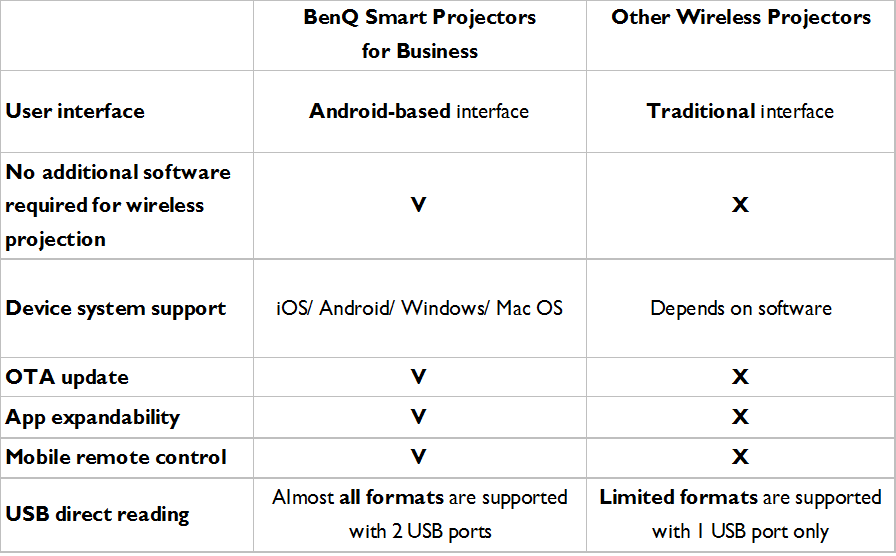
How do BenQ Smart Projectors for Business compare?
BenQ Smart projectors for Business deliver seamless and stress-less mirroring and meeting presentations. Like all outstanding technology, it doesn’t need fussing over. It doesn’t need expertise. It enables ideas and information to flow freely, leaving you free to focus on doing business. Comparing the BenQ Smart projectors with other wireless projector is like comparing the smart phone of today with the bulky heavy models of the 1980’s.
Meetings of all types are part of doing business. Anything that makes them more efficient, is to be embraced.
See How BenQ Smart Projector for Business Elevates Your Meeting Efficiency.
Related Articles
-
Trends & Knowledge
6 Smart New Trends in Today’s Workplace Practices and Presentations
Traditional business meetings are structured and formal – a world of suits and ties, of PowerPoint presentations in big stuffy board rooms. But increasingly employers are realising this may not be the most productive way to do business.
2020.03.10 -
Trends & Knowledge
How to Use Smart Projectors for Business - A Step by Step Guide
Unlike other wireless projectors on the market today, BenQ Smart Projectors for Business provide convenience like never before, along with useful apps to elevate your agile team. To help you take advantage of the wireless, PC-less, and effortless possibilities that Smart Projectors bring to your huddle meetings, here are our step by step tips on how to use your Smart Projector.
2019.11.15 -
Trends & Knowledge
How to Choose a Business Projector for Wireless Presentation
Make an informed choice for your small meeting room.
2020.02.24 -
Trends & Knowledge
How to Use Smart Projectors EW800ST & EX800ST - A Step by Step Guide
Unlike other traditional short-throw projectors on the market today, BenQ Smart Projectors EW800ST & EX800ST provide convenience like never before, with internet connectivity and useful apps to elevate your agile team. To help you take advantage of the wireless, PC-less, and driverless experience that Smart Projectors bring to your office or school, here are our step-by-step tips to guide you through on how to use your Smart Projector EW800ST & EX800ST.
2019.12.27

Subscribe to Newsletter
Subscribe to BenQ’s latest product insights, innovations and more. Be the first to hear about BenQ product launches, upcoming events and sales promotion.