Page updated: May 2020
Some essential features on BenQ sites just won’t work without cookies. And having other cookies switched off can seriously affect the way you’ll be able to enjoy our services.
Please check your cookie settings below and turn on any cookies you’re happy with.
“Strictly necessary” cookies can’t be turned off. But Functional and Performance cookies can be turned on or off below. You can learn more about cookies and what they do on our other pages.
If you've chosen to block third-party cookies on your browser, your cookie preferences won't carry over from benq.eu to benq.xx and vice versa. Please make sure to set your cookie preferences in both places.
On
These cookies are essential so that you can move around the website and use its features. Without these cookies services you have asked for cannot be provided.
On
Off
These cookies allow the website to remember choices you make to give you better functionality and personal features.
On
Off
Performance cookies
These cookies help to improve the performance of BenQ. If you want to opt-out of advertising cookies, you have to turn-off performance cookies. We also use Google Analytics, SessionCam and Hotjar to track activity and performance on the BenQ website. You can control the information provided to Google, SessionCam and Hotjar. To opt out of certain ads provided by Google you can use any of the methods set forth here or using the Google Analytics opt out browser add-on here. To opt-out of SessionCam collecting data, you can disable tracking completely by following link:https://sessioncam.com/choose-not-to-be-recorded/. To opt-out of Hotjar collecting data, you can disable tracking completely by following link:https://www.hotjar.com/privacy/do-not-track/.
Advertising cookies
These cookies are used to track your activity on the BenQ website and other websites across the Internet, help measure the effectiveness of our advertising campaign and deliver advertisements that are more relevant to you and your interests. We use various advertising partners, including Amazon, Facebook, and Google. These cookies and other technologies capture data like your IP address, when you viewed the page or email, what device you were using and where you were. You can find out how to avoid them below.
其實投影機早在 2009 年,便嘗試導入 LED 光源,推出 LED 投影機。而 BenQ 在當時也推出導入 3LED (3 組 LED 燈泡)的 LED 行動為型投影機 GP1。然後隨著技術不斷演進,近幾年推出多款表現優異的 LED 投影機產品,讓更多消費者開始接觸 LED 投影機、踏入家庭電影院行列。
近期為創造更佳的投影效果、推出 4LED 投影機,但什麼是 4LED?可以為消費者帶來什麼好處?
簡單來說,LED 投影機就是使用 LED 作為光源的投影機。傳統投影機(常見的學校、會議室投影機)是使用一顆高壓汞燈,通過色輪分色、再透過 DMD 晶片反射成像。
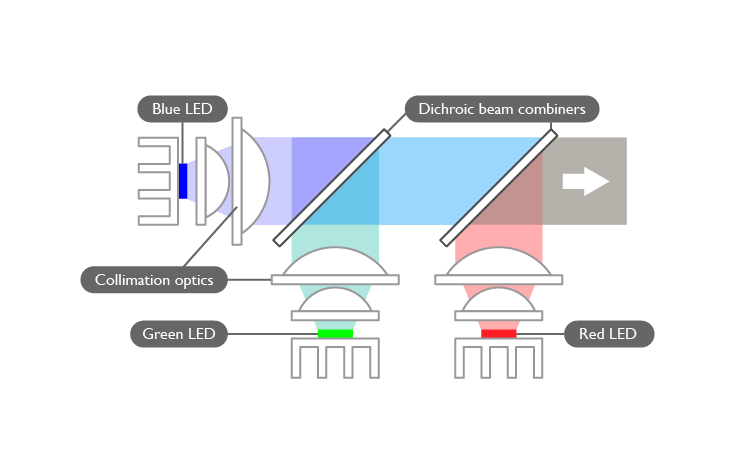
而 LED 投影機則是使用 RGB 三組 LED 燈發光 (取三原色光源),再透過 DMD 晶片反射成像,而這類設計即是市面上常見的 3LED投影機。
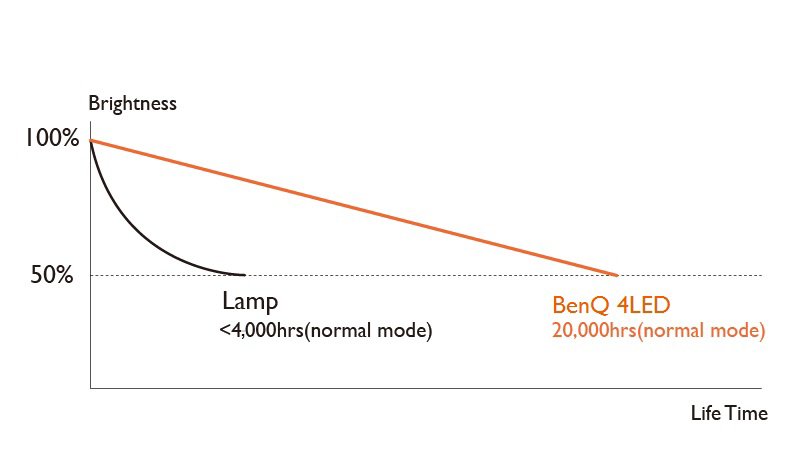
使用 LED 投影機有幾項好處,最大好處就是正常使用下壽命可達 2萬小時以上(部分使用節能模式、降低亮度更可達3~6萬小時以上),這幾乎是傳統燈泡投影機的5~10倍使用壽命,可大幅降低維護成本。
而在投影的色彩表現上,LED 投影機所使用的 LED 色域,其實是可以整個涵蓋 Rec.709 色域範圍、是用於 HD 以上的高畫質影片。且 LED 投影機調校得宜,可獲得比傳統燈泡投影機更飽和的色彩、更高的對比度,使得 LED 投影機成為觀看 HD 高畫質影片、電玩遊戲的最佳選擇。
LED 投影機還有另一個好處,就是可以縮小投影機體積。與傳統燈泡投影機相比,LED 投影機熱度較低、因此不需要大型散熱模組;比較不受灰塵影響;耗能更低,可以搭配大容量電池使用。這三個因素讓 LED 投影機可以變成小型、露營好用的可攜式微型投影機。
最後一個使用 LED 投影機的好處,就是快速開關。他不像傳統燈泡需要一小時預熱期,開機就可以馬上呈現最高亮度。
目前市面上常見的 LED 投影機多為 3LED 投影機。是使用色彩學中的三原色 - 紅藍綠,最為基底光源;每一種顏色都有自己單獨的 LED 燈,紅色、藍色、和綠色,這些光透過 DMD 晶片反射匯聚在一起,然後投射在投影布幕上,形成我們常看到的畫面。
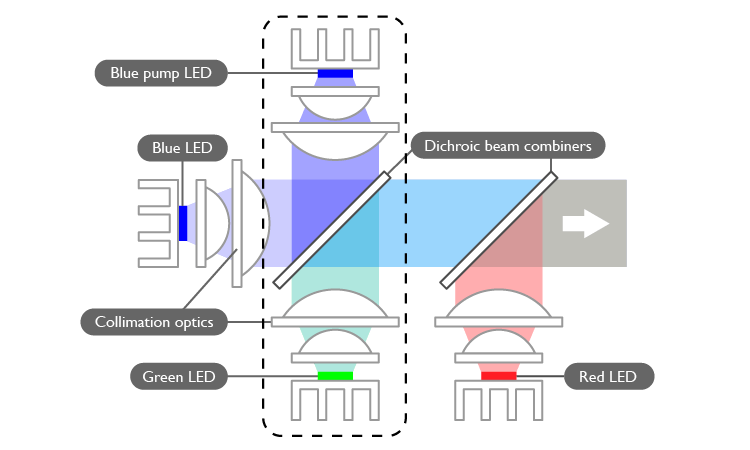
另外就是 3LED 發色的關鍵,就是 3LED 投影機中其實發射出的 "綠光" 其實是 "藍光",是透過激發其中的陶瓷螢光粉介質,將 "藍光" 轉換為 "綠光"。然後在 RGB 三原色系統中,綠色肩負起讓人覺得"鮮豔明亮"的責任,可是目前技術純綠色的 LED 亮度不足、難以產生讓人覺得"鮮豔明亮"。所以透過螢光粉介質激發的"綠色",讓整體畫面亮度達到讓人覺得"鮮豔明亮"的水準。
而 4LED 更是基於此基礎,要提供更高亮度與彩度。
4LED 的原理,就是在 3LED 的光源系統中,增加一個藍色"幫浦 LED"的 LED 投影機,這個光線也會透過陶瓷螢光粉介質,將其 "藍色" 轉換為 "綠色",以放大綠色的輸出量。透過這樣加法,綠光的輸出量較 3LED 增加 40%,整體亮度增加約 8% ~12%。但這樣的設計,要考慮不影響原本 3LED 的運作、也必須要加大投影機本身機體大小、考慮到散熱問題 (雖然不會很熱,但還是有熱度),否則都會影響原有 LED 光源的壽命。。
除了 4LED 投影機擁有較佳的亮度與彩度表現外,BenQ 另有一系列獨家調整技術,提高整體使用體驗的品質。
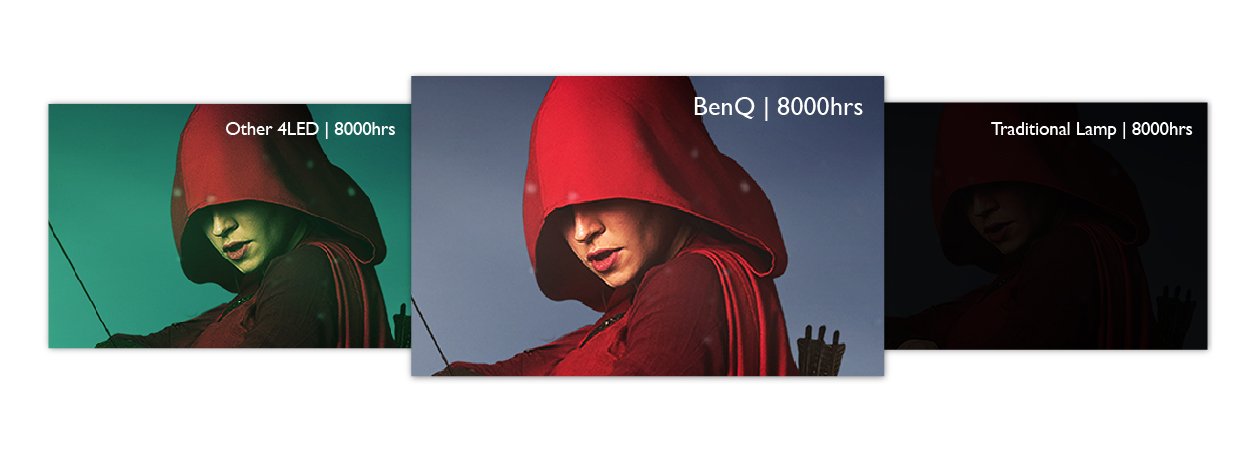
BenQ 4LED 投影機 X1300i,提供自動色彩校準功能,可在投影機因為長時間使用後,LED 發生不可避免的色衰。隨著 LED 投影機長時間使用,其 RGB 三原色會不均勻地慢慢色衰(通常以紅色衰退速度較快),進而慢慢整個畫面偏向藍綠色調。而 BenQ 導入"自動色彩校準",透過相對應的調整其他顏色,確保在各階段,各色彩比例一致、讓整體色彩畫面維持一致的。
Thanks for your feedback!