


Page updated: May 2020
Some essential features on BenQ sites just won’t work without cookies. And having other cookies switched off can seriously affect the way you’ll be able to enjoy our services.
Please check your cookie settings below and turn on any cookies you’re happy with.
“Strictly necessary” cookies can’t be turned off. But Functional and Performance cookies can be turned on or off below. You can learn more about cookies and what they do on our other pages.
If you've chosen to block third-party cookies on your browser, your cookie preferences won't carry over from benq.eu to benq.xx and vice versa. Please make sure to set your cookie preferences in both places.
On
These cookies are essential so that you can move around the website and use its features. Without these cookies services you have asked for cannot be provided.
On
Off
These cookies allow the website to remember choices you make to give you better functionality and personal features.
On
Off
Performance cookies
These cookies help to improve the performance of BenQ. If you want to opt-out of advertising cookies, you have to turn-off performance cookies. We also use Google Analytics, SessionCam and Hotjar to track activity and performance on the BenQ website. You can control the information provided to Google, SessionCam and Hotjar. To opt out of certain ads provided by Google you can use any of the methods set forth here or using the Google Analytics opt out browser add-on here. To opt-out of SessionCam collecting data, you can disable tracking completely by following link:https://sessioncam.com/choose-not-to-be-recorded/. To opt-out of Hotjar collecting data, you can disable tracking completely by following link:https://www.hotjar.com/privacy/do-not-track/.
Advertising cookies
These cookies are used to track your activity on the BenQ website and other websites across the Internet, help measure the effectiveness of our advertising campaign and deliver advertisements that are more relevant to you and your interests. We use various advertising partners, including Amazon, Facebook, and Google. These cookies and other technologies capture data like your IP address, when you viewed the page or email, what device you were using and where you were. You can find out how to avoid them below.
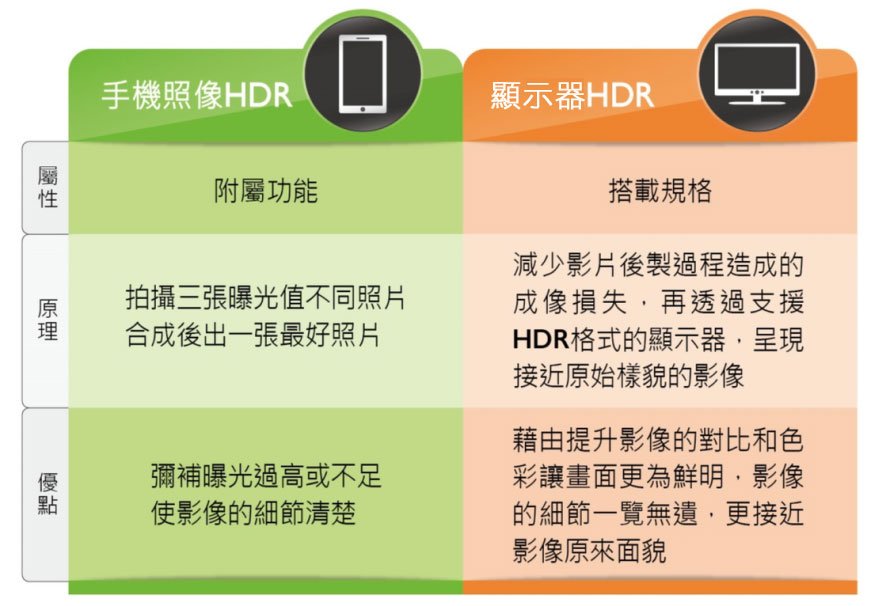
A: 雖然名字一樣是HDR,現在高階手機常搭載的拍照HDR功能跟電腦螢幕的HDR本質不一樣。照片HDR是一種提升畫質的功能,開啟HDR後,相機會一次拍攝數張不同曝光值的照片,然後進行合成,最後生成一張曝光值最寬容的照片。而顯示器中的HDR是一種新的影像規範,藉由增加訊號的亮暗與色彩範圍,顯示出更高對比和更廣色域的影像,讓細節更加清楚鮮明並貼近現實生活的影像。
A: 有了HDR顯示器後,就像擁有了進入高畫質世界的門票,接下來就要確認可以用哪些途徑探索HDR世界裡的內容。在台灣,現在可以從這幾個方式將你的HDR顯示器與最高畫質的影像世界串接起來:
1. 所購買或租借的影片內容具有HDR高畫質版本。
2. 裝置(含螢幕、播放器與連結線材HDMI2.0)能支援高畫質影片。
3. Internet 連線速度夠快(至少15Mbps),足以觀看高畫質內容。
A: HDR內容並不是遙不可及,其實現在有越來越多提供HDR內容的管道,尤其是螢幕使用者經常使用的網路平台都陸續開放相關HDR規格內容影像,以下介紹幾個最容易取得的HDR內容。
1. 自己或家人拍的HDR影片或照片,經由主機或播放器HDMI/USB連接螢幕的接孔收看。
2. 很多網路影片如音樂錄影帶或是電影已經提供HDR規格,可以直接下載或在線串流播放。
3. 全球使用量最大的影音媒體網站YouTube和已經進駐台灣的串流影音服務龍頭Netflix與 Apple TV也提供HDR規格的影像了。
Thanks for your feedback!