쿠키 설정
내 BenQ 쿠키 세팅을 어떻게 바꿀 수 있나요?
On
꼭 필요한 쿠키
On
Off
기능성 쿠키
On
Off
성능 쿠키 및 광고 쿠키
퍼포먼스 쿠키
이러한 쿠키는 벤큐의 성능을 향상시키는 데 도움이 됩니다. 광고 쿠키를 옵트아웃하려면 성능 쿠키를 꺼야 합니다. 또한 구글 애널리틱스, 세션캠 및 핫자르를 사용하여 벤큐 웹사이트의 활동과 성능을 추적합니다. 구글, 세션캠 및 핫자르에 제공되는 정보를 제어할 수 있습니다. 구글에서 제공하는 특정 광고를 옵트아웃하려면 여기에 명시된 방법 중 하나를 사용하거나 구글 애널리틱스의 브라우저 추가 기능을 사용하여 여기에서 옵트아웃할 수 있습니다. 세션캠의 데이터 수집을 옵트아웃하려면 다음 링크:https://sessioncam.com/choose-not-to-be-recorded/ 를 사용하여 추적을 완전히 비활성화할 수 있습니다. 핫자르의 데이터 수집을 옵트아웃하려면 다음 링크:https://www.hotjar.com/privacy/do-not-track/ 를 사용하여 추적을 완전히 비활성화할 수 있습니다.
성능 및 광고 쿠키 목록 보기
광고 쿠키
이 쿠키들은 벤큐 웹사이트와 인터넷의 다른 웹사이트에서 여러분의 활동을 추적하고, 광고 캠페인의 효과를 측정하고, 여러분과 여러분의 관심사와 더 관련이 있는 광고를 전달하는 데 도움을 줍니다. 우리는 아마존, 페이스북, 구글을 포함한 다양한 광고 파트너를 사용합니다. 이 쿠키들과 다른 기술들은 여러분이 페이지나 이메일을 봤을 때, 어떤 장치를 사용하고 있었는지, 여러분의 IP 주소와 같은 데이터를 캡처합니다. 여러분은 그것들을 피하는 방법을 아래에서 찾을 수 있습니다.
성능 및 광고 쿠키 목록 보기
For all photographers with a unique “photographer’s eye,” the next step after capturing a scene using a digital camera, is to make the image as attractive as possible. After the image is enhanced, the final stage is soft-proofing and finalize the outputs. This stage is not only limited to hardcopy printing, but also sending images digitally in their final form. BenQ Photographer Monitors have established excellent color management capabilities that allow professionals to trust the color that is displayed on the screen.
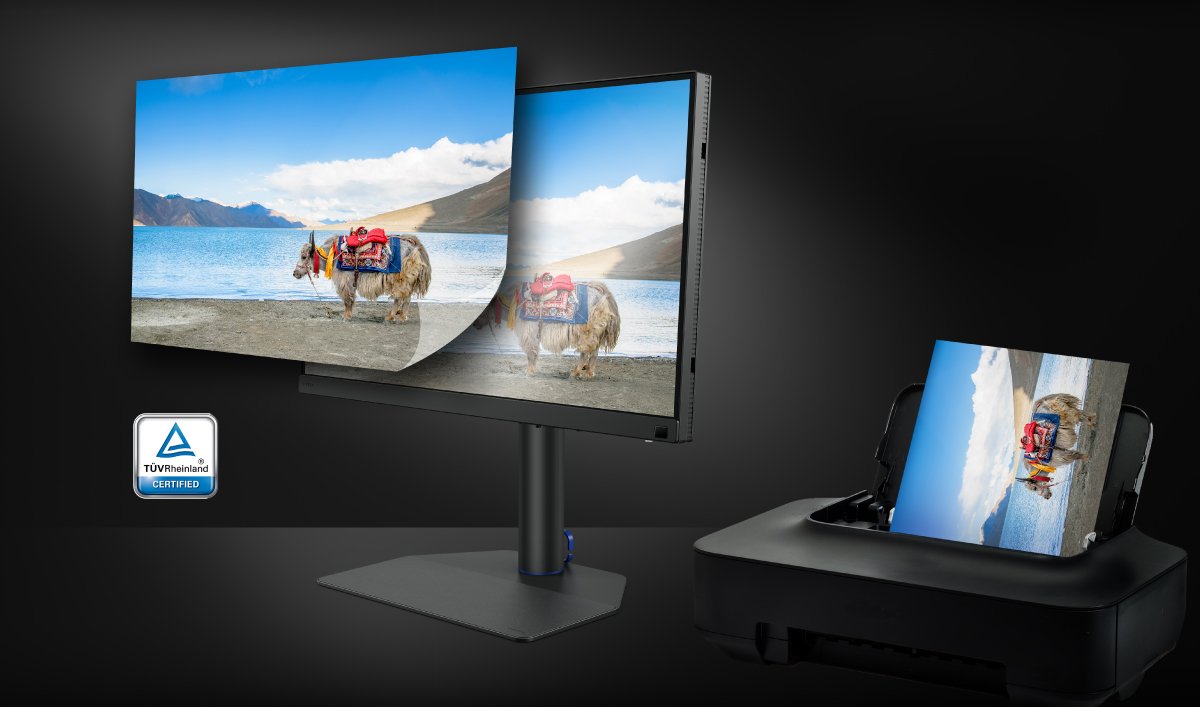
BenQ Screen-to-Print Solution utilizes the Fine-Coated Panel and Paper Color Sync software to ensure the best quality visual experiences on-screen under different types of ambient lighting to get perfect results. Not only does the Fine-Coated help to greatly reduce reflections but it also produces a unique texture affect. When used in conjunction with the Paper Color Sync software, the result is a highly realistic platform, suitable for the most advanced photo edits and soft proofing.
The Fine-Coated Panel features an exclusive surface. The exclusive surface coating has a superior ambient contrast ratio (ACR) under any lighting condition and a simulated paper-texture. That is to say, when editing, your judgment regarding color won’t be affected by ambient lighting, which ensures the high consistency between what you see on screen and printed images. And finally, the surface coating has anti-glare properties that help to protect the eyes regardless of the lighting conditions. Anyone who spends long hours in front of a computer monitor understands how glare can cause eyestrain, which leads to lessened productivity.
After photo-editing is completed, you can start soft proofing. With Paper Color Sync, you can easily preview prints on the screen before actual print out. You will be surprised that you no longer need to repeatedly compare your photos against your monitor, wasting time and money. Paper Color Sync supports many printer models and paper, including those which are commonly used by photographers. With BenQ exclusive Fine-Coated Panel and Paper Color Sync software, screen-to-print color consistency can be achieved everywhere.
This exclusive Screen-to-Print Solution is inspired by BenQ AQCOLOR Technology, which keeps forging color accurate monitors. For years, BenQ monitors have been the leading brand among professional photographers and video editors. This proprietary technology has kept BenQ at the forefront of the professional world, but Screen-to-Print Solution takes these displays to the next level. The TUV Rheinland-certified Fine-Coated Panel creates a simulated paper-texture screen cover that, when used in concert with the Paper Color Sync software, delivers the highest quality screen-to-print fidelity available. This industry-leading level of accuracy and fidelity makes BenQ monitors the ultimate platform for accurate photo editing and printing.
Recommended Products
{{item.productWordingTag}}
{{currency}}{{item.finalPrice| numberThousandsCommas | numberDecimalPoint}} 할인 {{currency}}{{item.saveAmount | numberThousandsCommas | numberDecimalPoint}} 할인 {{item.savePercent | numberThousandsCommas | numberDecimalPoint}}%
새제품 가격{{currency}}{{item.regularPrice| numberThousandsCommas | numberDecimalPoint}}