
ClassroomCare™ Interactive Flat Panel: RM Series
All the essentials for interactive teaching
BenQ’s RM Series interactive display contains all the essential functions for interactive and collaborative teaching and learning, creating a smart and engaging learning environment. Available in four sizes - "55-inch", “65-inch”, “75-inch and “86-inch”, BenQ RM series interactive displays suit a variety of classrooms sizes.
When it comes to effective learning, health matters. BenQ IFP ensures classrooms can embrace innovation without compromising students’ health by providing smart eye-care technology.
The Smart Eye-Care solution can function intuitively with the help of the embedded sensors. For a smooth and comfortable viewing experience, BenQ IFP will activate Flicker-Free and Low Blue Light features automatically when the user approaches the screen.

Anti-Glare
With cloud features, EZWrite 5 streamlines classroom discussions by making it easier than ever for teachers and students to share ideas, notes, and opinions as if they are annotating on the same whiteboard regardless of where they are. Furthermore, with AMS functionality, teachers are able to access teaching materials stored in cloud storage and start the class directly with BenQ’s IFP.

Packed with teacher and student-friendly features, BenQ’s EZWrite 5 is the leading annotation solution for interactive and collaborative classroom scenarios. Users can enjoy enhanced interactivity with EZWrite Cloud Whiteboard to collect, categorise, edit, and share notes between the IFP and mobile devices.

EZWrite 5 allows teachers to directly download and upload files to cloud services such as Google Drive and Dropbox. Exclusive to EZWrite 5, this convenient cloud access makes it easy for teachers to modify their materials and bring them everywhere.
Saving Files with EZWrite 5
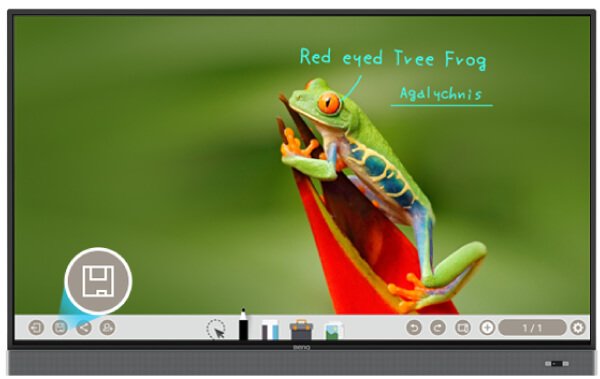
Step1. Save your file

Step 2. Choose your cloud storage
Loading Files with EZWrite 5

Step1. Download a file from your cloud stroage

Step2. Open the file directly in EZWrite 5

Step1. Press the Screen Shot button on the Floating Tool

Step2. Capture on-screen content directly on the IFP

Step3. Import to EZWrite 5 and make annotations
With EZWrite’s Floating Tool, teachers can capture screen shots of anything on the screen, including content from apps, websites, and videos from any source. They can then import this content into EZWrite 5 for further discussion and annotation on a brand new page.

EZWrite 5 comes with dual pens that allow two users to write or draw simultaneously with different colours, making it ideal for lively classroom activities.

EZWrite 5 is ideal for creative, inspired creation in art classes. Users are guaranteed to enjoy an effortless experience that feels like writing and drawing with actual pens and brushes.

EZWrite’s built-in Floating Tool empowers teachers to write on top of any app, video, website, document, or image. Whether using Windows, Mac, Chrome, or Android, a teacher can take notes on top of any on-screen content and save them. With screen capture, it allows users to capture all – or just part – of the screen within two fingers at both hands. The Floating Tool also offers a smooth writing experience when used with HDMI, VGA, and other signal sources, ensuring maximum flexibility.

EZWrite’s handwriting recognition feature allows users to instantly convert written text, numbers, forms, and drawings into easily legible digital text without having to switch modes.

To further ensure uninterrupted learning for students, RM6502K streamlines the steps for teachers to start classes with BenQ Launcher. Created to aggregate all key tools into one hub, BenQ Launcher allows teachers to start using EZWrite whiteboard as well as accessing to variety input sources in a single tap without logging into their accounts. Teachers can also put announcements on the message board. Additionally, BenQ Launcher comes with SwitchQ, a task switcher, letting teachers effortlessly switch between recent apps and input signal sources at fingertips.

BenQ's IFPs support multi-account management which allows users to directly access and manage their personal system setting, network drive and cloud storage space such as Google Drive and Dropbox.

X-Sign Broadcast is a wireless broadcast system that can push alerts, messages and announcements during class. Unlike traditional classroom messaging systems, X-Sign Broadcast ensures immediate message delivery as well as group notification.
BenQ’s new education IFPs fine-tune handwriting experiences with an advanced fine IR touch that further reduces the gap between actual landing point and the point displayed on the screen. Additionally, the new series also allows users to take advantage of a more natural handwriting feel as the new touch frame recognises a smaller radius. To avoid creating cursive handwriting by accident, the new series reduces the pre-touch distance to offer a better touch and writing experience.

Further reducing the gap between actual landing point and the point displayed on the screen.

Creating a more natural handwriting feel as the new touch frame recognises a smaller radius.

Reducing the pre-touch distance to offer a better touch and writing experience.

InstaShare is the software designed for seamless wireless presentation and collaboration during lectures. It allows the smooth streaming of visual, audio files and Full HD quality videos. Users can also mirror all digital content from devices including PCs, tablets, and smartphones, empowering contributors to enrich their presentations with a variety of multimedia resources.

RM6502K offers an extra level of flexibility for device control through Voice Assistant, allowing teachers to control the flow of the class, such as starting the timer or searching the internet from wherever they are in the classroom. Teachers can easily control the IFP through voice control or remote control, further ensuring a smooth classroom experience for both students and teachers.

RM6502K repositions the two 16W speakers to the front, offering better sound transmission that elevates the level of audiovisual enjoyment during classes. Additionally, RM6502K comes with a Mic-In port that allows teachers to connect external microphones, further facilitating an impactful and effective learning experience for students.

RM6502K supports dual display application through HDMI out, allowing teachers to share teaching materials to more than one screen and increase the efficiency of teaching and student engagement.

The Interactive Flat Panels can work seamlessly with a wide range of computing and mobile devices running most major operating systems, from Windows to Mac, Linux and Chrome, through its plug-and-play feature.

RM6502K incorporates several recommended Android apps into BenQ Suggests, in addition to partnerships with solution providers such as Teamviewer and Blizz, further expanding the IFPs' potential by simplifying app updates and downloading in the future.
With cloud features, BenQ DMS combined Device Info and Management, Apps Management and OTA (Over-the-Air) Update to provide you an ultimate device management solution for your productivity.

Remotely control your displays with DMS Cloud via Internet. It’s an effective way to lower TCO and energy consumption for your operation.

Install Android™ apps for a selection of displays through our cloud server. DMS Cloud is designed to save you the hassles of repetitive manual installation work.

Upgrade the latest BenQ firmware for your displays through our OTA Update support and keep them running smoothly at all times.
DMS Local is a Device Info and Management software based on Windows OS. For users who would like to control displays remotely via LAN, you can download DMS Local software.
For users who would like to control your displays remotely via RS232, you can download MDA software.

BenQ’s Interactive Flat Panels (IFP) are classroom-ready solutions designed to support schools in bringing a truly healthy and collaborative experience to the classroom. Request a demo to see how BenQ’s IFP enables teachers to enhance learning experience and boost interaction.

Privacy Policy | Cookie Policy | 2020 BenQ - all rights reserved.


